i have an android, I’m dubious any of them hang up the phone.
Fwiw, “can’t hang up” is not a problem I’ve ever had. But i also don’t use my gadget to make phone calls very often. Text, email, sdmb, discord, news, games… That’s how i mostly use my gadget. And i guess i take photos and use it as a step counter and for gps and Google.
There is only one side button. It is big and honking. The other 2 buttons are volume buttons. They are small and non-honking. Or if you have an iPhone 15, there is also an action button next to the volume buttons making 4 total buttons.
Using the power button to end a call is an option available to you in Settings.
I’ve not had troubles hanging up my rare phone calls, but that’s good to know.
And yes, it does suck. I hated using a command line, because i was always struggling to remember the magic word. And i don’t use many keyboard shortcuts. (It doesn’t help that keyboard shortcuts on my work PC and home Mac are different.) I love the keyboard accessible menus that used to be all over Windows. Just one magic key to enter the menu, and i can press buttons to do all sorts of stuff, while SEEING WHICH BUTTON DOES WHAT on the screen. Sadly, i seem to be in a minority.
My personal belief is that much of tech does make sense for people who use it all the time. Sure, perceiving a particular icon/button/swipe as the way to accomplish something makes sense if you figure it out and then do it multiple times every day. But if you do it one time - and then have to remember how to do it again a month later…
Never had any confusion hanging up the rotary wallmount phone growing up!
But to backup your point, by the time you first hung it up, you’d probably seen your parents and others do it hundreds of times.
I think when people say “intuitive” they often really mean “familiar”. That can often be great. If you’re used to an iPhone, then you’ll find an iPad very familiar. If you’re used to lots of different tech, than you’ll have a greater basis for a new thing to be familiar.
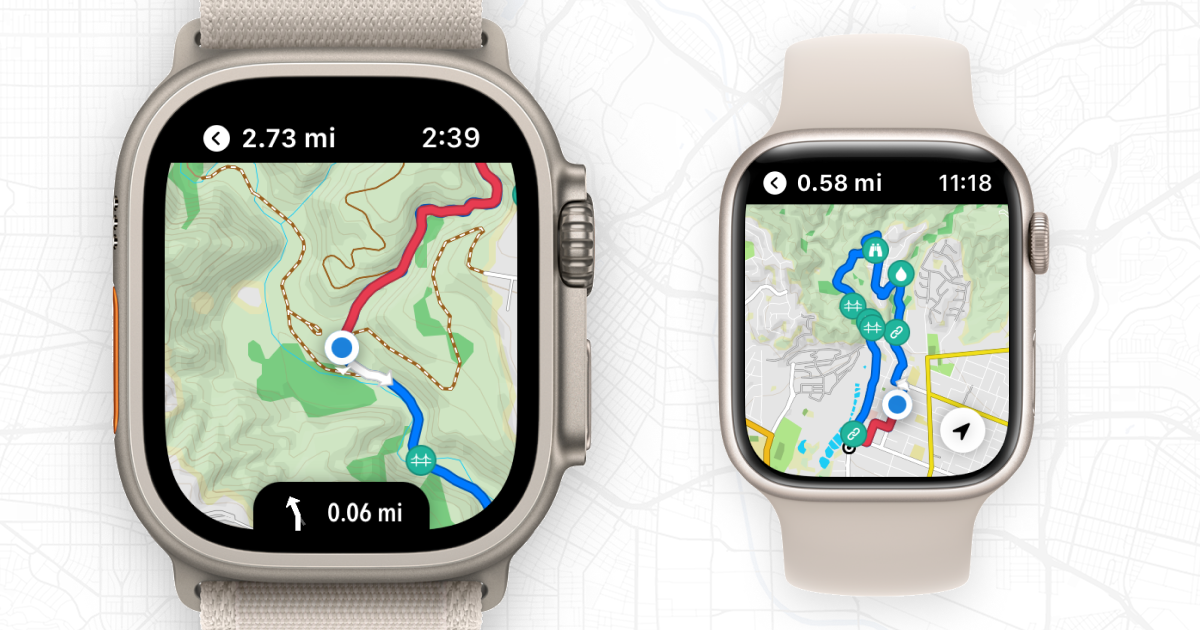
AllTrails on the Apple Watch is actually quite usable by itself while hiking but still requires a phone nearby. Workoutdoors is even better. I have all my maps and routes available to me without having to resort to using my phone on the trail or having it with me at all.
Footpath is great and self contained while on the go too
I do use it all the time. I’m addicted to my phone. I spend my entire work day in Excel. I’m going to do some work on audacity on my MacBook pro while the turkey cooks this afternoon.
And i still can’t remember magic words and key strokes. I’m just bad at that. But the popularity of graphical user interfaces suggests I’m not alone.
Ergonomics is a crucial, and often failed, part of design, but many things/conventions like left versus right clicking and magic key chords so on are completely arbitrary and you have to learn them from some manual or tutorial, and they may vary between systems.
(sorry didn’t reply earlier, was busy with the holiday)
That’s far better than what I was expecting. All the app images (in an admittedly cursory search) showed most of the mapping, tracking, and waypoint features on the phone, with much more limited on-watch information. Very possibly one of the reasons that the last article I linked was making much of the newer Apple Watch options.
Certainly far better than what I can expect from similar features / apps on my Wear OS smartwatch, which has gotten far less support from Google than Apple has for it’s wearables.
My 15 doesn’t have that 4th button – looks like that’s only for the Pro and Pro Max.
In older phones without a side button, the top/power/sleep button would end the call as well, so far as I remember, but it’s been years since I’ve had a phone with the top button. It’s the on/off button, so it seemed intuitive to me that it would end a phone call. At least it’s not completely arbitrary.