My phone had all the software I needed back when I bought it.
The problem I have now is probably caused by the company loading it with bloatware that I have never wanted.
My phone had all the software I needed back when I bought it.
The problem I have now is probably caused by the company loading it with bloatware that I have never wanted.
I doubt it. Something else (bigger) is wrong.
Even if you only have the 32gb version, that gives you ~20gb after the OS. With only 2 apps, you’d need ~5k photos to fill it up. Or maybe you have a lot of videos.
First thing to do is reboot as @engineer_comp_geek suggested and if that doesn’t work, backup and reset at @Thumper668 suggested.
But if you’re emailing yourself photos, then maybe you have an extra copy of each in your inbox.
I did a reboot before I started this thread. It didn’t change anything.
The issue of my emails being stored on my phone or laptop is something I admit I had never thought about. This could be an issue because I get a ridiculous amount of spam every day and it would add up. I have an aol address and I use aol to send and receive emails. I just checked and it appears aol stores my old emails on a cloud and not on my laptop or phone.
As I said above, the problem seems to have resolved itself for now. But I’ll look into the backup and reset option.
PS You can go into the “Device care” menu to see a breakdown of what’s actually using your storage, so you don’t have to guess: Keep your Galaxy phone or tablet from slowing down with Device Care
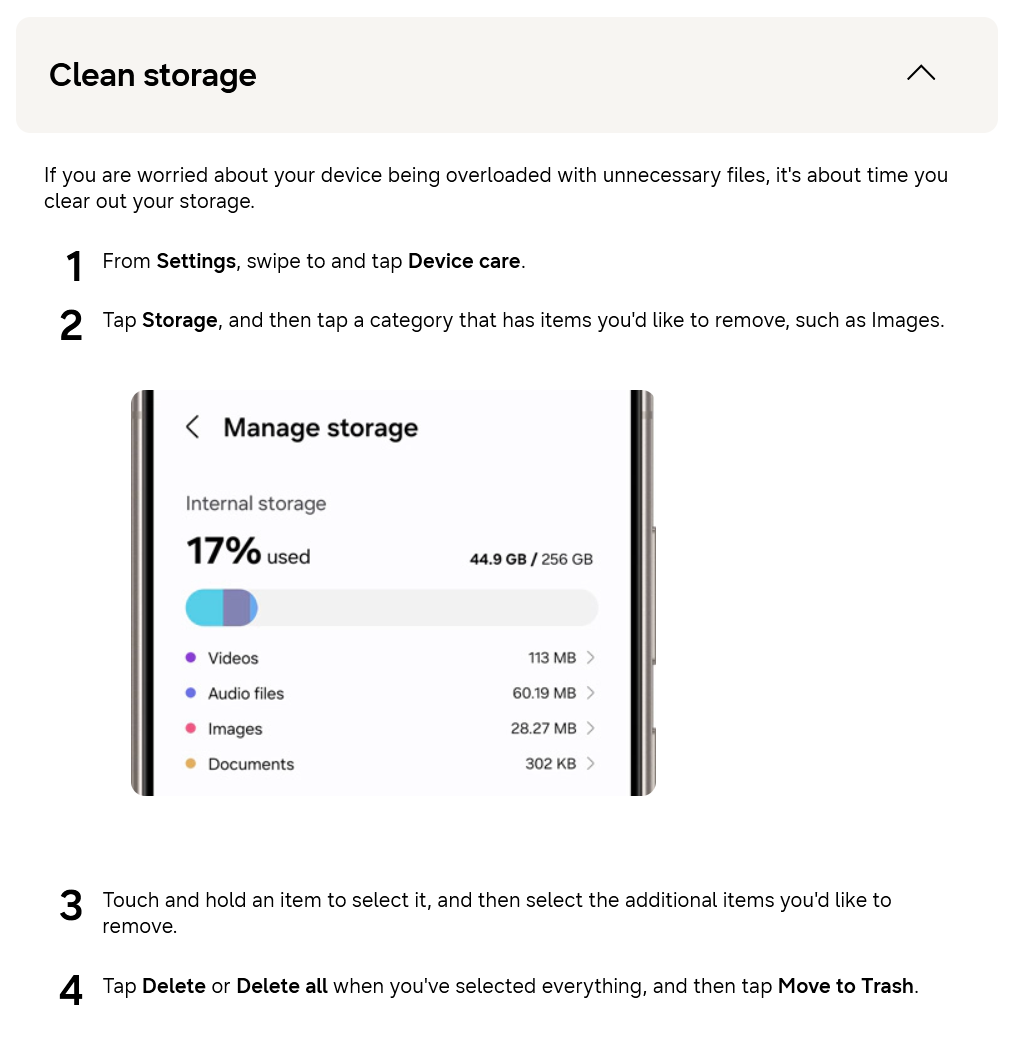
If I were you, I’d back up the photos and other stuff you really care about and then just completely wipe and reset the phone and start from scratch, and monitor that storage menu every week or two.
Also, for your next phone (if you ever decide to give up on this one), I might recommend something mid-range instead of ultra-budget like the A12. Google’s own Pixel phones have the least bloatware, have good automatic storage cleanup capabilities, and are often very cheap, especially a year or two after release. Hell, they tried to sell me a Pixel 11 Pro for $40 after trade-in. You can usually find deals like that when it’s time to upgrade or switch carriers.
Google’s incentives are different than Samsung’s. They keep the phone basic and “clean” in the hopes that you’ll use their services, and they don’t need 2x the apps for the same functions like Samsung does. They also don’t really care too much about losing money with Pixel or its market performance… it’s just an afterthought for them compared to their main AI and search businesses, and they don’t need to make annoying deals with shady carriers and vendors like Samsung has to.
Given the level of sophistication shown here, I suspect the phone’s storage is filling up with more than just updates. People don’t always understand that every app installed occupies SOME storage space; the amount depends partly on how efficiently the app is coded. You can’t continue to add more apps forever (are you still playing those old games that were clickbait?), especially on a budget phone. See if some are no longer used, and delete them.
As I posted above, I’m not an app user. I’ve only installed four on my phone since I bought it and I deleted two of those.
Speaking of apps, whenever I check on my phone’s storage space, I’m given the option of “optimizing” it. If I use this option, I’m informed that two or three background apps have been closed.
These background apps apparently quickly re-open themselves because I can check my storage space again within an hour or so and I’m once again asked if I want to optimize things to close them down.
Is there anyway I can find out what these background apps are? I can’t help but wonder if they’re something that installed itself on my phone without my knowledge and should be deleted.
This is a good idea, but it won’t automatically fix the issue. You have to change app settings to use the SD storage, otherwise it will probably default to the phone’s internal memory.
More than likely they are system apps like Google Play Services etc. If they don’t show up by name on the page with storage details they are probably background apps required by Android.
Here’s the breakdown:
32.00 GB total
31.73 GB used
Images - 4.24 GB
Videos - 0 GB
Audio Files - 5.32 MB
Documents - 0 GB
Installation Files - 0 GB
Compressed Files - 0 GB
Apps - (i)
System - 10.30 GB
Other - 17.18 GB
Trash - 0 GB
The Apps is a little circle with an i in it. I don’t know what this signifies.
I also don’t know why I have such a large amount of audio files. I’ve never downloaded a song or anything else like that. I open this listing up and it lists twenty-six .ogg, .m4a, and .mp3 files, mostly default ringtones or AOL sounds. These twenty-six listed files add up to less than five hundred KB so I don’t know what the other forty-eight hundred KB are.
And I don’t know what “other” covers but it’s the largest item on the list. I can’t open up the apps or other listings to see any details of what they include.
LOL!! You don’t have a large amount of audio files. You have an extremely minuscule amount of audio files. That is the size of like one song. 5MB is basically zero space.
It’s whatever the “Other” section is that is taking up space.
I am not familiar with Android so don’t know specifics, but is there anything here that can help?
Meh. That’s lame. And not your fault. Samsung is just giving you the runaround, it looks like. Sorry.
I’m not sure how you can get more detail  With effort, you could maybe connect it via USB and ask an AI to use Android Debugging Bridge (adb) to figure out what’s actually taking up space, but that’s a lot of effort.
There are a bunch of free “storage analyzer” apps you could temporarily try, if you wanted to, but I can’t vouch for any of them…
Maybe just wipe the whole thing and start over. 32GB just isn’t a lot of space to begin with, and whatever that “other” is might eventually come back anyway. It could just be some poorly optimized app cache, or some stupid AI model, or some system update it auto downloaded but never installed… hard to say without physical access to your phone.
I think ultimately you’ll just have to decide if the shitty budget phone experience is worth the hassle, and try to upgrade to something bigger when you can… preferably something first party, like a used Pixel or iPhone, if you don’t want the Samsung bloat. Samsung uses a heavily modified version of Android and adds a ton of crap to it.
You can also try this for every single app you have:
Go to Settings, then tap Apps
Select the app that you want to clear the cache for
Tap Storage
Tap Clear cache
(Edit: the (i) icon by the “Apps” entry is probably an information icon, like  but circle? If you tap on it, or the word Apps itself, it may or may not expand into more details.)
It might be a system update that is pending or failed to apply.
Check Settings->Software Update and see if the system is up to date. Or if there is anything to clear.
You can also try clearing storage and cache for the System Update app.