# Og Damn You, Video Card, or, Assistance Please?
**URL:** https://boards.straightdope.com/t/og-damn-you-video-card-or-assistance-please/391615
**Category:** Factual Questions
**Created:** [February 10, 2007, 2:27pm UTC](https://boards.straightdope.com/t/og-damn-you-video-card-or-assistance-please/391615 "2007-02-10T14:27:24Z")
**Posts on this page:** 20
**Page:** 1
### Author:  [@Least\_Original\_User\_Name\_Ever](https://boards.straightdope.com/u/Least_Original_User_Name_Ever)
#### Post date: [February 10, 2007, 2:27pm UTC](https://boards.straightdope.com/t/og-damn-you-video-card-or-assistance-please/391615/1 "2007-02-10T14:27:24Z")
So I get the BFG 7800 video card. I’ve got two games that I’ve bought but can’t run because my video card isn’t beefy enough. Well, I uninstall the old one and put the new one in. I get a beeping noise. It’s a long, monotone beep. The card spins, the nifty neon light comes on, but the video signal isn’t going through to the monitor. I even tried putting the monitor into the slot that the motherboard has and no dice. I figured it could be power supply, so I get a 400 watt power supply, put all the cables in their appropriate places and still get the beeping.
Gah.
In between these attempts, I put in the old (5700 FX LE) video card to verify I haven’t broken anything. I haven’t. Everything works frickin’ dandy. I even tried JUST installing the drivers for the new card, but it won’t let them in unless it senses the video card. I thought I could trick it by keeping the old card in and putting the new drivers in, which worked, but it bought me that same beep.
Um. Help? A video card guru at work says it might be my chipset drivers or something…whatever in the fuck THAT is. Googling found me nothing. For the record, it’s an AMD Sempron 3000+ that’s overclocked by the good folks that put my computer together.
Also FYI, the folks that put my computer together want something like 60 bucks to open it up and check stuff out.
I’m not against the prospects of having to buy a new motherboard and CPU, but such a new thing would have to have an AGP slot and a PCI-E slot for future incursions into the video card realm. (I’m also aware that a new motherboard, CPU, and PCI-E video card would have been about as much as the 7800. Talk about hindsight.)
Grr.
---
### Author:  [@casdave](https://boards.straightdope.com/u/casdave)
#### Post date: [February 10, 2007, 2:37pm UTC](https://boards.straightdope.com/t/og-damn-you-video-card-or-assistance-please/391615/2 "2007-02-10T14:37:56Z")
I’d seriously consider setting the clock speed back to the defaults, and stop overclocking.
Most graphics cards are intolerant of bus overclocking, though they can have the graphics processor overclocked.
---
### Author:  [@Least\_Original\_User\_Name\_Ever](https://boards.straightdope.com/u/Least_Original_User_Name_Ever)
#### Post date: [February 10, 2007, 3:48pm UTC](https://boards.straightdope.com/t/og-damn-you-video-card-or-assistance-please/391615/3 "2007-02-10T15:48:36Z")
Well, I’ve no clue how to overclock (or underclock either) the processor. If my memory serves me right, it’s a 1.8 GhZ running closer to a 2.5 or 2.6. **gonzomax** should be able to provide that information in a little bit. The card I had in there was fine with the overclocking, and I know it could be apples and oranges, but what exactly makes these apples and oranges we’re comparing?
---
### Author:  [@thelurkinghorror](https://boards.straightdope.com/u/thelurkinghorror)
#### Post date: [February 10, 2007, 3:48pm UTC](https://boards.straightdope.com/t/og-damn-you-video-card-or-assistance-please/391615/4 "2007-02-10T15:48:56Z")
Chipset drivers can be found at the motherboard manufacturer’s website. You should probably update your BIOS as well.
Who makes your motherboard, and what BIOS do they use (e.g. AWARD, AMI)? Search the internet for the manufacturer and “beep codes” to find what the beeping means.
I had a similar problem, where the beeping indicated a video error. The only solution was to RMA the video card and get a new one as it was faulty.
Also, did you remove the drivers for your original video card before installing the new one? I doubt that’s the problem here, as it sounds like you don’t get past Post, but it is worth a try.
---
### Author:  [@Least\_Original\_User\_Name\_Ever](https://boards.straightdope.com/u/Least_Original_User_Name_Ever)
#### Post date: [February 10, 2007, 3:58pm UTC](https://boards.straightdope.com/t/og-damn-you-video-card-or-assistance-please/391615/5 "2007-02-10T15:58:24Z")
Yeah, the old card’s drivers were removed first. I saw the warning that I should do it and heeded it.
Um. I don’t know what kind of motherboard it is. How do I go about finding that? How is this beep code classified as opposed to another one? Is one “long beep” and another “short beep”? I mean, what criteria is used to differentiate beeps?
---
### Author:  [@thelurkinghorror](https://boards.straightdope.com/u/thelurkinghorror)
#### Post date: [February 10, 2007, 4:08pm UTC](https://boards.straightdope.com/t/og-damn-you-video-card-or-assistance-please/391615/6 "2007-02-10T16:08:01Z")
Yep, long/short beeps. It’s not really scientific. At the time I had the problem, video error was 1 long followed by 2 short.
The BIOS should tell you what version/company it is when you go into it, usually by pushing Delete at startup. The motherboard company/version is probably printed on the board itself, but it might also be easier if you identify it with some diagnostic software, but I don’t have any specific recommendations. If you decide to look at the board, different parts of it may be marked with different company names, but you should really be looking for the descriptor on the board itself, rather than on a component. It may also have a serial number which you can look up online to identify it.
Beep Codes:[1](http://www.computerhope.com/beep.htm)[2](http://www.pchell.com/hardware/beepcodes.shtml)
---
### Author:  [@da\_pope](https://boards.straightdope.com/u/da_pope)
#### Post date: [February 10, 2007, 4:11pm UTC](https://boards.straightdope.com/t/og-damn-you-video-card-or-assistance-please/391615/7 "2007-02-10T16:11:32Z")
Most of the new cards have a connection that plugs into your power supply, make sure it’s plugged in!
Chipset drivers come with the motherboard, but if it’s a VIA chipset, which you can find by looking up the board at the manufacturers site, there are always newer chipset drivers you can find here:
[http://www.viaarena.com/default.aspx?PageID=2&Type=1&OSID=1](http://www.viaarena.com/default.aspx?PageID=2&Type=1&OSID=1)
I linked direct to the XP version.
---
### Author:  [@Least\_Original\_User\_Name\_Ever](https://boards.straightdope.com/u/Least_Original_User_Name_Ever)
#### Post date: [February 10, 2007, 4:17pm UTC](https://boards.straightdope.com/t/og-damn-you-video-card-or-assistance-please/391615/8 "2007-02-10T16:17:14Z")
[QUOTE=thelurkinghorror]
Yep, long/short beeps. It’s not really scientific. At the time I had the problem, video error was 1 long followed by 2 short.
The BIOS should tell you what version/company it is when you go into it, usually by pushing Delete at startup. The motherboard company/version is probably printed on the board itself, but it might also be easier if you identify it with some diagnostic software, but I don’t have any specific recommendations. If you decide to look at the board, different parts of it may be marked with different company names, but you should really be looking for the descriptor on the board itself, rather than on a component. It may also have a serial number which you can look up online to identify it.
Beep Codes:[1](http://www.computerhope.com/beep.htm)[2](http://www.pchell.com/hardware/beepcodes.shtml)
[/QUOTE]
I’ll have to work on that one when I get home, then. Gracias.
---
### Author:  [@Least\_Original\_User\_Name\_Ever](https://boards.straightdope.com/u/Least_Original_User_Name_Ever)
#### Post date: [February 10, 2007, 4:18pm UTC](https://boards.straightdope.com/t/og-damn-you-video-card-or-assistance-please/391615/9 "2007-02-10T16:18:51Z")
[QUOTE=da\_pope]
Most of the new cards have a connection that plugs into your power supply, make sure it’s plugged in!
Chipset drivers come with the motherboard, but if it’s a VIA chipset, which you can find by looking up the board at the manufacturers site, there are always newer chipset drivers you can find here:
[http://www.viaarena.com/default.aspx?PageID=2&Type=1&OSID=1](http://www.viaarena.com/default.aspx?PageID=2&Type=1&OSID=1)
I linked direct to the XP version.
[/QUOTE]
I do Windows Update pretty frequently, so when it had the VIA updates, I always wondered what in the hell those things were. I always installed them anyways. I’ll have to check that out and thanks much for the link.
And there IS a cord that looks like it could go to the power supply. This is where I hang my head in shame because that cord should prolly go to the power supply. I looked at it, and where it could connect into, but how…does..it…fit?
God I sound stupid with that last sentence.
---
### Author:  [@casdave](https://boards.straightdope.com/u/casdave)
#### Post date: [February 10, 2007, 4:19pm UTC](https://boards.straightdope.com/t/og-damn-you-video-card-or-assistance-please/391615/10 "2007-02-10T16:19:49Z")
I have looked up both these cards on this site,
[http://www.beyond3d.com/reviews/galaxy/5700le/index.php?p=2](http://www.beyond3d.com/reviews/galaxy/5700le/index.php?p=2)
[http://www.beyond3d.com/reviews/bfg/7800gtoc/index.php?p=02](http://www.beyond3d.com/reviews/bfg/7800gtoc/index.php?p=02)
Your shiny new card requires that you connect it up to the power supply, but your old one takes all it needs off the motherboard.
If you look at the second link, at the very bottom, you’ll see pictures of the cards, and if you click on each one, you get an enlarged view.
Look at the upper right hand edge, and you see a connector, this needs connecting up to the power.
The website also mentions this on the following page,
[http://www.beyond3d.com/reviews/bfg/7800gtoc/index.php?p=03](http://www.beyond3d.com/reviews/bfg/7800gtoc/index.php?p=03)
> [@](#):
>
> The installation process for the board follows the same pattern has other high end PCI Express graphics boards, with the graphics card being placed in the x16 PCI Express lane and then the internal power is connected. Newer PSU’s may natively include the internal PCI Express for graphics power connector, in which case it can just be connected directly to the graphics board; if, however, the system PSU does not include these newer connector types then the supplied converter can be used by taking two free hard drive power plugs and connecting these to the relevant sockets on the converter and then the converter connected to the PCI Express for graphics power socket on the back of the graphics board
If you haven’t got this connector supplied directly from your power supply, then you will get this problem, I had this when I forgot to do the same thing on my 6800Ultra card.
If your power supply has not got the proper connecter, I belive you can get an adaptor which converts the usual one to the one you need.
It will all be mentioned in your installation guide, and maybe the converter is included in the kit for your card.
I am not saying this is definately your problem, if you already have installed this card with this power connector, I would be suspicious of the card itself.
If you have a friend who is willing to let you put your new card in their machine to try it out, maybe you will be able to find out for certain.
I’m sort of concerned that if you don’t at least know what overclocking means, (even if you don’t know how to do it), then you may not have the tech skills to install the card yourself.
Sometimes the installation instructions are unclear, ambiguous or just rubbish, and most folk ignore them as installing cards is usually a fairly standard procedure.
Most times, when you change your graphics card, you first uninstall your drivers for the old one, restart and check it works, but do not install the drivers, even though the computor asks you to do this.
Then you shut down, remove your old card, insert thenew one, along with its extra power connector, restart, and then your computor will ask you for the drivers for your new card and thats when you put in the CD/DVD.
Personally, I normally skip this step, I usually go to the website of the card manufacturer and download the latest drivers from there, I do this before I take my old card out, and write them down on a disc - these dowloaded drivers are almost always much better than the ones the card came with.
---
### Author:  [@da\_pope](https://boards.straightdope.com/u/da_pope)
#### Post date: [February 10, 2007, 4:22pm UTC](https://boards.straightdope.com/t/og-damn-you-video-card-or-assistance-please/391615/11 "2007-02-10T16:22:20Z")
from website:
Included:
Dual 4-pin to single 6-pin power cable
so you plug the 6 pin into the back of the card, and you take one of the 4 pin connectors from your power supply and connect to that cable. (they are called molex connectors)
viola!
---
### Author:  [@Least\_Original\_User\_Name\_Ever](https://boards.straightdope.com/u/Least_Original_User_Name_Ever)
#### Post date: [February 10, 2007, 4:30pm UTC](https://boards.straightdope.com/t/og-damn-you-video-card-or-assistance-please/391615/12 "2007-02-10T16:30:39Z")
Thanks much. Lemme prod my old man into acquiring such a connector.
---
### Author:  [@da\_pope](https://boards.straightdope.com/u/da_pope)
#### Post date: [February 10, 2007, 4:33pm UTC](https://boards.straightdope.com/t/og-damn-you-video-card-or-assistance-please/391615/13 "2007-02-10T16:33:09Z")
the card should have come with it.
---
### Author:  [@gonzomax](https://boards.straightdope.com/u/gonzomax)
#### Post date: [February 10, 2007, 4:38pm UTC](https://boards.straightdope.com/t/og-damn-you-video-card-or-assistance-please/391615/14 "2007-02-10T16:38:41Z")
It is a AMD 1.8 GHz 3000+
150 ram
windows dxp
dell e173fp monitor
power supply is 400 +
---
### Author:  [@gonzomax](https://boards.straightdope.com/u/gonzomax)
#### Post date: [February 10, 2007, 4:39pm UTC](https://boards.straightdope.com/t/og-damn-you-video-card-or-assistance-please/391615/15 "2007-02-10T16:39:56Z")
How do you identify the BIOS? or motherboard.
---
### Author:  [@da\_pope](https://boards.straightdope.com/u/da_pope)
#### Post date: [February 10, 2007, 4:58pm UTC](https://boards.straightdope.com/t/og-damn-you-video-card-or-assistance-please/391615/16 "2007-02-10T16:58:51Z")
[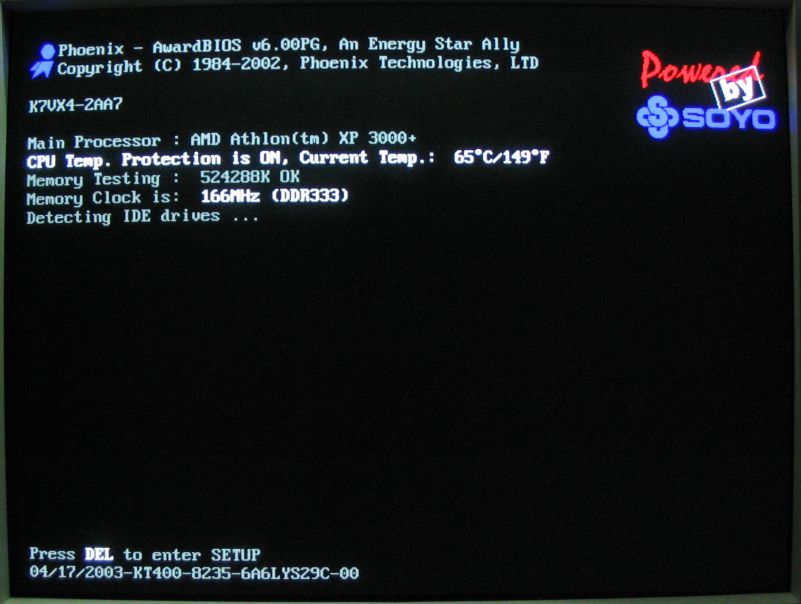 ](http://www.linuxhardware.org/images/articles/nf2kt400-071003/SOYO-KT400-BIOS-Post.jpg)
in this case the motherboard name is at the top, SOYO (logo on the right)
K7VX4 from the left.
The chipset version is on the bottom, along with the bios date:
04/17/2003 KT400
You can also look on the mainboard itself, make and model should be silkscreened on the board, sometimes between the connectors. Get a flashlight and open it up.
sometimes you can pause the boot screen using your pause/break key to catch it as it comes up. Hit enter to continue when you’re done.
---
### Author:  [@Least\_Original\_User\_Name\_Ever](https://boards.straightdope.com/u/Least_Original_User_Name_Ever)
#### Post date: [February 10, 2007, 5:14pm UTC](https://boards.straightdope.com/t/og-damn-you-video-card-or-assistance-please/391615/17 "2007-02-10T17:14:13Z")
By the way, **pope** , I just want to say that I like your funny hat.
---
### Author:  [@Least\_Original\_User\_Name\_Ever](https://boards.straightdope.com/u/Least_Original_User_Name_Ever)
#### Post date: [February 10, 2007, 5:16pm UTC](https://boards.straightdope.com/t/og-damn-you-video-card-or-assistance-please/391615/18 "2007-02-10T17:16:56Z")
[QUOTE=da\_pope]
the card should have come with it.
[/QUOTE]
I don’t have it in front of me, but it DID have a splitter. I’d assume that said splitter is our molex connector. It also gave a video-to-DVI coupler, as well.
---
### Author:  [@da\_pope](https://boards.straightdope.com/u/da_pope)
#### Post date: [February 10, 2007, 5:19pm UTC](https://boards.straightdope.com/t/og-damn-you-video-card-or-assistance-please/391615/19 "2007-02-10T17:19:24Z")
yup, the spliter should have 2 molex and one 6 pin on it. that should do ya, let us know!
---
### Author:  [@Least\_Original\_User\_Name\_Ever](https://boards.straightdope.com/u/Least_Original_User_Name_Ever)
#### Post date: [February 10, 2007, 5:20pm UTC](https://boards.straightdope.com/t/og-damn-you-video-card-or-assistance-please/391615/20 "2007-02-10T17:20:23Z")
[QUOTE=gonzomax]
It is a AMD 1.8 GHz 3000+
150 ram
windows dxp
dell e173fp monitor
power supply is 400 +
[/QUOTE]
Christ, dad. Are you typing with your fists or buttcheeks? Hell, either would be an improvement over the hunting-and-pecking you’re doing now.
[Next page](https://boards.straightdope.com/t/og-damn-you-video-card-or-assistance-please/391615.md?page=2)