This is probably the best solution for the OP. You don’t need to install anything or learn how to use any new tools. Just type /s on your dir command.
Sorry, didn’t mean to make you go down a rabbit hole. It was just a side thought, but if you really care enough to find out:
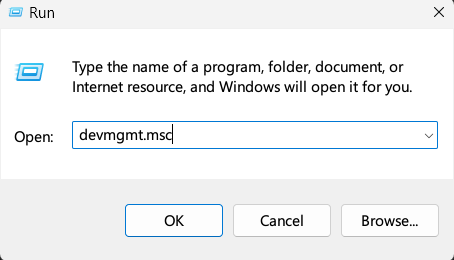
Push Windows+R on your keyboard. That should bring up the Run prompt. Type devmgmt.msc:
Then navigate to the Disk Drive and it’ll tell you what you have:
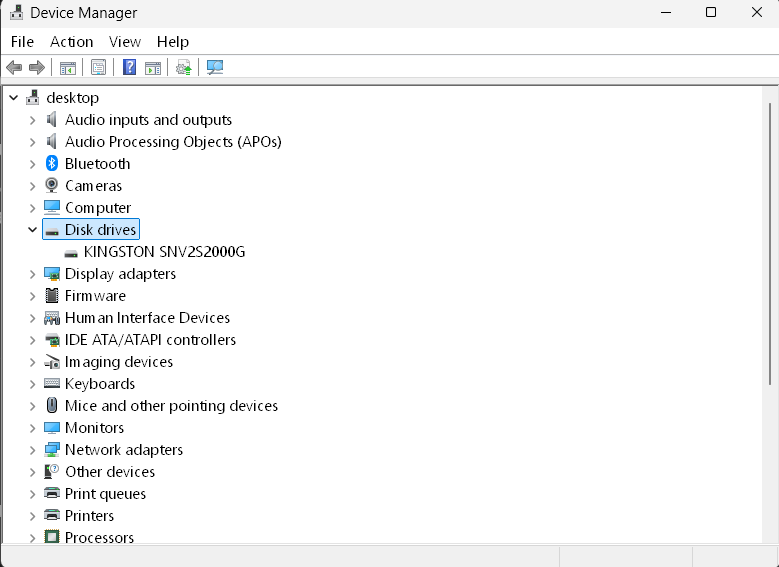
Having that information would let us know:
-
Whether you still have an older, mechanical hard drive (which might be slowing down the search and everything else)
-
Whether there’s a reasonably-priced upgrade that might be available.
A smaller SSD would typically cost, I dunno, maybe $100-$300 depending on brand, size, and whether you’re comfortable installing it yourself or want someone else to do it.
If you don’t care and don’t want to spend the money, just try that utility 
If you already know the folder the file is in (or at least its parent/ancestor folders), yes. Otherwise, if you just start from the C:\ root, it could take a long time on a slower computer. And if you start from your home folder and the file was actually elsewhere on the drive, like C:\customfolder\, it’ll never find it.
I have a much bigger problem, the need to search thru .5 Petabyte files on my network frequently. I found a program I really love, “Everything”, from Downloads - voidtools
If you don’t have 9 network-connected, multi-terabyte drives, this might not be that useful. But for me, it’s a godsend. You can do fractional name searches, including “?” and “*” wildcards.
Everything not only indexes all files on multiple drives, at no discernable overhead, but provides instant search capability with incredible speed (=instantly). It even has periodic re-scans that the user can program, although I rarely find a need for that.
did it. still the same Sandisk SDSSDA120G
It is a real laptop drive. Not a SD card
i only have 32GB free on this 120GB drive
I am seriously considering purchasing a 512GB laptop SSD drive
they’re very cheap now.
a OEM Dell is only $120
Just a simple test. I have a 2TB SSD, and a file in my Downloads folder called SteamAchievementManager-7.0.37.zip.
- A naive Windows Explorer search looked for more than 30 seconds before I gave up and stopped it. A modified
name:~~"achievementmanager"search eventually found it after about 20 seconds, but I have no idea what that syntax means… where /R c:\ *achievementmanager*took about 6 seconds to find it.dir /s *achievementmanager*took 3 seconds to find it (starting fromC:\)- The Everything app took about 1.5 seconds to index my whole drive, then the search was instantaneous… it found the file before I could even finish typing. Literally anything I type in the search field shows up instantly. Even indexed, Windows search isn’t anywhere near this fast.
Oops, my apologies here! You were totally right the first time… I misread the model number, sorry about that.
Yeah, it’s already a SSD. My bad on that.
went to voidtools, downloaded Everything 64 bit installer, Installed
Thanks
Unfortunately, that’s about twice of what it went for a year or two ago. Example: 2024 August, B&H, Crucial BX500 4TB 2.5 inch SSD, $250.
I just wanted to show how MUCH faster Everything is… it blew me away
In a command line, it takes several seconds to find it:
In Everything, it’s literally instant:
For those Everything fans, like me…this program has many options, most of which I have not yet learned. If you go to Tools->Options, you can specify which drives you want it to rescan (or not) periodically, and when. I have each of my network drives rescanned about one a week, at different hours, just as a precaution.
My one objection to this program is it seems to retain data for inactive drives permanently, even duplicating the data. I hope this can be configured differently.
If you think this program is fast, you should see how it works for 7 Network drives (Drobos, Synology).
Just a few more network drives and you can be the next Google!
I have a long ways to go: Google is in the upper-Exabyte range and growing daily.
I don’t know how to Link Threads
Yoi may find the thread about Backup Software.
I just asked about using a Disk Image backup to setup a New Replacement laptop boot drive.
What’s a few orders of magnitude between friends?
That’s probably worth starting a new topic about? It’s different enough from either searching or cloud backups.
With the right software and a USB enclosure or adapter cable for the drive, you should just be able to clone your existing drive over to it, bit for bit. But I don’t know what the latest and greatest for that type of software is… back in the day it used to be Easeus, but maybe there’s something better or freer now.
I’ll ask the mod to move my drive swap question to a new IMHO thread
.
Yeah, some storage is more expensive now (but particularly RAM and GPUs). However the one linked was $20 more then, although $30 more than it was 2 months ago.