LOL
Everything is the App
The new lens in my eyes and computer screen glare conflict.
LOL
Everything is the App
The new lens in my eyes and computer screen glare conflict.
Everything is the greatest.
I resisted installing a third party app for years because I just couldn’t quite believe that Microsoft were incapable of having a practicable and effective search function in Explorer. I just went on year after year assuming I must be doing something wrong, installing “fixes”, listening to advice on the internet about what I should do to get Explorer’s search function working blah blah blah. This lasted through several versions of Windows.
Then I gave up and reached the conclusion that for reasons that remain baffling to me, Microsoft are incapable of having an effective search function and installed “Everything” and now life is good. In one small respect, anyway.
It should be table stakes, right? <side rant> There is SO MUCH in Windows that should’ve-could’ve been fixed years or decades ago, but never was. So many low-hanging-fruit easy fixes that would make a big difference in the day-to-day user experience. Why not hire the guy who made Everything to fix Windows Search? Why not index the whole disk by default and prioritize filename searches? Why not unify your control panels and settings so there aren’t like 5 different UIs to change a group of settings? Why is your main consumer operating system so trashy? It feels like abandonware at this point. If anyone at Microsoft’s listening — they’re not — get your shit together! </side rant>
At least apparently they heard the backlash on the nonstop Copilot spam: You won: Microsoft is walking back Windows 11’s AI overload | Windows Central
I think Microsoft has totally given up on the consumer side of their business. It’s an afterthought at this point.
I guess this is the reason (from How Microsoft Makes its Money: Revenue Breakdown):
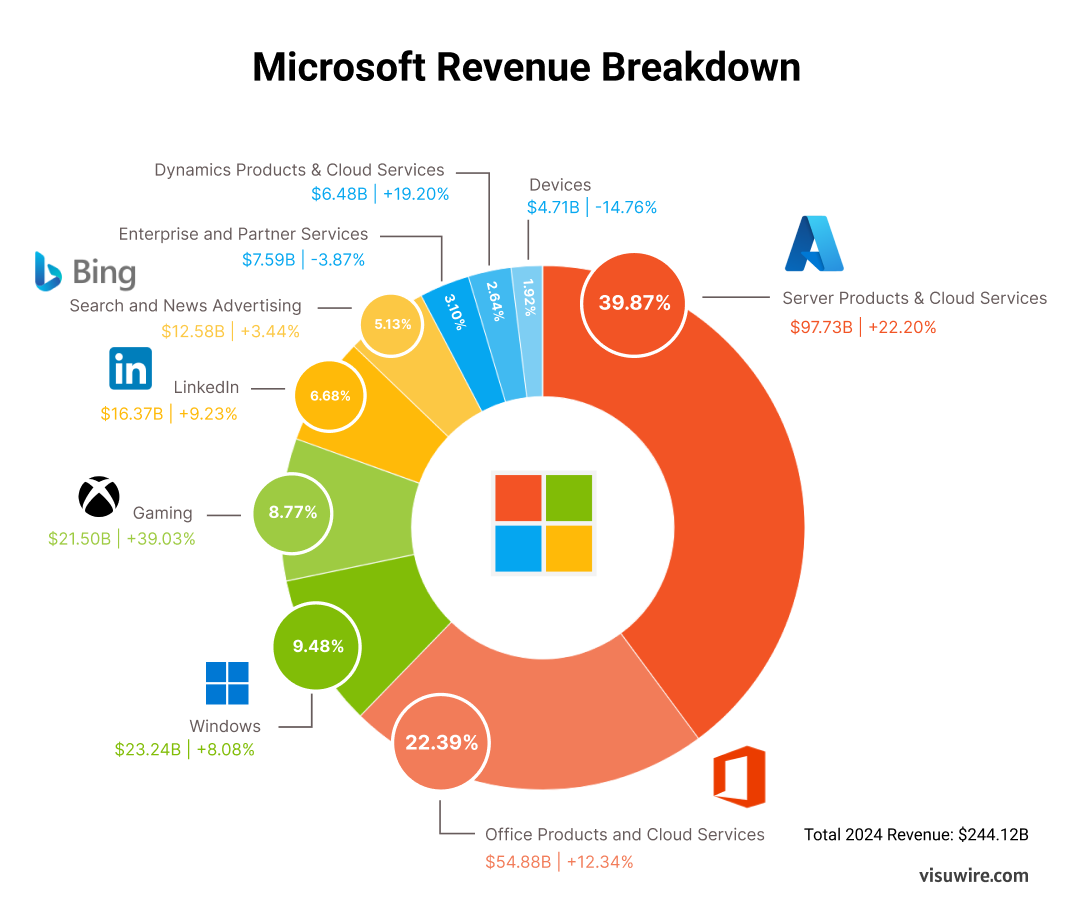
Windows now accounts for < 10% of revenue, about on par with Xbox, which is also dying.
Office still makes money (probably from the captive enterprises), but by and large they’re a cloud services company now. Azure is where the plurality of their income comes from. AI is probably a part of that.
Windows doesn’t matter anymore, and they’re just using it as an advertising outlet now.
That’s why my experience with NT 4 was the best I ever had with windows.
NT 4 was lean and mean with all the home user fat cut out.
Our department used it on all our staff’s workstations for as long as possible. That was for almost 3 years.
IIRC it had a fast search engine.
I’m still surprised that I never ran across Everything before. Not a peep in Reddit or other Forums.
I’m impressed by the Apps’s functionality.
Since it’s freeware, you might consider donating a few bucks to the developer: Donate - voidtools
David Carpenter did what 200,000 Microsoft employees could not.
Lemme adjust that for you …
David Carpenter did what a half-dozen Microsoft execs told 200,000 Microsoft employees not to do
could not.
Heh, that is probably true.
This isn’t (necessarily) very meaningful because it’s revenue figures not profit figures.
Can I please ask one question without a new thread?
It’s a long standing problem.
files in a zip file have modification dates from 2016.
Windows Explorer opens zip files now. WinZip or WinRAR are no longer needed to open a zip file.
ctrl-A selects all, ctrl-c copies and ctrl-v pastes into a new folder
Congratulations 9 years of history is gone.
Just like a stinky fart in a strong wind.
all the files copied have the current date and time.
any solutions?
You should be able to right-click the column headers and choose to show a separate “Date created” column, which should be the original timestamps:
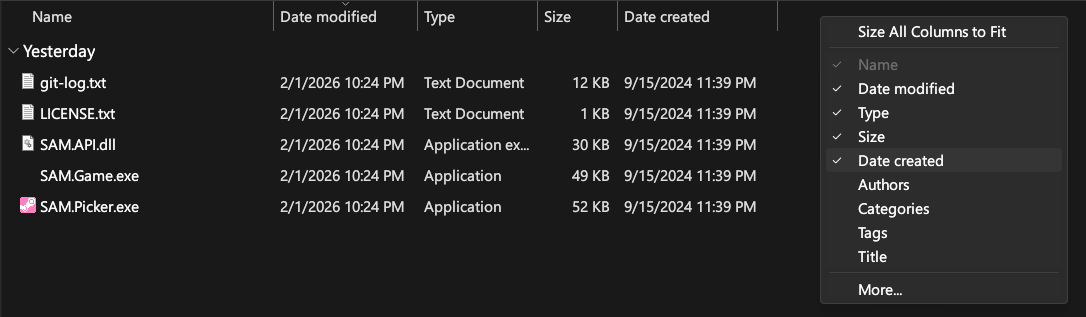
Alternatively, if you use 7-zip, it will retain the Modified date and instead set the Created date to today (the inverse of the default Windows logic): https://www.7-zip.org/
As Reply said, 7-Zip is better than the inbuilt Windows tool.
I’m sensing a theme here…
Original creation date Problem solved.
Thanks Reply
i’ll try 7-Zip
winRAR is my go to App for creating or reading Zips and RAR.
Android’s version works equally well as the Windows version.
i bought a license last year.
i got lazy on WinBlows and used Explorer
let’s try
dir *Alice*.doc
dir `*Alice%%.doc
finds LoudAlice03.doc and ignores LoudAlice2.doc
I need to add @Reply to the payroll.
he’s hitting home-runs all day.
Heh, I was home sick all day and had nothing better to do 
PS just ` around the entire thing, like:
dir *Alice*.doc
or dir *Alice%%.doc
If you’re going to start sharing more code, you can also use ``` (triple backticks) to encode an entire block, like:
```python
print("Hello, world!")
```
becomes:
print("Hello, world!")
And Amazon gets under 40% of theirs from amazon.com, stuff like AWS is a growing market.
In windows, if you COPY a file, the Date Created timestamp gets reset to the current date/time.
If you MOVE a file, the Date Created timestamp is preserved.
Other than command-line (Robocopy) or 3rd party programs, if someone knows how to avoid this and copy a file WITHOUT changing the Date Created, I’d sure like to know.
Move is a cut and delete. Ctrl-x
That ruins the original zip file’s integrity.
You’ve dragged the files out of it.
The poor zip file is disemboweled.
Do most people select a file or files and ctrl-c in the folder where you want them?
I have never trusted dragging and dropping with a mouse. I screw things up every time.
That half-a-second time savings isn’t worth it.
A zip file isn’t actually a folder though; that’s just an abstraction that some versions of Windows show you. It’s more or less arbitrary what it sets the timestamps to after extraction, whether you “copy” or “cut” it… if you “cut” a file out of a zip file, it actually has to go there in and modify the bytes to delete it from the zip file afterward. (And in this particular case, it still results in the same timestamps as if you copied or simply “Extract/Extract All” the files… doesn’t change the behavior)
The folder is a fake GUI to make zip files more understandable. The timestamps are added by that fake folder program. 7-zip just adds its own fake timestamps. They’re all arbitrary… you can use Powershell or other programs to set them to anything you want.
I know of several ways to copy or move a file, from the command line (old-school DOS) to copy & paste (^C, ^V), but my favorite is to put two windows side-by-side, select the file(s), then USING THE RIGHT MOUSE BUTTON, drag it/them to the desired destination. When you release the button, you are presented with 2 options: Copy (rewrites the timestamp on the copied file) or Move (preserves the timestamp on the copied file). Normally, to avoid irreversible mistakes, during a Move operation, I select the Copy option, then return to the scene of the crime after I have verified all is well and delete the copied files from the source. Extra steps I shouldn’t have to make.
However, this means the timestamp on the copied file has been rewritten. It would be so simple for the Windows programmer to offer another option such as “Copy, preserving timestamps”, but so far, no Micro-Idiot has thought of that. This is in spite of the numerous and mostly useless options we often get for other functions, and newly installed programs often inserting their own without telling anyone.
I like the side-by-side windows procedure because I can get a visual reference of source & destination to reduce errors on my part. With the millions of files I work with daily, and sometimes complicated and duplicate directory paths, it’s all too easy to goof.
I have developed a game plan over several decades that works well for me. Audio/Video editing plus page layout projects are my main focus, and long-term storage and retrieval is a primary goal. it is common for me to want to retrieve 10 or 20-year old projects to re-edit them, often using new tools that were not available when the project was first started.
Most editors I know about (audio/video/art layout) use script files to allow for non-destructive editing. These usually imbed data that points to related files that are a part of the final production process. There’s nothing more frustrating than trying to re-edit an old project and find the critical files are lost, misplaced, or just mis-pointed-to, yet it seems a bad idea to include ALL the necessary files with the archive project’s storage, so I compromise.
Since the storage requirements for these projects are considerable, when I am done with a current project, I store it as a long-term archive as intact as possible, and here is where I would like preserve the timestamps. If I return to the data 10 years later, I must copy the archived data to a working drive/dir, which makes the internal links work again.
If something didn’t get properly stored, the original timestamp would be highly useful to find a missing file, but this may no longer exist. Bummer, dude. (That’s the American version of “bummer,” not the UK version.)
The filesystem timestamps are innately finicky things and not particularly trustworthy, especially once you have to copy them across devices/clouds/platforms…
Do the file formats you work with have their own metadata format, perhaps? Sometimes you can write timestamps into that directly, as data inside the file itself, which should be more durable.
Alternatively, sometimes the metadata is just an accompanying text file by the same name. Harder to ensure that gets archived alongside the file itself, though.