I just got a new laptop at work, and because our IT department just switched from Dell to HP, they had to replace my docking station as well. This new docking station has a long power cord from the dock to a large power brick, and a shorter cord from the power brick to the wall outlet. The stupid part – the long cord is permanently attached to the dock. It cannot be unplugged from the dock, nor can the other end be unplugged from the brick. I wanted to set the power brick on the floor under my desk and run the longer cord up to the dock on the desk, which is how I had the old one set up. But since the cord can’t be detached, and the power brick and dock are both too large to pass through the space between the desk and cubicle wall, the only option is to put the power brick on my desk about six inches from the docking station, with the longer cord uselessly coiled up between them, and run the shorter cord down to the power outlet under the desk, which it’s just barely long enough to reach.
That is stupid. However if the dock connects to the PC via USB-C, you’re probably not limited to using an official HP dock. Instead, you can get similar docks from Apple, Dell, other computer brands or third-party companies like Belkin and use them instead.
I’m not sure about that. This one uses HP’s “Thunderbolt” cable, which has a round power connector and a USB-C connector combined into one plug, like in the image below (not the exact dock they gave me, but that image best illustrates the plug). I suppose I third party dock might work, but I’m not sure if it would deliver power.
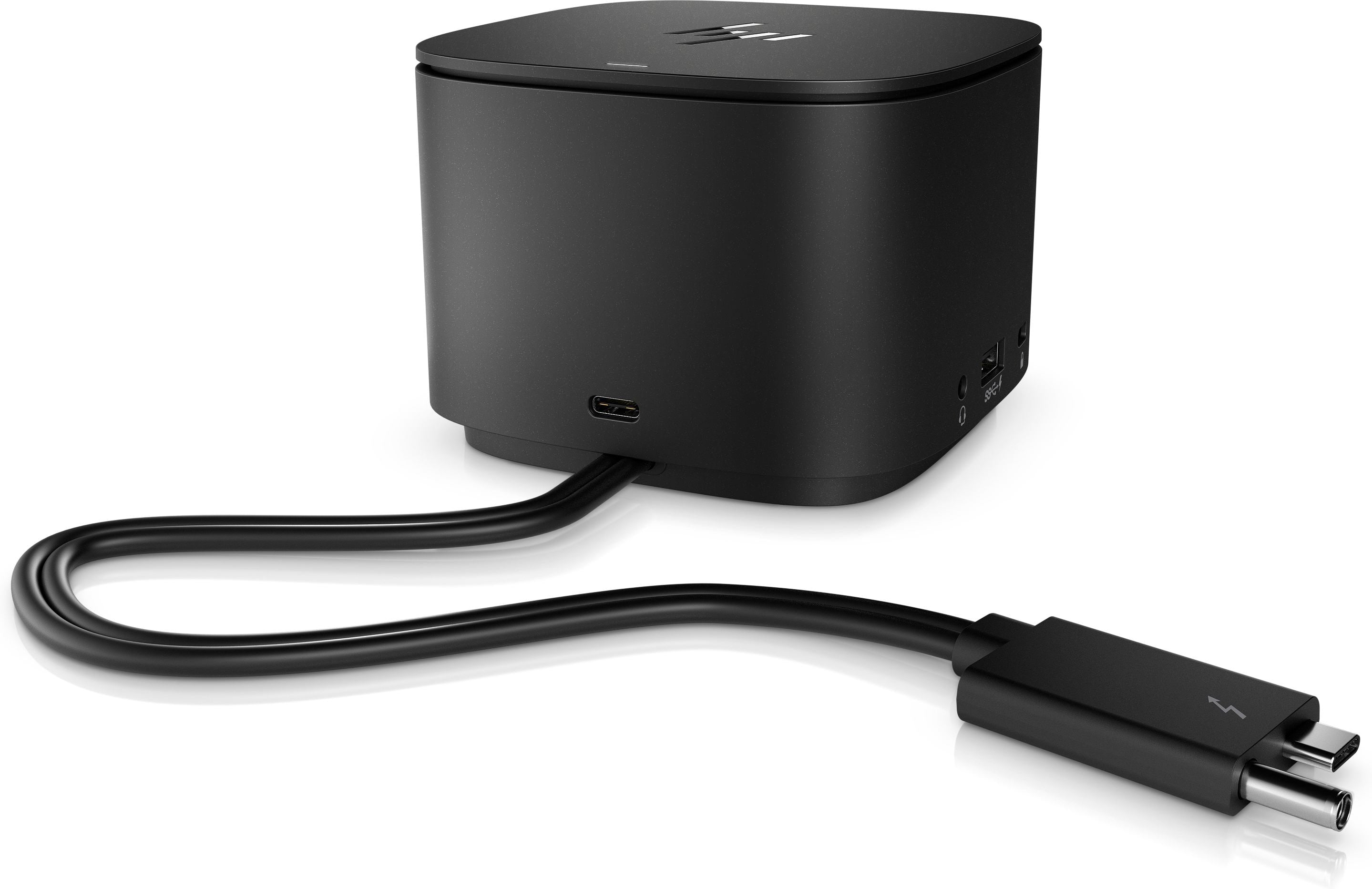
Now that is some world class rocket surgery there, HP.
Okay, yes, you’re probably stuck with the HP dock. But I think other companies connect Thunderbolt docks via only a Thunderbolt port (which I think looks like a USB-C port).
The desk can’t be moved further away from the wall for a couple of minutes?
An immovable desk strikes me as bad product design in itself.
Imagine a desktop attached to a cubicle wall.
With only a couple of holes just large enough to put a cord through?
If so, I was confused by the language about the space between the desk and the wall.
I’d be tempted to bring in a hole saw and carve one of those holes out to be as large as necessary.
Yes, what Dewey said. Don’t think of a piece of furniture, think of more of an oversized shelf attached to the cubicle wall, with a hole for routing cables through.
I have an HP work laptop with a “dock” like the one in your picture. But the power cord is detachable - the port is on the back side, just under the ethernet port. And the cord from the power brick is about four feet long, plenty long enough for me to put it on the floor and snake the cord up through the desk hole. Sounds like they reinvented the dock and made it worse.
But speaking of bad design, you know where the power switch is on that thing? It’s the entire top of that cube. I can’t tell you how many times I was trying to reach around behind a monitor to plug it in and managed to lean on the top of that dock and accidentally shut my laptop down. They couldn’t have just put a little switch on the back?
At least they didn’t include that design “feature” on mine. This one just has a small power button on the top, towards the front.
I’d have taped something above the top of that the first time it happened. Well, knowing me, maybe the tenth time.
Yep, after doing the same stupid thing half a dozen times or more, I finally stuck a sticky note on top. That helped… some…
My company only offers this monstrosity for “docking”. It has a short little 4” pigtail to plug into the laptop, and the circular ports mean that I have a wagon-spoke whorl of cords splaying out on the left side of my laptop. The stiffest bulkiest one, the HDMI, gets crammed and bent up right against the laptop. Guess where I need my mouse pad to be as a left-hander? And supposedly being a “hub”, guess how many USB-C inputs it can take in…that’s right, just one!
I have one of those (Dell Pro DA310 7-in-1 USB-C Travel Hubs) in my travel kit. For that it’s great, because it takes up little room and lets me connect the power source, keyboard and mouse to the computer using one USB-C connection. But in corporate offices and in my home office, we use something like a Dell WD15 or a WD25 dock which have multiple USB connections. And none of the Dell docks have the permanent cable connection described by @WildaBeast, so it’s possible to feed the power or other cables through a grommet hole or behind the desk surface.
One of the freezers we have in the store at work has two switches at the bottom and under a tinted, flip-up shield. You can see a red and green switch here below the doors on the right side (without the tinted shield).

One of them turns the lights off, the other shuts off power to the entire unit…which also shuts the lights off. The day we got it, I made the executive decisions that we’ll just leave the lights on 24/7, otherwise we’ll regularly be getting to work in the morning to find out that freezer’s been off overnight and everything melted. There’s no way we’d go any length of time without someone hitting the main power switch, seeing the lights turn off and walking away. I really can’t think of any good reason to have the power switch in such a prominent location and in a spot the general public has access to (kids play with things, people bump them etc). That goes for having the controller right there as well. The power switch and controller really should be behind the grill, not in front of it.
The freezer this replaced had the light switch located inside the unit in a spot that you couldn’t see. Not a big deal, other than the fact that they put it right next to the temperature knob, so it would occasionally get changed by accident as people were trying to blindly find the light switch.
Now, that’s stupid!
Thunderbolt itself can deliver 240w. Adding a separate power connector is ridiculous.
But it does ensure you can only use proprietary HP cables. Sheer marketing (evil) genius!
Which is especially annoying to me as it meant I can’t continue to use the old Dell docking station I had at home. So since I work a hybrid schedule I am stuck using the laptop screen while working from home today (My manager did at least give me permission to buy another docking station to use at home, but it hasn’t arrived yet).
Can you share the model number of the HP dock with the permanent cord to the power brick? I want to look this up.
Because, yes, USB-C or Thunderbolt docks should be universal, so that you can use your old Dell dock with your new HP computer, or an Apple dock with an Acer computer.