That’s odd. But try this: right-click on “process name.” Do you get a drop-down list where you can select what columns you want to display? Mine starts: “Process ID, User, %CPU, CPU Time, %GPU, etc.” Towards the bottom you should have “Bytes Written.” Check that. Or does that already have a checkmark next to it?
Under the View menu there is a “Columns” item. Make sure all the important columns are checked.
Or, yeah, you could look there for the same options. 
Perfectly normal. That column would probably be better named “virtual address space”. It is not constrained by physical RAM or hard drive space.
For “System Data” are you talking about the folder called “System” at the root level of your hard drive? There should be four folders there called, “System,” “Users,” “Applications,” and “Library.” Do you actually have a folder there called “macOS?” What is in it?
With the root level of the hard drive open, change your view to “List View” if it isn’t already. Sort the folders by size. Next to the “System” folder, click on the little arrow carrot “^” thing that’s pointing to the right. That will display all the folders in the System folder in order of their size. You may have to wait a few moments as the folder sizes are calculated. Which folders have the larges sizes? If there are some that are a lot larger than the rest (like say 10s of gigabytes) then there might be something going on there.
Also, you might have other movies or audio files tucked away somewhere, so you can do a search for files that are, say, 300 megabytes (or whatever size you want) or larger. For example, do you have GarageBand installed? If you do and you don’t use it, you might have gigabytes of audio loops taking of space.
You can pretty much get rid of these. It’s fairly unlikely they are going to fix more problems than they cause.
I think you are referring to “CleanMyMac”.
I am always wary of all these kinds of applications, but would be interested in your specific reason(s) for discouraging use of this particular one.
Yes. CleanMy Mac is widely regarded as malware-adjacent, and doesn’t do anything particularly innovative or useful that couldn’t be done with free utilities.
No, I was not clear. There are those usual 4 folders.
HERE was the problem. I followed the detailed instructions and waited more than a few minutes. One of four folders actually got processed by the Mac as it should have been-- Applications. The other three never produced detailed information that would have allowed me to do a dive into the file trees per folder and look for large files. I waited several hours. No dice.
Yep. Deleted all of Garage Band. That did open up a few Gig of space. I never have used it, I never will. I get why it’s native to the MacOS, but it’s a waste of space.
Please tell me why both Avast and Malwarebytes aren’t worth the electrons they live on?
Maybe give DaisyDisk a try? There’s a free trial on its home page or you can get it straight from the App Store for $10.
It’s fast (scans a terabyte in a few seconds) and breaks down the disk usage in a clear way, like:
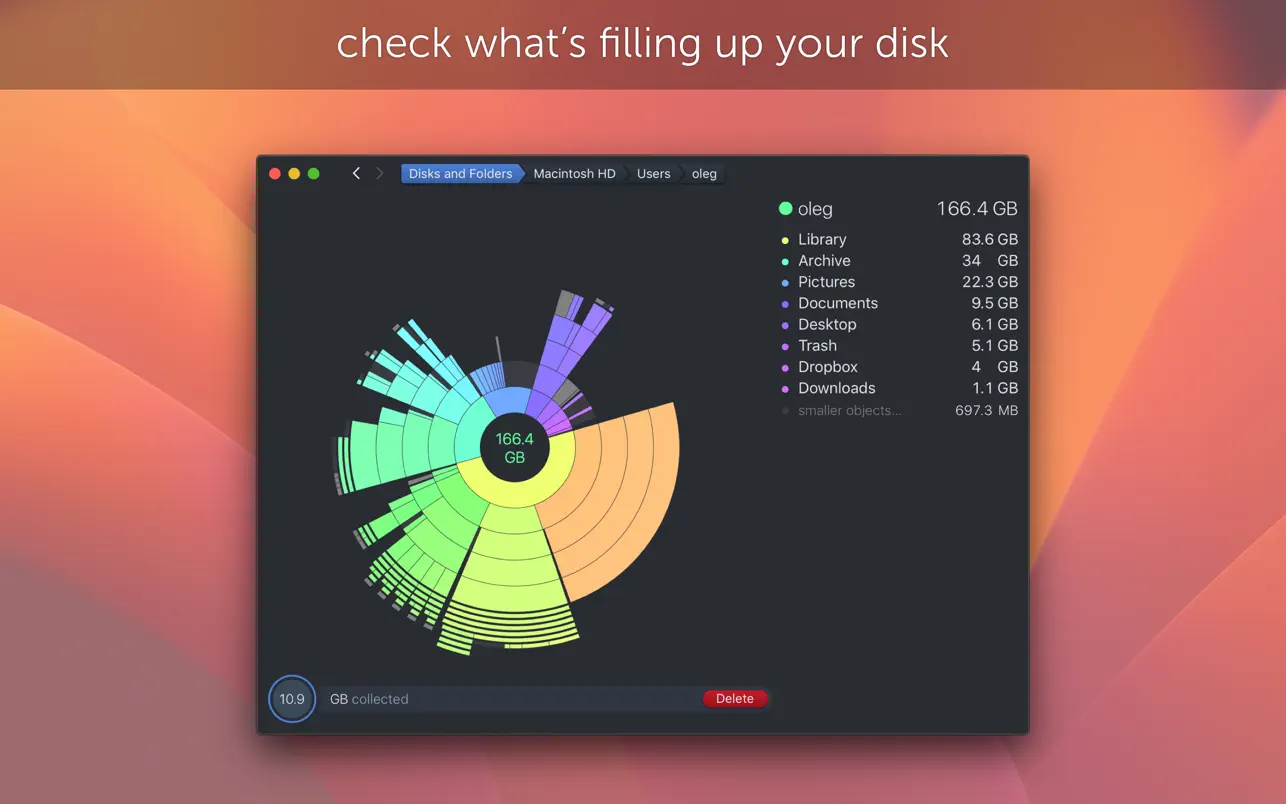
So you can easily see the files or folders in a tree that take up the most space, and then choose what to delete right there.
Grand Perspective is free, and works great.
IMHO: The macOS security model is different enough from the old Windowses that those software are often unnecessary, especially if you don’t run random small programs you find from outside sanctioned sources (like the app store or big software companies). The system itself will prohibit many random apps from running at all. (To an extent this is the case in modern Windowses too, but there are both a lot of unpatched Windows computers out there and also a lot more Windows users and malware authors, so you’re a much more likely target.)
If those AV programs aren’t causing you issues, there’s no real harm to leaving them (except for a small performance penalty). But if they’re leaving behind a bunch of stray files that are cluttering up space, you should be fine just deleting them altogether.
Go to the root level on the hard drive and press Command J (⌘J). This brings up the view options for the hard drive. Near the bottom, there should be an option called “Calculate all sizes.” Is that box checked? If not, check it, click on the little arrow carrot thingies again to see the various folder trees and then see if the folder sizes start to appear.
Nothing is 100% foolproof, but between the built-in macOS security functions of Gatekeeper and XProtect, you’ve pretty much got everything covered malware-wise. But if using the other 2 puts your mind at ease, go for it.
Do you really mean 327 Gigabytes? That is really massive. Currently my Mac has kernel_task at 280 Megabytes. This might be the culprit, as this amount of memory would to my understanding be cached on your hard drive.
When was the last time you rebooted? Kernel_task should start low when you reboot.
If you meant Megabytes, you can disregard the above.
I did so. Twice. Three of the four root folders remained unexpanded, thus I cannot see what large files live inside of them.
And yes, I’ve rebooted the computer several times since posting the O.P. ( NOT Restarting. Rebooting completely. )
What’s the difference?
Very little.
When you say they “remained unexpanded,” do you mean literally nothing showed up when you clicked the carrot? Like as if these 3 top level folders were all completely empty? Or do you mean you were able to see all the folders nestled inside, but the sizes of those folders were never calculated?
I mean that the Applications folder opened up with data visible after I clicked on the proper prompt as detailed up-thread.
The other three folders cannot be empty: the Mac being discussed is the one I’m typing on. If the Library and Users folder were empty, well, I’d be well and fucked.
Just saw this article. I have no idea if it will be useful in solving the OP’s problem, and I have not tried it.
It is a free command line program to check used disk space and do some cleanup.
Thanks for this recommendation. I’ve used DiskInventory X in the past, but Grand Perspective seems a bit zippier to me, while still looking familiar.