Bwahaha, yeah. The differences between Command + left arrow in just about every application (go to the beginning of the line) and the same key combo in the terminal (switch to the next terminal window) are maddening. I’m mostly accustomed to them, but they sometimes still frustrate me.
Did so long ago to Ubunru, as I was using WSL2 for a long time and really wanted a machine very close to my Digital Ocean server.
Games: I know nothing either way. I do have a dual boot, yet don’t partake. Too addictive. Just 20 minutes. Yeah, right.
The main frustration is seeing a page with an app and choices for the OS to install something on: Windows, iOS, or Android. That is all.
I cannot make a compelling argument for Linux. If I could only have Microsquish or a Mac, I’d choose Mac.
Huh? My Mac has a useful taskbar that doesn’t take up anything like 10% of the vertical real estate. You can change the size of the icons, i think? Anyway, mine are really small, and i probably have 25 or 40 across the bottom of the screen.
You can, but they’re not really designed to be seen at that tiny size, and the dock doesn’t obscure the background. It ends up looking like:

vs the Windows taskbar, one of the very few things I actually like about Windows:

I especially miss the text labels instead of icons, and also having the system tray (notification area) and the clock integrated into the taskbar instead of taking up yet another row up top. I know I can also auto-hide the macOS dock, but that’s not really helpful either, since I can then no longer see which apps are still open.
It’s the kind of thing I like to whine about on the internet and then forget about five minutes later 
Maybe I’m more nearsighted than you? I quite like the Mac dock with it’s tiny icons. And it does tell me which are open (even though i pin most everything i use to the task bar) because when things are bogging down i go across the task bar and close stuff.
The one thing i prefer on the Windows task bar is that if i hold the mouse over an open app, it shows me all the open windows owned by that app. To do the same in the Mac, i need to open one of the windows, and then click on the menu item on the top of the screen (“Windows”) to see what’s out there. The windows interface for that is much faster and easier to use when i want to find a specific window.
But as for hiding the dock, i have two screens, and my complaint is that it will only show the dock on one at a time. And it moves which one that is. I want to always see the dock on the bottom screen.
I’m pretty blind, so yeah, need everything either in huge fonts or at least with text labels I can read, not tiny icons 
I think macOS does have something like that, but I can never remember what it’s called or which combination of seven fingers to use to open it. Stage Manager, Split View, Space Jam, something… it’s a exploded crystal ball view of all your windows, bunched together by the app that spawned them. It’s like a battle map…
On the other hand, I remember you saying in another thread you don’t particularly like using keyboard shortcuts, right? Too bad, because Command-`(cmd-backtick) will cycle through all the open windows of the current app only. It’s an incredibly useful shortcut and present on some Linuxes too, but not on Windows.
I hate that too. It’s one of those things that can only be fully controlled with a third-party app like DockLock.
Yeah, the odds I’ll remember that are about zero. Also, there’s some keyboard command on the Mac that closes the focused window, state deleting information like where your cursor was. After accidentally doing that once or twice and washing an enormous amount of time restoring where i was and what i was doing, I’ve been extremely wary of trying any keyboard commands at all on the Mac. It’s just to damn expensive to guess the wrong one.
See, that’s trivially easy to do with the pointer on Windows, (i usually use a touch pad, not a mouse) so i don’t miss that at all. That’s actually something i miss when I’m not in Windows, because Windows does it really well.
So if macOS added Windows’s shortcuts and Windows added macOS’s, we’d both be happy!
Of course, that probably means they’ll both move to AI UIs next year and remove all the shortcuts everywhere… 
Yup, I made the jump just about a year ago. I had a perfectly functional Win10 laptop that was driving me up the wall with how slow it ran, how invasive Windows had gotten and how it hogged up about 90% of all the computer’s resources during its interminable and constant “update” process. I fell into a bit of ready cash and Costco had a screaming deal on a touchscreen laptop and I jumped on it, and when it got here I immediately hit the BIOS key, set it to boot from USB and installed Linux Mint Cinnamon.
And I fucking LOVE it. I’ve always been a great candidate for Linux since I’m pretty passionate about using open source software and will always find an open source app for anything I need to do. My first experiences with personal computers predate the GUI era as well so terminal windows don’t befront me none. I’ve used LibreOffice by preference for years now so that’s no problem either.
The install was seamless, everything worked right outta the box (including drivers for the touchscreen–I was “meh” about it but the laptop has it and it was cheaper than the non touch version so fine) and now that I’ve been using this laptop for a year I have to say it’s brought my blood pressure down considerably, what with not having to swear and fight with my fucking operating system for every goddamned clock cycle. A minor quibble is that appearance and function tweaks are a bit rudimentary compared to the Windows equivalents but I can handle a more basic desktop–it’s a fair tradeoff for a computer that’s also faster and more stable.
Okay, next up was the media computer, a somewhat elderly item running Win7. Found another smoking deal on one of those cute little mini form factor jobs so I went ahead and bought another couple SSD external drives and a powered USB hub and transferred all the media onto those. Did the initial install and it failed–took it to the local geek shop and discovered this particular mini form factor computer had a wifi card that does not play with Linux at all–cost me a couple bucks to swap out the wifi card and I had them do the install of the OS then I did all the tweaking and tuning.
Have to say that Linux mops the floor with Windows when it comes to media handling. Found a nice video player (with VLC as a backup if needed but the native player is perfectly good and works seamlessly out of the box), set up Clementine for music, and maxed out the accessibility features and this thing is easier to use, easier to see (it’s on a 50 in TV across the room–luckily I’m farsighted lol) and just all around a better experience than the Win7 system it replaced. Only bobbles I’ve had are minor, tried to set up Jellyfin and that is definitely easier in Windows, then again I need to just buckle down and set up Samba sharing over the home network so all the computers can access the treasure trove of media on the living room box.
I still need to install Mint on the older Win10 laptop and on the old Win7 desktop–laptop will go out to the guest house and the desktop in the home gym to serve music since it’s the only one that has the proper jacks for the very loud Logitech speaker/subwoofer system that got replaced by an Atmos theater bar when I set up the mini box. Once those are on line (I got a wifi extender for the back half of the property–stucco walled house really fucks with wifi signal) and sharing data this is gonna be a very nice little network here.
I’m pleased as punch I finally made the migration–I’ve dabbled in Linux before, had a short lived install circa 2007 or so but it just wasn’t quite there yet. It’s there now, and with a lot less bullshit and expense. Ain’t fancy but it works.
Thanks for the details! That’s really encouraging, and gives me confidence that hopefully things will Just Work once I’m ready to make the switch (again).
Edit: PS Does Atmos work right in Linux? Or Dolby Vision and HDR in general?
I also wonder about DRM… it used to be that there were certain services (like Netflix, maybe?) that couldn’t play right in Linux due to a lack of WideVine support. Has that gotten any better or worse?
I’m an open source person and I don’t use streaming services–I will say though that Linux fucking screams on downloads and torrents. And yeah, I have had no issues with hardware, not even printers. Linux recognized and took ownership of my touchy ass Samsung printer like a fuckin’ boss. The only odd bit was having to manually tell Linux about ownership of the SSDs plugged into the hub, it wanted to kinda forget they existed but once I got into the terminal and brute forced mounting and ownership of all five drives it all laid down and purred like a kitten.
Granted, my computer usage isn’t intensive, game focused or dependent on proprietary software so my experience reflects that but man, if all you want/need is a fast, unobtrusive, stable, simple OS that is there to do what YOU want, Linux is the shit.
Widevine is installable in browsers on Linux. The big limitation is that it will only allow 720p. Not really an issue on a laptop screen, but could be if you’re using a TV as output.
There have been work arounds that come and go over the years, but I haven’t kept up, because I have no use case.
This is not entirely accurate, depending on the service you might be able to get 1080p with streaming, but generally if you want to get more than that you will need to have a downloaded file or a disk (yes those still exist!).
//i\\
Oh, huh, Netflix is definitely something i want on my travel laptop. I guess I’ll need to check that.
Although Netflix has seriously downgraded how well it works on Windows laptops. #°{¢£√ And when i thought i was doing something wrong and reached out to them, their support person kept insinuating it was because I’m on the cheapest plan and I should upgrade. And no, i eventually found the FAQ on their website that said they just don’t let you download shows on a Windows laptop any more. That’s i guess the one thing that a tablet would (currently) be better for, even though you have to hold the damn thing up awkwardly to view it. But Netflix has restricted the devices it will let you download movies onto. #°¢®£$&#.
Well, we’re all different, but as I mentioned in another thread, I’ve literally not turned on my TV in several months. All the movies and TV shows I’ve watched that I’ve commented on recently were viewed on my tablet while lying in bed. Yes, even including the 93 episodes (around 77 hours) of “The Alfred Hitchcock Hour” that I talked about recently. Being nearsighted, I love the theater-like large field of view presented by the tablet which I can comfortably view without glasses, and I don’t find holding it to be a problem. I’ll periodically shift from lying on my back on a pillow to lying on one side or the other. I can watch stuff on my tablet for hours and hours! And what could be more cozy than lying in bed under warm sheets and comforter!
My bed and tablet have somehow become my de facto movie theater. The main problem is that I restrict my selection of available snacks because … crumbs! 
Lots of people like tablets for consuming media. But i didn’t. My phone is much lighter. My laptop holds itself up.
I mostly watch YouTube on my phone, and everything else on the big screen in front of the couch. But i used to like to watch movies when i traveled. And mostly used my laptop.
Honestly, the tablet was okay for watching movies and reading books. What absolutely sucked was the keyboard. And i want to use a keyboard most of the time I’m using an electronic device. I can swype on my phone. My laptop has a real keyboard. The tablet had this horrible thing that was too large for one finger, and didn’t work for anything resembling touch typing. And yes, i know you can get keyboards to work with your tablet, but if you usually want a keyboard, why not get a for factor that includes a useable keyboard?
(I do read on a Kobo, formerly a Kindle.)
Sounds more like Netflix is on the cheapest support person plan and they should upgrade 
DRM is an old nemesis of Linux The usual Linux answer is to just torrent the shows instead. Thus, understandably, this is the same audience the content companies are in no particular rush to please. Valve (as in Steam) is probably the one exception, since PC gaming has a long history of being hacker-friendly anyway and openly revolting against overly strict DRM.
They do make some dockable tablets that can snap to some sort of keyboard-like thing in a landscape layout, emulating a small laptop. And because they’re “corporate Linux”, they usually do have all the proprietary DRM bells and whistles that let you stream and bank etc. without issue.
But you did say they’re a non-starter for various reasons, so I’ll shut up now
Still, if streaming 1080p is enough for you (vs 4k+, and no downloads), Netflix on your Ubuntu laptop is worth a shot.
Heh, while I was single, I had a hospital-style adjustable reclining bed and a projector pointed up at the sloped attic ceiling. Didn’t even need to hold anything. It worked well — too well — and I became overly cozy (and overly single). I never left the house and never finished a movie before falling asleep…
I totally agree with you there… most tablet keyboard setups suck, with that stupid little kickstand behind the screen holding it up.
However, there at least USED to be some convertible tablets that had a proper keyboard + hinge, like the old Microsoft Surface Books:
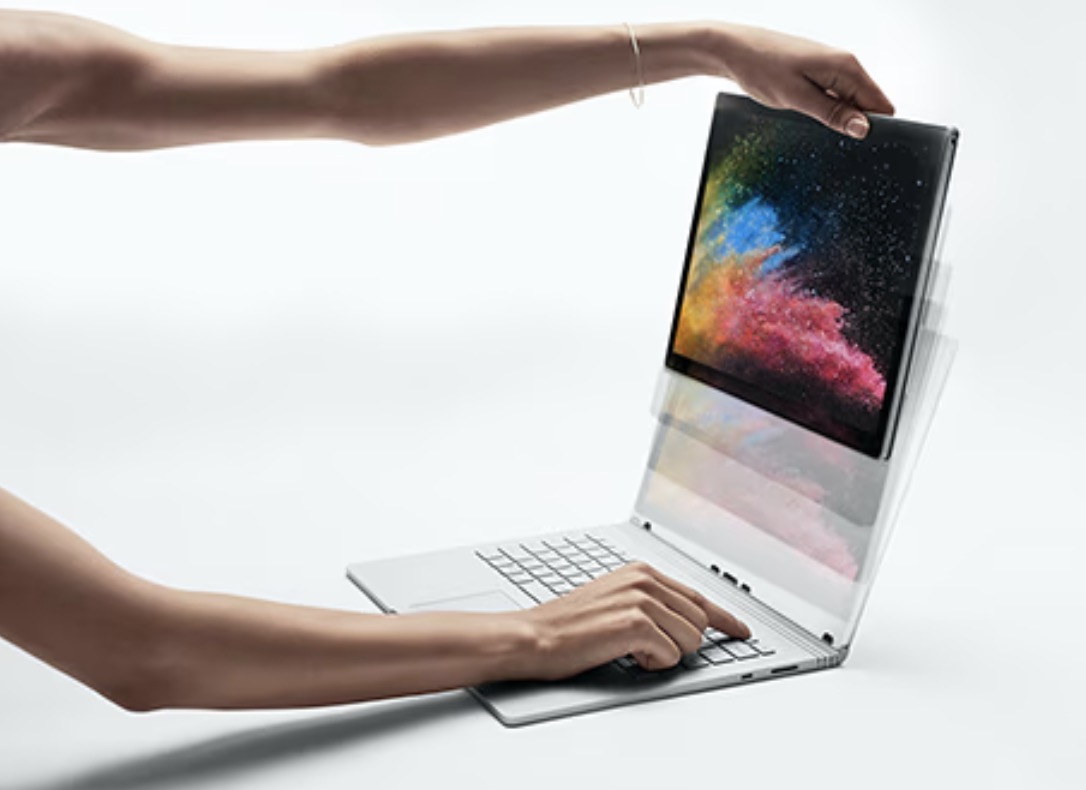
It was stable and self-supporting, so once you docked the tablet into the keyboard, it had the same form factor as a regular laptop — adjustable hinge and all, and no kickstand. That form factor was fantastic and one of the rare instances of Microsoft actually designing novel hardware (this was back in the Surface exploratory hardware era, with the big computers and fancy dials and such. They’ve almost entirely given up on that, I think, and now only sell basic laptops and tablets). That laptop sucked in other ways, though… hardware design ahead of its time held back by Windows past its peak
I could’ve sworn there also used to be some Android tablets with a similar setup, but now I can’t find any. Either they’re all discontinued now or I misremembered. Hmm.
At least they do have iPad-style cantilevered keyboards, so you can get a quasi-lappable experience:

But if the Apple version is any indication, at least, it’s still much less adjustable and much less comfortable than a proper laptop.
Meh.
I just counted. I have over 50 little icons on the task bar of my Mac. The ones at the right are all minimized windows. There’s a background (admittedly translucent) that obscures the screen background. Every one of them is readable. None is them wastes space with a lot of words. The calendar icon tells me what day it is today. There’s a vertical bar separating the ones that are pinned from the ones that aren’t.
I’m quite happy with the task bar.
The clock, the power indicator, and some other stuff are up at the top, but they don’t take any extra space because the MacOS annoyingly puts menus up there. (So i have to guess whether some function is in the menus within the app’s windows or on the upper left group.) Plus the camera divot. So that space isn’t useful anyway. I’m quite happy to have the various indicators in their own place, away from the task bar. I’m always running out of space on my Windows’ task bars…
Our little back-and-forth is a great example of why UI design is hard (and underappreciated, IMHO). Two different users can use the same software in completely different ways. Scale that up to millions of users, add in a few mid-managers vying for their next AI promotion, three decades of backward compatibility, fifty different screen sizes and then users who are hard of sight or hearing… it ain’t easy making a good OS interface!