Changing my text again

Test:

  • 3 (5)
  • 2 = 1 (10)
  • 3 = 4 (16)
  • 2 = 2 (32)
  • 1 = 1 (37)


The above was typed with all lines justified left, with plus signs at the beginning of lines 2 and 4 and minus signs at the beginning of lines 3, 5, and 6. Why the hell is Discourse changing what I type? There is NO excuse for this!

3 (5)
+2 = 1 (10)
-3 = 4 (16)
+2 = 2 (32)
-1 = 1 (37)

(I see only five lines, not six.)

Don’t put a space between the + or - sign and the number. Discourse interprets those characters as bullet points when there’s a space following them.

New math?

There was originally another line at the top.

“-3” is a negative number. “- 3” is subtraction.

3 (5)
+ 2 = 1 (10)
- 3 = 4 (16)
+ 2 = 2 (32)
- 1 = 1 (37)

If you want math symbols to not be parsed as markdown, enclose them in $'s.

It is mis-interpreting your input as bullet points.

To get around it, enclose the whole thing in a preformatted text block. You can push the </> button in the toolbar, use the hotkey (CMD/CTRL-E), or enclose it with triple backticks (```) above and below.

Like this:

Then it shows up like:

3 (5)
+ 2 = 1 (10)
- 3 = 4 (16)
+ 2 = 2 (32)
+ 1 = 1 (37)

The “txt” is optional, but lets Discourse know to not try to guess what’s in that block. Otherwise it might think it’s code of some sort and accidentally try to colorize it.

Discourse just tries to be too many things to too many people and will often mis-guess your input as something it wasn’t meant to be, especially if you start a paragraph with a symbol of any sort.
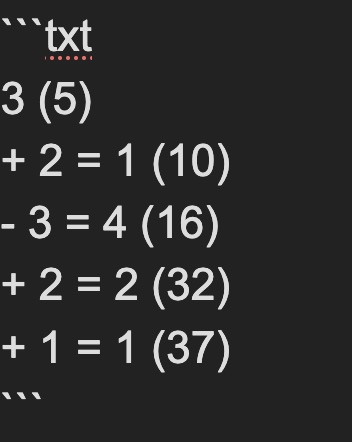
(Edit: Nevermind, this won’t work if you’re in the newer WYSIWYG editor mode).


Also, if it’s easier to remember, you can also just use the old-fashioned HTML <pre> tag (for “preformatted text”), like this:

<pre>
3 (5)
+ 2 = 1 (10)
- 3 = 4 (16)
+ 2 = 2 (32)
+ 1 = 1 (37)
</pre>

Will show up as:

3 (5)
+ 2 = 1 (10)
- 3 = 4 (16)
+ 2 = 2 (32)
+ 1 = 1 (37)