Help Setting Up Dual Monitors w/Work Laptop

Hi.

So, I’m getting dual monitors for my home office. It’s mostly because the dated Dell laptop my work provided does not work properly with the ultra-wide monitor I bought, and I need serious real estate to do my job. It’s partly an excuse to get new 27’’ curved gaming monitors. Anyhow. They each have HDMI and Display Ports.

My current setup is I have one ultra-wide monitor and a switch for moving back and forth between my work laptop and desktop. The switch allows me to control both with my keyboard and mouse. Laptop is hooked up to the switch with HDMI cable.

For this basic setup, will I need to do anything different with two monitors vs. one big one?

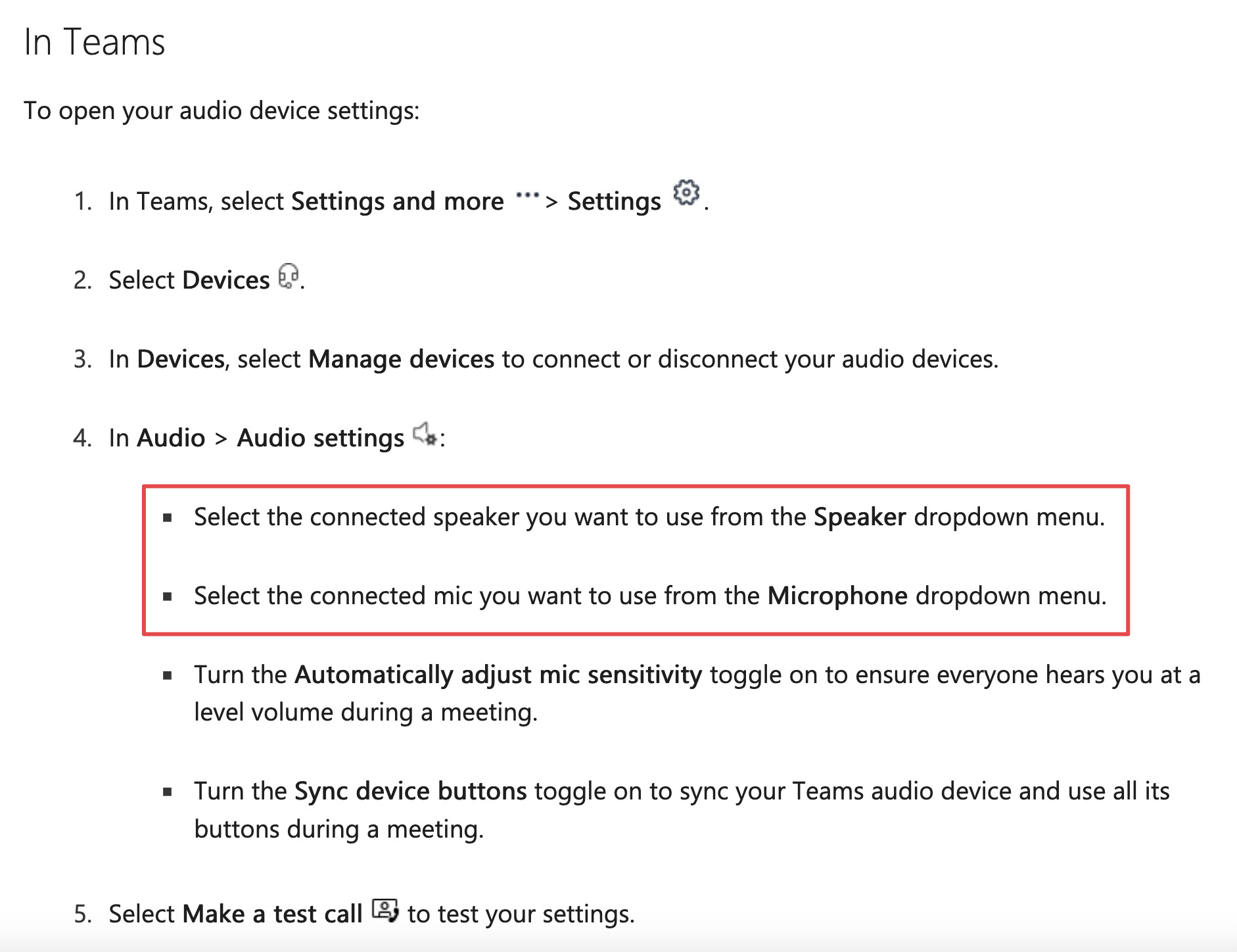
Secondly, I would love for there to be a way for me to do Teams meetings (video calls) using my home office USB camera/mic and bluetooth speaker with my work laptop. I can only figure out how to do video calls through the laptop, and it sucks. I have been taking video calls from my PC but I’m not allowed to do that anymore.

Does anyone have any suggestions?

If you have suggestions, I would be most appreciative if you could include a link to the relevant product I need to buy. I get so confused about what these different cables and ports and switches are supposed to do. The monitors are arriving Sunday and I’m hoping to spend some time getting everything hooked up this weekend.

Thanks!

ETA: Here’s the current switch I’m using, if it helps.

As there are many ways to do this, I moved it from FQ to In My Humble Opinion. Also tends to be where most of our computer hardware questions go.

Of some possible use, I had fairly good luck with a USB to HDMI converter before I upgraded my Game Room computer. These might be an option to help.

But I think you need to find an actual KVM switch that supports two monitors. Something more like this.

Please note, I am not recommending that model, I just wanted to show an example. I would do a lot more digging first to try and figure out compatibility. It may or may not be a good choice.

Thanks! I might actually have one of those KVM switches because I think I bought it by accident and forgot to return it. Will have to look into that.

ETA: Nope, it was only for one monitor/two USB.

So maybe I need a KVM switch with four USB ports.

(EDIT: If you can provide the exact model number of your laptop and monitors, I can help figure this stuff out)

What resolution and refresh rate are the new monitors? If they’re 1920x1080 at 60 Hz (the most common), just about any HDMI cable will work. If it’s newer, like a 4k monitor or a 3440x1440 ultrawide or a 5120x1440 superultrawide, you might need a semi-recent DisplayPort or HDMI 2.1 to reach their full specs (it’s a matter of cable bandwidth).

Every part of your setup needs to support the max: your computer, your switch, your cables, or they won’t be able to drive the monitors at full spec. That may mean either they get degraded (lower resolution or refresh rate) or you’ll get a blank screen.

I don’t quite understand this part. What is the current connection from the Dell laptop to the monitor? How are you splitting that into two monitors?

Typically, to use 2+ monitors with a laptop, you’ll need at least two of the following:

  • HDMI port
  • Separate DVI or VGA port (if it’s really old)
  • A USB-C port capable of “DisplayPort alt mode” so you can connect to a USB-C monitor (or use a USB-C to DisplayPort cable)
  • Last resort: A USB port of sufficient speed so you can use an external USB graphics card (they look like dongles but actually have a little chipset inside that lets you add a monitor and send it over USB… performance sucks though)

Alternatively, you can also use a Thunderbolt 3/4/5 port and Thunderbolt displays capable of daisy-chaining to each other, or else a Thunderbolt hub. But it has to be Thunderbolt in particular: A Thunderbolt port LOOKS like plain USB-C but it’s not; it’s a stricter, higher-performance superset typically found on Macs on and some higher-end PC laptops. (Look for a lightning bolt icon by the USB-C)

It is very complicated because there are like half a dozen competing standards… it is actually much simpler to use just one big monitor (assuming your graphics card and cable are up to spec).

I would strongly suggest buying the displays from somewhere with a good and easy return policy. There is a decently high chance it won’t work right with your work laptop — especially if that laptop can’t drive a single ultrawide.

Also, does your work have an IT department? This is the kinda thing you should be able to ask them for help with, either for recommending a compatible setup or just requesting a laptop that actually lets you do your job effectively.

As for this, are you saying you want to be able to use the USB mic as your input, and Bluetooth speaker as your output (instead of the laptop’s own mic + speakers)? If so, you can explicitly set them in Teams: Manage audio settings in Microsoft Teams meetings - Microsoft Support

However, this sort of setup separate mic + speakers setup might cause a lot of echo and feedback, if it’s a regular desktop USB mic (it will pick up the speaker sound, especially if the Bluetooth speaker has a noticeable delay). A wireless lapel mic like this will typically work better with speakers: https://rode.com/en-us/products/wireless-micro?variant_sku=WIMICROC (or just wear headphones with a built-in mic)

Monitors:

Laptop: Dell Latitude 5500

Just an HDMI cable connects the laptop to the switch, plus a USB cable. Right now it’s a single monitor.

I know this is possible because I have it at my office, with two old monitors, but you only have to plug in a single USBC cable to the laptop and it charges and everything.

Thank you.

I think you have two options, then:

  1. Cheaper: You can plug one monitor directly into the HDMI port, but only at 60 Hz. The other one you can connect via a USB-C to DisplayPort adapter like this: CableMatters USB-C to DisplayPort Cable - 8K Ready

  2. Easier: You can also use a Thunderbolt 3 dock and hook up two USB-C to DisplayPort adapters there (two of those cables). But true Thunderbolt docks are expensive, often several hundred dollars. I do not believe you can use a passive regular USB-C hub for this (not enough bandwidth?), but I’m not totally sure… maybe there are some that would work, but you have to make sure they can support the bandwidth. The Thunderbolt designation makes it easier to shop for. This is the one I have, at $200: OWC 11-Port Thunderbolt Dock for Mac

If you can figure out its model number, or take a pic of it, I can try to figure that out too. It’s unclear to me why it would take both a HDMI connection and a Thunderbolt/USB-C connection. (Or are those two different scenarios; one HDMI at home and the dock at work?)

Keep in mind, though, that it’s not just the # of monitors, but also their combined resolution (megapixels) + refresh rate that matter. You have to do the math on it with tools like Video Bandwidth Calculator - Chen Index to see what exactly you need.

Two old 1920x1080@60 Hz monitors will use less than 25% of the bandwidth of your new 2560x1440@144 Hz monitors (4 Gbps each on the old ones vs 17.60 Gbps on the new ones). So you’ll need higher end equipment to run them at full spec, or you can lower them to 60 Hz (it’ll look slightly jankier, but if you’ve never used a high-refresh rate monitor, you might even not even notice the difference).

Yes.

At home, currently, I have one monitor hooked up to a switch (linked above.) In order to use the monitor with the laptop, I have to plug in an HDMI and and standard USB cable.

At work, I use two monitors. I didn’t do the setup so I’m not exactly sure how it works. But I do know that all I have to do is plug in one USBC cable to the laptop, which I presume is the thunderbolt.

I probably won’t. I can’t even remember the last time I played a game with high end graphics because I don’t really have time anymore. But I’d like to think that it’s possible if I ever got around to it. I was thinking of checking out ClairObscur during break. Cuz someone bought it for me like a year ago.

Well, it would be safest to get a Thunderbolt 3 dock (TB3 is what your laptop has) and either 2x USB-C to DisplayPort cables (best), or if the dock has two HDMI connectors built-in, that MIGHT be worth a try, but it’s not entirely clear to me how those work; they might have internal chips that do DisplayPort to HDMI conversion. It is better to avoid that if possible and just stick with USB-C and DisplayPort wherever possible.

Sorry… you’re probably thinking of frames per second (FPS)? The refresh rate (in Hz) is how fast your monitor can redraw a screen, both in and out of games. It’s not necessarily a gaming thing, but affects the smoothness of motion in any app. You can see the difference just by moving a mouse around in Windows. But realistically, most people in the world use 60 Hz and they never even notice, especially for office work, so it likely won’t matter. Many people can’t even tell in a side-by-side. You’ll be fine.

If you do want to game, your laptop has a weak old graphics card that probably won’t be able to play modern games very well. However, for $10/mo (on sale for the holidays), GeForce Now will let you stream Clair Obscur (and many other games) with a RTX 5080 in the cloud (one of the most powerful gaming GPUs).

Oh, I have a gaming PC. I wouldn’t run a game on that old laptop.

Legion T5 26AMR5

Thank you. I’m sorry for being confusing about this.

I’m okay with this solution being expensive. I’m feeling spendy.

Just to be clear - all the cables running from my PC to my monitor need to be the ones that can handle the crazy bandwidth.

But it doesn’t really matter about the cables running from the switch/dock to the old laptop (which I’m just using for work.)

Is that correct?

Huh…

(re-reads OP more carefully)

I’m very sorry, I totally missed the nuance about the two computers (work laptop and PC)!

What I said previously was only about how to connect one laptop to two monitors. To connect two computers to two monitors, you actually do want something more like what @What_Exit suggested:

Get that instead. If you don’t care about the 144 Hz, I thiiiiiiink that very device will work.

You’d connect the desktop via DisplayPort and the laptop via USB-C. I do not think you can connect either computer to the HDMI port, because the two-monitors-to-one-port situation requires DisplayPort multi-stream transport.

Got it. Okay, I’ll noodle on this.

I’ve had an Invision Dual Stand for five years. Strong and Sturdy. I have other singles which are also top quality.

What do we think of this guy?

KVM Switch 3 Monitors 2 Computers Amazon.com: KVM Switch 3 Monitors 2 Computers 4K@120Hz Displayport and 4K@60Hz HDMI USB C KVM Switch Docking Station Shared Dual or Triple Monitors for Thunderbolt 3 Laptop and Desktop Support 100W PD Charging : Electronics

I noticed it doesn’t list my specific Dell model as compatible, but if it’s Thunderbolt 3, shouldn’t it work?

I only have one Display Port on my PC, but my understanding is I can do one DP and one HDMI for each monitor. Correct?

I may be fucked. I have one HDMI port on my computer and two on each monitor. Could I use an HDMI splitter and just do everything through HDMI?

I don’t know anything technical. But i have a bunch of monitors around the house that i use with both my work laptop and my personal laptops, and i just unplug the cable when I’m done using it, and then plug it into whatever i plan to use next. In some i have both a dataport cable and an hdmi cable hanging on the desk. (Or clipped to a cable organizer on the wall, when not in use.) No fancy switches needed.

And two of my monitors have an easy way to tell them which port to talk to (hdmi 1, hdmi 2, DP…) so i can leave the cables plugged in if i want to. Although with my setup, it’s actually easier to unplug two of them rather than to have the monitor change focus. (I have three multi-use monitors. I only have the giant TV change focus itself, because i don’t want to unplug the cable connection.)

What’s the advantage of the switch?

It would enable me to use the same mouse and keyboard for both the laptop and the PC.