Sorry for the late reply. Had fam visiting last night.
Can you just double-check real quick to make sure your laptop actually has Thunderbolt, please? It should look like this, with the little lightning logo:
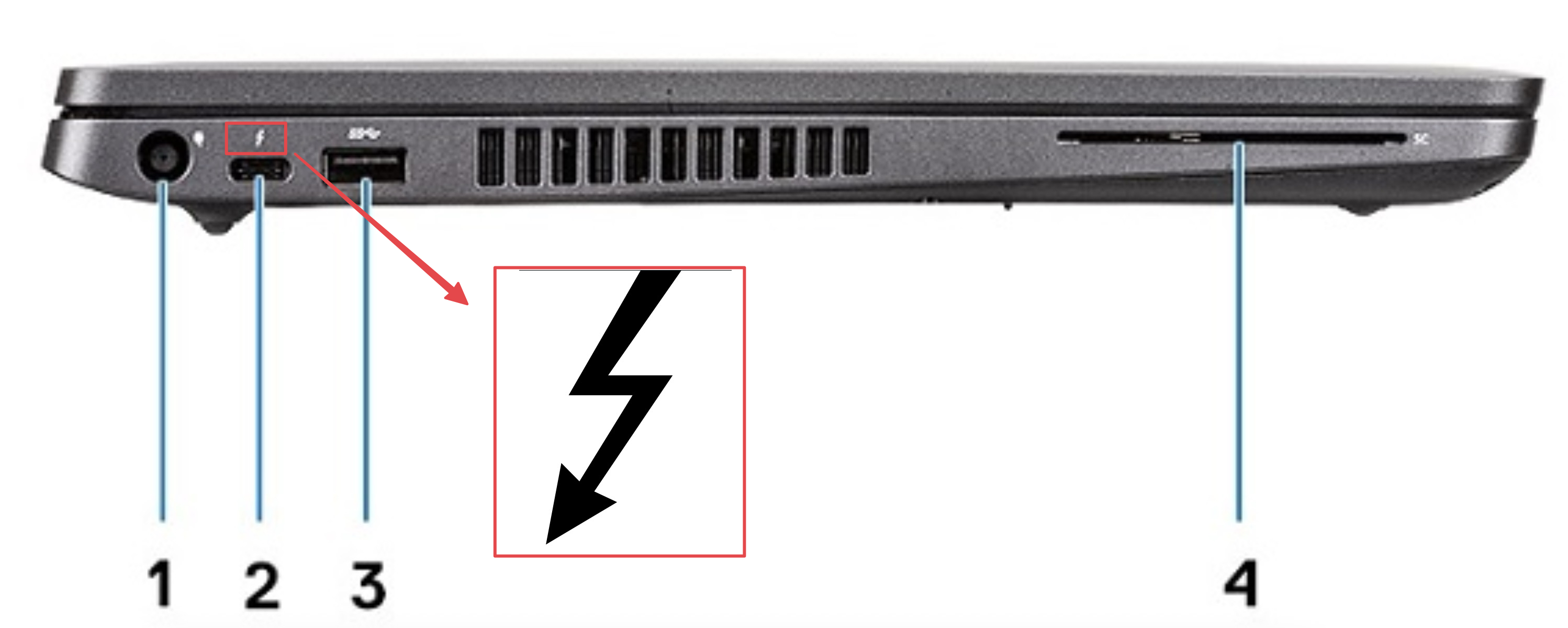
If so, I believe this KVM will work. It’s worth a shot, IMHO. You would:
- Connect laptop via a Thunderbolt 3 cable (if you want to be safe, try to buy one that’s actually a Thunderbolt 3+ cable (with the logo on the cable itself), as opposed to plain USB-C… some USB-C cables will work, but genuine Thunderbolt cables help eliminate the guessing game)
- Connect desktop via the USB port and two separate DisplayPort cables (hopefully your desktop PC has two? I’m not sure if this setup will allow daisy-chaining from one DP cable). You shouldn’t need to plug in HDMI anywhere.
- Connect switch to both monitors via a DisplayPort cable each
- You shouldn’t need HDMI anywhere, just the switch, a Thunderbolt 3 cable, 2x DisplayPort male-to-male cables, and a USB 3.2 male-to-male cable.
I am not 100% certain of this setup, but I think it’s worth a try. Maybe @What_Exit can take a look too, or @echoreply or @SenorBeef? I’ll also page the nerds over at PC Gaming general discussion (Gaming PCs, game sales, news, etc...) to see if they might have ideas.
I think those only mirror the one outgoing display, so they won’t be helpful unless you really want to see the same emails on both monitors 
Oh geeze, certainly we can figure SOMETHING less of a hassle than that!
But on that note, maybe take a pic and note down what kind of dock/hub they have at the office the next time you’re in? It would help confirm the kind of setup that does work with your laptop (though you’d still have to figure out the KVM part for your desktop, and also consider the slightly higher bandwidth of your new monitors).
Yeah, this is another option too. You can just use a keyboard + mouse switch and manually move the monitor plugs… but you would STILL need a solution to go from your laptop to the two monitors (either Thunderbolt → dock → DisplayPort → monitors, or Thunderbolt to DisplayPort → monitor and HDMI → monitor).
As far as I know — I’m not positive on this — you can’t go from one HDMI port to two separate displays (unless you want to just mirror them). Thunderbolt/DisplayPort can do that via a dock/hub or daisy-chaining, but I don’t think HDMI can.
I think the KVM you listed is worth a shot, but let’s also see if anyone more knowledgeable chimes in…