The most awesome way to color-code the periodic table is by stellar origin.
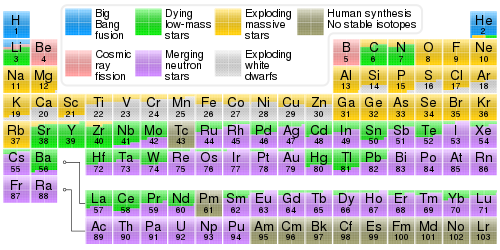
Wow,that idea about an .svg file and Inkscape is a huge headstart. Thanks!!! But that table has some problems. It’s weird how in the new version of Inkscape, all the molar masses run out of the boxes, for instance.
Here’s color-coded with light colors so text shows up against it: store.ptable.com in 20 sizes or so on vinyl for cheap. Might save you a lot of trouble.
Good point. Thanks, that is a lot better. Mine has family names and charges, and an asterisk for diatomics, too. I know I could just label those on the one at that store, but I think if I get mine designed, my family member will probably give me a print for actual cost, which will not be close to $99.
Well, if you want to browse around there are plenty of options. I found that SVG file as the first result in a Google Image search with the search terms “periodic table filetype:svg”. You could also search for PDF files in a regular Google search with "periodic table filetype:pdf, when importing a PDF, experiment with both Poppler and Internal import methods to see what gives you better results.
Once you have the file imported, scale it to fill your document size, leaving .5" border on all sides empty. Then with the imported object selected, click “Ungroup” and get to editing in the improvements and preferences.
Once you’ve got it all nailed down, under File menu save as Inkscape SVG so you can always continue where you left off, then under Edit menu “Select All in All Layers”, then under Path menu “Object to Path”, then back under File menu “Save a copy” and in the Save dialog change “Save as type” to PDF then save it.
Oh, to get the PDF the right size, you may need to create a rectangle of that size with white fill and no stroke, and with it selected, press End to put it down to the bottom under everything else. You could have that in it’s own locked layer from the beginning or just add it at the end so that your exported PDF ends up the right size.
I didn’t see it mentioned above, but it may prove useful in the context of this thread:
Once you have created your huge image, this program offers a way to slice it for printing on desktop printers:
https://woodgears.ca/bigprint/
That sounds like a font problem. If you don’t have the font that the SVG was designed for, then Inkscape will try to load a replacement, and it may not fit right.
Once you get the file correctly, I still recommend using a “print as PDF” option. Usually those will save the fonts as well, and PDF is a common filetype for printing.