2-3 weeks is way way too low. I’d be thinking either the batteries you use are bad or there is something wrong with your mouse. I use my mouse all day for work, so roughly 8 hours, but that’s not continual, and get over a year, maybe 2. Even if you use it 24 hours a day, there is no way it should run out in just 3 weeks.
I was replacing batteries every 3 to 4 weeks a few years ago. Bought a wired mouse and threw the battery eater in the trash.
I’m giving this new wireless mouse a chance. Leaving it on.
If my battery dies in a month then I’ll go back to a wired mouse.
I’m hoping it does hibernate when it isn’t used. Saving the battery
If you’re still serious about using those NiMH rechargeable batteries, you may find you have to recharge more often than intended because (again), those batteries are lower voltage than the alkaline batteries they’re replacing. Which means that as they discharge, they could fall below minimum usable voltage sooner than other batteries, and it absolutely wouldn’t be the mouse’s fault.
Yep. Use the wrong batteries and you’ll get shitty results.
NiMH are obsolete tech.
I decided against buying rechargeable batteries after the warnings about lower voltage.
Duracell copper tops are in the mouse now.
Where’s that purple rabbit with the drum?
I’m hungry and almost time to make lunch. Skillet Fried rabbit dunked in beaten egg & buttermilk and flour sounds tasty. 
Is lithium worth the extra cost?
They’re not that much more expensive.
Duracell 8 pack of copper top is $7.11.
I only use one AA in the mouse. Lithium might be worth it.
They seem to have a great deal more energy capacity, being based on a form of lithium chemistry and polymer construction, but to me it feels like overkill for something that’s going to be sleeping 90% of the time and drawing negligible power when not sleeping.
They also have a higher resting voltage, but the data sheet says that voltage drops immediately to the rated 1.5v under any load, so it’s probably OK.
Data sheet: https://data.energizer.com/pdfs/lithiuml91l92_appman.pdf
Yes, PDF. But it’s an interesting read.
When I buy batteries for wireless mice, I just go with the dog-standard alkaline cells like everything else. I would be intersted in the lithium cells for something like flash photography, assuming I wasn’t using a professional-grade camera with a dedicated rechargeable battery pack.
I’m happy with my rechargable wireless mouse. It’s but a big deal to plug it in.
As someone who enjoys PC gaming the scare that my mouse will die (lose battery charge) in the middle of a play session so I have to stop and re-charge for 30 minutes is too much to bear. (not to mention latency issues and occasional dropouts from sun spots or a neighbor’s microwave).
So, wired mouse for me. But that’s just me. I get the wireless is fine for lots of other people. Good to have choices.
Mine doesn’t need to recharge for 30 minutes. I can use it while it’s plugged in. It only takes a few seconds for it to charge to a useable level. And most of the time, it’s truly wireless.
Generally, that’s a pretty good arrangement. But (like @Whack-a-Mole), my computing arrangements allow me to use a wired mouse, and I prefer it.
Most of the wireless mice in the house aren’t mine personally, but I have some responsibility for them as household IT support.
The mouse I have now is this wireless gaming mouse rated for 100 hours of use, or about 12 eight-hour days. Other similar mice I’ve used (like the SteelSeries or Razer ones) had similar battery life.
Doing some quick math, it has a 370 mAh li-ion 3.7V battery (so maybe 1.3 Wh?), vs a typical AA battery’s 2500 mAh 1.5V (3.8 Wh) — quite a bit less to begin with. And plus it polls at 1000 Hz instead of the typical 125 Hz or so for a Bluetooth mouse, and uses a proprietary wireless protocol instead of Bluetooth. It feels a lot smoother & quicker than any Bluetooth mouse, especially on a high refresh rate monitor, but I guess the shorter battery life is the tradeoff for these wireless gaming mice?
I don’t have a RF monitor, but I would suspect it’s sending a lot more data over radio than a typical Bluetooth mouse would.
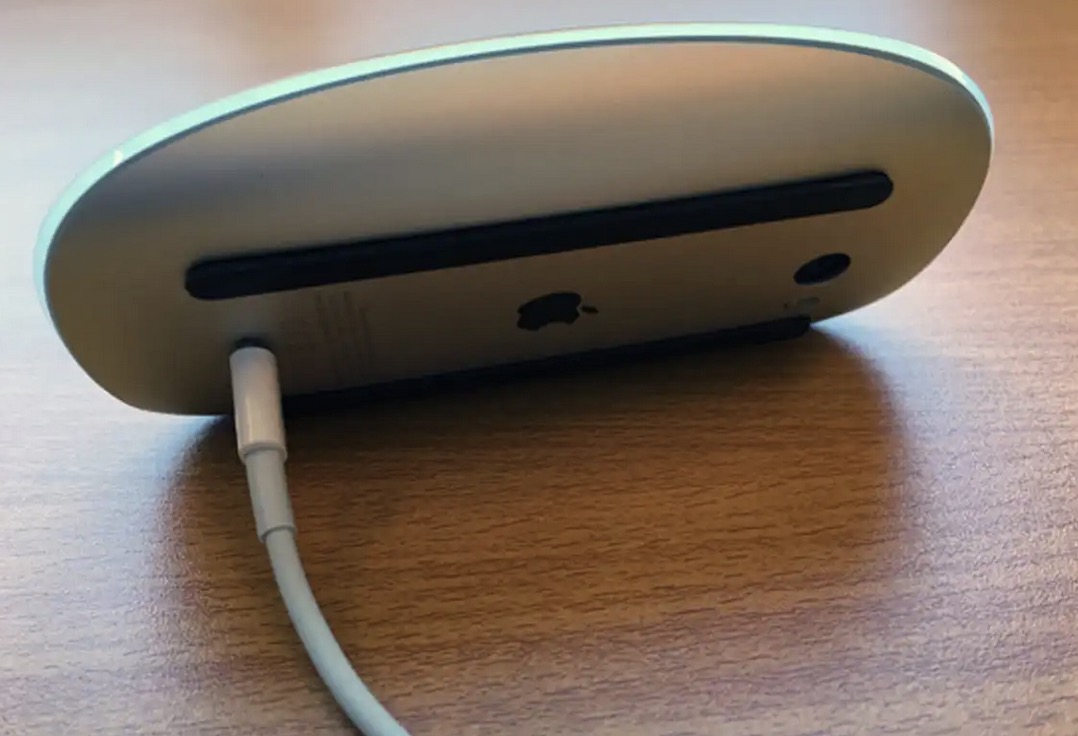
But yeah, it works while plugged in and charging (unlike the stupid “butt-charging” Apple Magic Mouse…)
The Eveready batteries back then had a guarantee. If the batteries ruined your flashlight, the would replace the flashlight. I guess that if they ruined your tape recorder, they would replace your flashlight. The lawyers had it figured out.
I actually took advantage of that guarantee a time or two. It was wildly impractical for anything other than a pretty expensive item.
In an odd coincidence, yesterday I tried to use the flashlight in my toolbox. It’s maybe 5 years old, good quality LED, and runs on two AAs. I’d last used it sometime in the previous 6 months. Which did not turn on. It was difficult to unscrew and sure enough one of the two batteries (Duracell coppertop alkaline) had swelled and leaked and destroyed the device.
I haven’t thought about, or written about, battery leakage in years. And now this.