Basically, I have a long document I edit every day. Scrolling through 30+ pages to work on one thing and then back 25 pages for something else is a pain.
I just want something on the side with a list of sections that I define and if I click on an item in that list the document jumps to that point. And I want this to be a part of the document so if other editors work on it they see the same thing (and I can copy the document and those tabs work).
I have looked this up and seen some things about tabs and links but I can’t seem to make it work. Seems like it would be an obvious feature to have. What am I missing?
I have some 2-300 page Google Docs where I ‘insert Bookmark’ at chosen reference points, then edit an index section that is a series of brief phrases, where I ‘insert link’ for each such bookmark. I don’t think Gdocs supports a sidebar, but if your desired number of section jumps is low you could put those links in a header or footer. I use twin monitors, and finally realized I can open the document twice [or more!], looking at and editing two separate areas - but it’s tedious and fussy, and gets balky at the high page counts - not sure if that might be due to me using a vintage Mac, and thus out-of-date browsers that Google Docs claim are not supported. YMMV.
I don’t know if this is exactly what you want–but I have a long document I keep of notes for the game I play in. Whenever we start a new section, I use “Heading 1” to title it, like “Session 1” or whatever. Then I used Insert→Page Elements→Table of Contents at the beginning, and it created a table of contents based on all the “Heading 1” titles. I can right-click on the ToC to update it, and when I click on any of the items in the ToC, it takes me directly to that part of the document.
I can also select View→Show Tabs and Outlines Bar, and it shows all these Heading 1 items as tabs on the left, which I can click on to take me there.
Yeah, it’s just like @Left_Hand_of_Dorkness said. Use the built-in heading levels, open the Outline sidebar, and they’ll all be there for you to click on (even if you don’t manually enter a table of contents at the top).
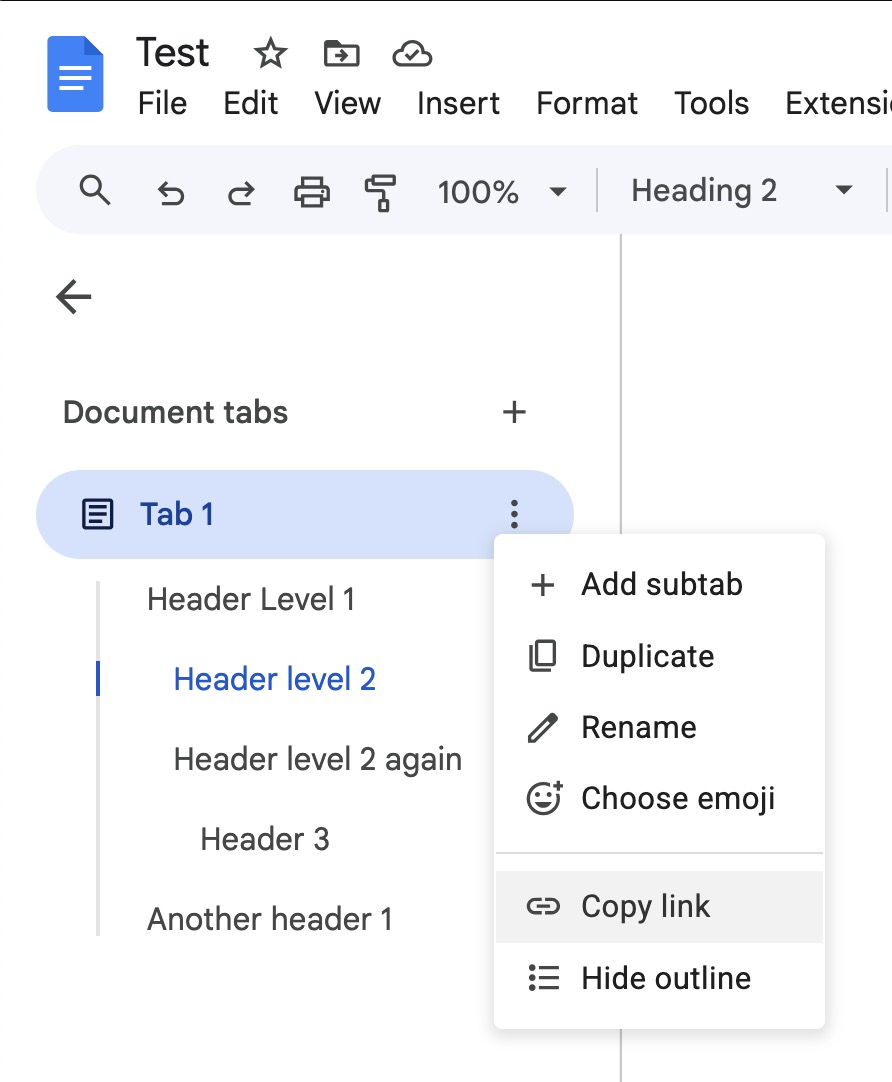
If you don’t see the list immediately, you might just have to click once on “Tab 1”:
If you want to copy a link for someone else to go directly to a section, just right-click it in that sidebar:
Or as you said in the OP, you can use document tabs.
At the bottom right of a doc is an icon that looks like three bullet points. Click on it to open a panel on the left side that lets you create document tabs that break the doc into sections like chapters. You can name them, re-name them, re-order them, etc.
I’ve never printed a document with document tabs, but it appears to put each tab name on a separate page. If that doesn’t suit your purposes, you’d have to deselect (or discard) those pages when you print.