I searched for a Craps game for Mac. I found this one on cnet. I cliked on the downloaded file, and it said to drag the game to Applications. I did that. I double-clicked on the .dmg file in Applications, and it opened the same window that said to drag the file to Applications.
The .dmg file is a container that holds the app. When you open it, the app itself is presented to you, usually in what looks like a small folder. That is the file you need to drag into applications, not the .dmg file.
If you drag the .dmg file into application and open it, you just end up repeating the start of the installation process again.
Sometimes there is a link to the Applications folder presented in the same virtual folder as the app, which is provided as a convenience. But not always.
I see ‘Your download will begin in a moment. If it doesn’t, restart the download.’ It downloads.
I open the .dmg file from Downloads. It says ‘Orchards craps’ (with a circle slash over it), an arrow that says ‘Drag Orchard’s Craps on to the Applications folder’. I do. Now I have Orchards_Craps.dmg in my Applications folder.
This is a Downloads folder. The file selected is a .dmg file – this one isn’t craps.dmg but pretend that it is.
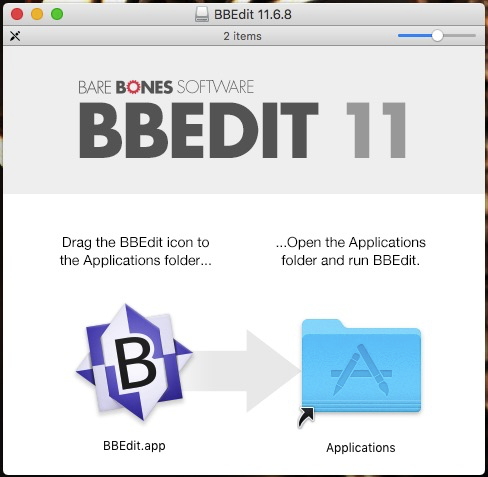
This is NOT what you drag into Applications. You did that anyway. Doesn’t hurt anything, though. When you double-click it (whether it’s in Applications, as it is now, for you, or if it’s still in Downloads) it opens a window like this:
See where my screen shot says “BBEdit.app” ? Yours would say “Craps.app” most likely. Drag that icon into the Applications folder. In this screen shot, they conveniently put an alias to Applications right there in the window to me to use. If they hadn’t, I would open the actual Applications folder which would open in a different window and then drag BBEdit.app (or Craps.app in your case) into it.
Now you can close the installer window, and you can drag the dmg file into the trash (or back into Downloads, if you wish to keep your dmg files for some reason). Double click the .app file that you dragged in order to launch Craps itself.
That circle with a slash over it most likely means that your operating system is the wrong version to run this game anyway. It may be an old game that your new Mac won’t run. For example it may be a 32 bit application and your MacOS only runs 64 bit applications.
Yeah, that, or for some reason the maker of the game decided to incorporate the circle-slash into the icon design. But that would be a really weird decision on their part.
Yeah, circle slash means it’s unsupported. From MacOS Catalina (10.15) onward, only 64-bit applications are supported, and what you downloaded is likely 32-bit. You can run it virtually, but that’s a bit involved.
ETA: Yep, I downloaded it and the File Info says “32-Bit Intel application,” so it won’t work without a workaround on a modern system running Catalina or beyond.
I did think the slashed circle was odd, but it allowed me to move it into Applications so I thought it might just be an oddity. And yes, I’m running Big Sur. I’m looking for gambling games because my Hoyle’s Casino won’t run on this machine.
Yep. Catalina killed a small handful of my applications. Most of them were still still maintained so, luckily, there were updates. This looks to be a game by a small/indie developer from over a decade ago, so you’ll be out of luck for that particular app unless you virtualize or install an older copy of Mac OS on another partition (which seems like overkill for this.) I would try to hunt down another free or low-cost craps game that is 64-bit.
ETA: I had the same issue with Hoyle’s Card Games back in … 2006? 2007? when OS X dropped Rosetta and my Power PC applications were no longer supported. Booted up to a big ol’ circle-slash on my Hoyle desktop icon.
I lost Free Cell and my Hoyle games. That’s why I waited so long to upgrade. I found a single-player Blackjack game, so I’ve got that anyway. The biggest impact was that the upgrade killed Microsoft Remote Desktop, which I need for work. I downloaded the Beta version, so I can do my job. MRD keeps telling me there are updates, but I’m afraid to install them lest the new version won’t work.
I’ve tried finding free download games, but I haven’t found a classic Free Cell or another one that I like. For casino games, I’d just like to buy a suite that will work on this system.
Is there a free substitute for Rosetta that works? I know that under Linux if you want to run, e.g., a 32-bit PowerPC binary on a 64-bit Intel system, it can be done.
Applications is just a folder, the same as any other. You could put your novel, your photo collection, or your music in it, if for some reason you wanted to. “Installing an application” by putting it in there doesn’t actually do anything, beyond putting it where you (and other applications) are likely to look for it.
I run MacOS 10.6.8 Server under Parallels as a virtual machine. It’s the last OS that had Rosetta built into it, so it runs PowerPC apps. Parallels isn’t free but I think QEMU, a different environment that can also do virtual machines, may be. (I never got it working on mine).
A person with Big Sur or Catalina (or Monterey, I guess) could run 32-bit apps as well as PowerPC apps there, as long as the 32-bit apps don’t require a later OS than 10.6.8; otherwise you could run anything up to Mojave as a virtual machine and still execute 32 bit apps.
I was indeed thinking of QEMU, or software based on QEMU. While QEMU will host entire virtual machines (including new as well as old versions of MacOS), it also offers the ability to translate binaries on the fly, so (ideally) you could seamlessly run Intel, ARM, and PowerPC binaries side-by-side, not in a separate virtual machine, e.g. assuming they are all Linux binaries and the host is also running Linux.
I have never tried installing it under any version of MacOS, but it seems like a feature many people might find useful, if this thread is any indication.