So... How does one actually use AI?

What you really miss is government mandated adequate investment by the telecoms incumbents.

If AT&T, Verizon, et al, were required to report every dropped call to the FCC and if they had more than a negligble percentage in any area they were ordered by the feds to install temporary portable towers that afternoon and permanent ones within 6 months, you would not have the problem you do.

So how does one actually use AI? I haven’t read all 300+ posts – just the first fifty – so I don’t know if anyone has actually answered the question; maybe it was answered in post 51. If it was, please point me at it.

Ask your favorite chatbot to summarize the thread for you. (not being a smart ass, actual suggestion)

The question is not “How do you / I operate an AI? What buttons do you / I push?”

The question is “What do you or other people you know use AI for? What can it do for you?”

The answer is each user uses it for different things.

It’s kind of like asking “What do you build with lumber?” The only sensible answer is “Whatever you want / need to build that could plausibly be made from wood. A house, a pagoda, a toothpick, an oxcart, a club, a pool cue, a croquet ball, …”

What do you want to do with it?

Generally, the TLDR is:

  • Pay for a good frontier model if you can afford it. The sweet spot is around the OpenAI and Claude $100-$200 plans. The free models aren’t as good. The intermediary models are a decent compromise for many uses. There are also many free or very cheap Chinese models that are pretty darned good, but require more setup and aren’t as easy to use.
  • If the model allows it, set the effort level somewhere between medium and very high
  • For many tasks, using an agentic harness like Claude Code or OpenAI Codex even if you don’t do any sort of coding can be very helpful because it gives the models a lot more freedom and power to not only manipulate & download files, but also to do web research from your computer’s own IP address (which is blocked far less often than the ones on their servers, e.g. it can read reddit and other sites without issue that way)
  • Use skills to add additional capabilities to your LLM. It downloads new capabilities to them (via specialized instructions), kinda like in the Matrix when they jack in and learn how to fly a helicopter
  • Use research mode to look information up if you need detailed analysis and verification (or just tell it to do research, in natural language)
  • They’ll get maybe 80% of your prompt right, and the remaining 20% will take further refinement and/or be the source of endless frustration

OpenAI models are generally the best all-rounder (as in its models can handle a mix of text, video, images, audio, graphics, etc. all very well). Claude is more limited but often more trustworthy. Gemini has fallen pretty far behind. Copilot is mostly a rebranding of the other models. Meta is trying to catch up. Siri is a basic assistant right now; Apple isn’t in the training business.

There are many other specialized models for e.g. graphics generation, music, medical, military, cybersec, cybersex, etc.

Thank you, @Reply.

You’re welcome, but those are really just the vague overview guidelines. If there’s something specific you’re trying to do, tell us where the lumber goes :slight_smile:

My real estate agent is currently staging my house for sale. She wants me to get rid of my two old couches and will bring in a new one. She told me she would show me a picture of the new couch the next time she came by.

OMG! It was not just a picture of the new couch, it was a picture of it in my own living room, with my coffee table, area rug, and my pictures on the walls – everything in the room, including the TV and sound system.. With my current couches removed from the image. And the walls painted in the proposed colour.

In short, it was a photo-realistic image of what my living room would look like after the proposed staging. I thought she might have used a specialized AI app to do it but it was apparently just a few iterations through the paid version of ChatGPT. I was quite impressed, not just by the results, but by her skills in using it.

I basically use ChatGPT to bounce ideas off. Just bas I would have done with an assiatnt when I was in employment.

Ask “will this work” or “what value resistor for this circuit”. For complex stuff it can do web searches much much faster than I can.

But it can get the wrong end of the stick sometimes

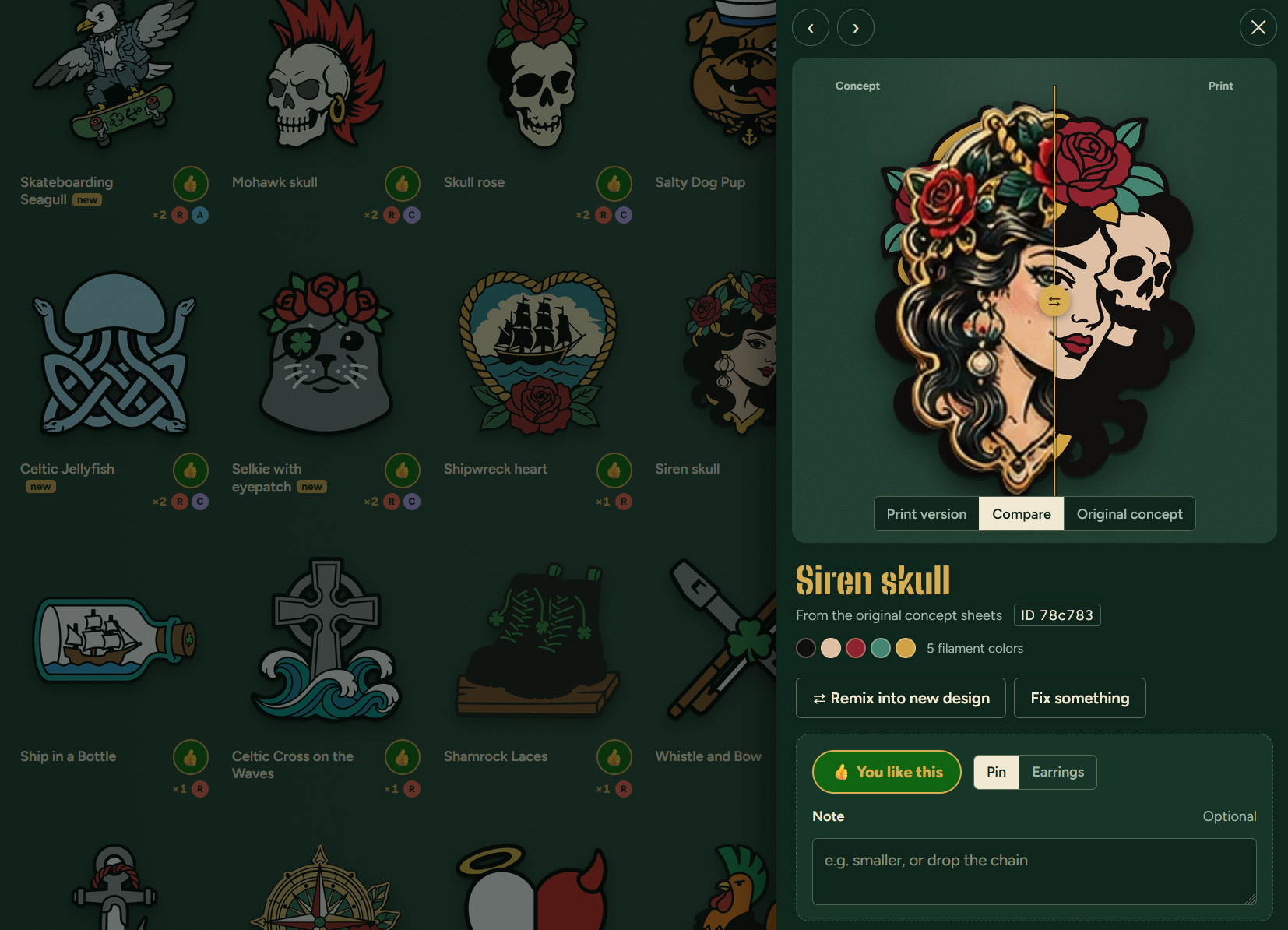
For every year’s Flogging Molly cruise, there’s an on-board swag swap. We wanted to print some trinkets into earrings & pins to give away this year, and Claude + Gemini + ChatGPT (everybody in our party had a different favorite AI) helped us come up with some designs, and then turned them into a live website where our favorites could be voted on and remixed and tweaked further:

The “fix it” functionality was particularly cool… given a design that somebody almost likes, they can just ask the on-page AI to tweak it a little bit (like make a hat green instead of purple, or whatever) and it’ll show them several new versions to pick from, Midjourney-style.

AI made all the designs, refined them into simpler 3D-printable versions, and made the voting website all in an evening. Now to see how they actually look from the printer… too bad that part’s still manual!

I’m unsure about this, but I always thought Google used some kind of AI resource to answer questions. Is this true? Or is Google merely using a good search engine? And what’s the difference?

For example, I typed this in the google URL line: “What was the cause of the local internet & phone outage yesterday?” And I got an intelligent reply. Obviously, the answer required some searches of recent news and other resources.

Google analyzes the search query and if it thinks it needs AI to answer it properly, then it uses Gemini. It will mark the AI response as “AI Overview”.

If it doesn’t use AI for your query and you wanted it to, you can select “AI Mode” on the results page to force it (just like you can select News, Shopping, Images, etc.)

How would I know that I wanted it to use AI? All I know is it usually gives a reasonable reply as long as I ask a sufficiently structured question.

Do you want a list of websites with words that match the words you typed? That’s search.

Do you want a question answered? That’s AI.

Google can figure out which you probably mean.

When I want search I enter the keywords in an order that can’t be mistaken for an English sentence.

To be pedantic about my answer, Google uses AI to make this determination. So AI is always in the mix now.

Then to go a little further: AI is just a fancy nickname for Machine Leaning (ML) and Google Search is ML so it’s always been AI. :wink:

You used to be able to choose, and you still can with some browser extensions (like https://chromewebstore.google.com/detail/ai-content-shield-hide-ai/eoghcliblbhjimkgnfemelcpfdnmiceo)

But in general, Google is going all-in on the AI stuff and it’s going to become harder and harder to avoid it.

If you want more control over your searches, try Kagi.com. It’s a paid search engine that gives you over how much AI you want (including zero), lets you rank results and hide domains, and has zero ads.

On the other hand, if you actually do want more AI, the free Google AI is the worst among them. A paid ChatGPT or Claude subscription will give you much better results, typically.

It’s the same basic rule everywhere: If you’re not the (paying) customer, you’re the product.

I’ve always suspected this.

Heh, it’s deeper than that, even. Google was the company that invented LLMs (the AI chatbots we know today) to begin with. They did the research, published the paper, toyed with it internally, and then just let it die. They were scared of the risks to their reputation and that it might displace Google Search, their cash cow

Well, it did… OpenAI researchers (including a former Google employee) also saw the paper, bet big on it, and the rest was history.

Not only was Google already a ML company, they could’ve been the AI company if they had just listened to their own research. Their engineering was overruled by leadership who didn’t believe in them — a far cry from how things used to work in the Google of the earlier dotcom years.

Google reorganized itself several times in the wake of this, kinda like how Microsoft panicked through the Web and smartphone eras. Both are now quite behind the leaders in AI, though Google still has a lot of in-house advantages that they could maybe use to one day catch up again. We’ll see.

Search, on the other hand… I don’t think anyone has a good idea about how to deal with that and its myriad problems now (how to monetize it in the age of AI, how to ensure good results when so much of it is AI slop, etc.)

I’ve been flitting between the free versions of both. Generally I’ve been satisfied in the ability to get to the primary sources using it and their responses to critical questions. I do not use it for writing or coding or image generation.

One. Would the quality difference upgrading be significant for my use case?

Two. If I was to pay for one upgrade, which one is better for my use case?

Wait, so what IS your use case?

Do you mean you use them solely for research? Of what, in particular, like just general web searches, or academic, or in a specific field, etc…?

What do you do with the research? Like are you just collecting a list of URLs that you then go through and read yourself, or do you ask it for summaries, or do you ask it complex questions and have it try to reason through to an answer based on the links it found?

Very generally speaking, paid access gets you access to stronger models (and more usage of those stronger models), which will improve overall performance at most tasks, at the expense of speed (they are slower, especially in heavier reasoning modes).

But sometimes that’s overkill, like if you just need text summarization or translation and no reasoning. “Reasoning” ability is usually the biggest differentiator between the higher-end models. They are far far better at deducing outcomes based on a chain of rationales, far less likely to hallucinate, and generally better at most tasks you throw at them. But they cost more and take a long time to answer.

Then there’s some stuff that works better not based on the pricing plan you’re on or the model you used, but the software you run it in — the chatbot vs a “harness” like Codex or Claude Code (even if you don’t do any coding). A big difference is that those harnesses can access resources and websites the chatbots cannot, because they search the web from your own computer and your own IP address and aren’t blocked by as many sites as the chatbots are (who do their searches in the cloud).

Anyway, that’s probably TMI already. Sorry. If you explain what you’re actually trying to do, I can try to be more specific.

Otherwise, give https://notebook.google/ a try first before you pay for anything. It’s Google’s own research-focused harness, and it has a free tier.