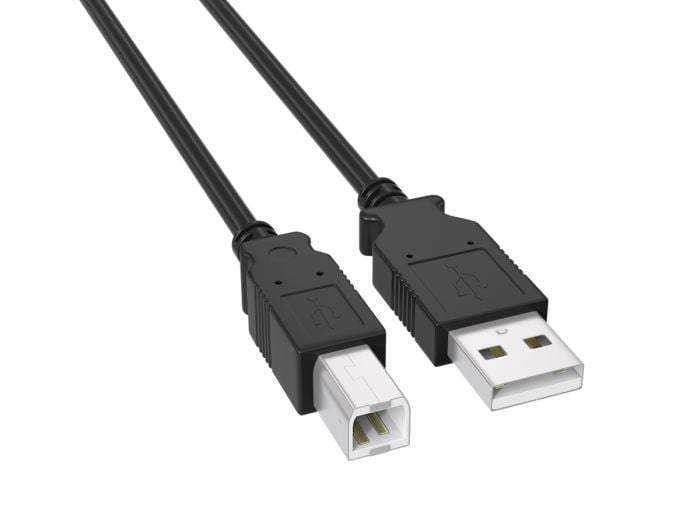
There are many forms of connectors for USB cables that we use with our computers. Sometimes I am baffled at why one is used rather than another but the one that always gets me us USB-B (see pic below).
I have only ever seen it used on printers. I will guess it has showed up elsewhere too but mainly you see it on printers.
Why? A printer is plenty big enough to use USB-A…certainly USB-C. Why does this one thing (printers) need its very own shape of USB plug?
Maddening. Please tell me there is a good reason for it rather than they found a way to make more money.
A modern USB-C connection can pretty much negotiate any role. But original USB was sensitive to whether it was attached to a host (providing power) or a peripheral (receiving power). So different ends were required.
Ok…but a connection from a computer to a printer I think is only a data connection. Neither need to provide power. Just sending data. Any USB cable can do that. If power is not needed then just don’t use it.
If USB-A to USB-A connections were commonly used cables for them would commonly exist. Then people would use them for devices that would be damaged even if printers would not.
Why did the printer end need to be that boxy connector rather than the connector typically on USB cables. It wouldn’t need to be a USB-A to USB-A. It could be USB-A to mini-B, like in the picture. Everyone had tons of those cables lying around. The only one with that boxy connector were the cables that came with a printer or scanner.
You aren’t missing the issue you just aren’t believing the correct reason you are being given.
It might help to understand that USB was never intended as a universal 5V power cord in the way it is used now, and the non-standard usages you describe are not how it was originally intended to be used.
Those mini connectors were regarded as a bit flimsy for something required to be as robust as semi permanent printer to PC connections. The mini connectors were for small devices where size was more important than sturdiness.
That may have been over caution but is nonetheless the reason.
For what it’s worth, I’ve also seen USB-A → USB-B connectors in which the USB-B connector was connected to an external hard drive. I still have one of these for backups.
As I recall it had to do with the vibration of the printers themselves. Lots of moving parts and the USB connection was made the shape it was to prevent accidental shaking out of the socket.
Scanners also used the connection as did some external hard drives.
Where is this understanding from? The A and B sides are not the same and the protocol is not symmetrical.
A USB-A to USB-A cable is non-compliant. The reason it can exist for your webcam is because the webcam manufacturer made sure that they act as a peripheral (B side) even though the connector is A.
However you wouldn’t want to plug both sides into your PC. And that was the reason for A and B: As a standard, an ecosystem it was critical to make sure that devices could only be physically connected in a meaningful way
Not printers, peripherals. Scanners and early external drives used the same connector because they were peripherals. As others said, it would be like an extension cord with the same plug on both ends. It would work but there’s a reason they don’t make them.
B connectors show up in a lot more places than just printers. As you all said, printers, scanners, and external hard-drives all used B. Also USB expander ports, external audio cards, debuggers, test equipment. Mobile phones used mini and then micro B before C. Wireless headsets still use micro B.
As a rule, peripherals either used B or were hardwired (keyboards, mice, and webcams).
Non-standard peripherals that use A to A are likely doing so for cost and / or physical stability.
USB was originally a host → peripheral connection. It wasn’t bi-directional. The electronics at each end were different. The intent was that very simple and cheap logic could be used in simple peripherals. All the work is done in the host.
Keyboards, mice, and printers. Printers could be really simple, with the control logic sent over the USB connection, and the host doing all the work, and just commanding mechanical movements and when to deposit ink. Audio devices were also very simple. For the most part USB does what is says on the tin. It is a serial digital connection. One with a very simple set of commands that allowed the host to interogate the device and send commands.
It was possible to link UBS devices in a tree - a singe host connection is split out with some very simple logic steering the data to the right device. But not the other way around. You can’t connect multiple hosts on a hub.
So the A and B connectors reflect the role. You must have a host on one end and a peripheral on the other. Different connectors makes it impossible to violate the host → peripheral topology. So double ended B - B or A - A cables made no sense. What you usually saw was a captive cable from your device - so the B connector that would have been there was subsumed by the wired connection. Printers were the common exception.
USB evolved dramatically over the decades. USB-C is essentially a totally different beast.
Also—as noted in the Wikipedia article I linked to above—another important point of the differing A (host) and B (peripheral) plugs was to prevent accidentally connecting two power sources.
Later, the USB-C specification was developed that allowed host/peripheral roles to be determined by software.
When interfacing USB-C with older legacy equipment, though, this paragraph is key:
In this paragraph, note that “plug” is the male end and “receptacle” is the female end.
This also explains why there are no adapters or dongles with USB-C receptacles, which I had previously wondered about.
I also saw USB B used to connect a cable to a USB 1.0 or 2.0 hub.
The hub was the client, the PC was the server. The hub’s USB A ports were for downstream peripherals, where the hub was the server and the peripherals were the clients.