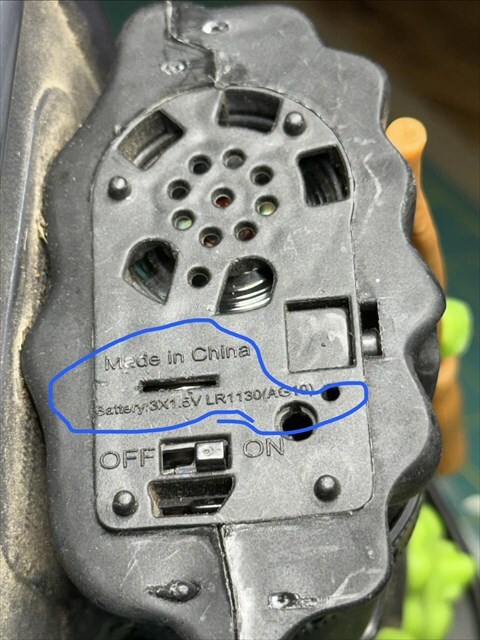
This is a Halloween decoration. I can find no way to open it. The silver in the slit is the battery. If I push on it with an X-acto blade it moves but I can’t force it out. It even tells what kind of replacement battery to use - it’s stamped on case.
"To change the batteries, follow these steps to open the compartment and swap the cells:
Required Tools
3 new LR1130 (AG10) 1.5V batteries
Small Phillips-head screwdriver (precision size)
Toothpick or small plastic tool (optional)
Step-by-Step Instructions
Turn off the device: Slide the power switch to the OFF position.
Remove the safety screw: Find the small screw hole located just below the battery text (near the “ON” label). Use your screwdriver to loosen it until the screw comes free or the panel releases.
Open the compartment: Gently pry open the plastic battery cover.
Remove the old batteries: Note which direction the flat sides (positive terminal) are facing. Pop them out safely. You can use a toothpick to help slide them out.
Insert the new batteries: Stack the 3 new LR1130 batteries into the compartment. Make sure they match the original orientation, typically with the flat (+) side facing up toward you.
Close and secure: Pop the plastic cover back into place and tighten the safety screw.
What’s in the hole above the word ON? Is that a place to plug in an external power source or a screw hole? If it’s screw remove it.
In either case, based on the picture, it looks to me like if you stick a screwdriver into the hole to the right of the square, you’ll be able to pry the entire panel off.
The slit isn’t there to replace the batteries, it’s there so you can pull out the piece of plastic that kept the batteries disconnected during manufacturing/shipping.
I’m leaving for Scotland in 4 days and my time is a little frantic now, sorry!, so I wasn’t able to look at it last night. I’ll give it a shot this weekend and let you know how it goes.
However, I consider myself a pretty handy guy and I didn’t initially see a way to open it. I’ll give it another go.