Is there a free, easy to use, pdf file editor floating around?

Yeah, PDF is more-or-less an open standard now: https://www.iso.org/standard/51502.html

I say “more or less” because there are still some Adobe-specific extensions on top of the base PDF version, but those are minor.

Also, Adobe Acrobat (the editing/PDF production tool, not Acrobat Reader) is still one of the better PDF editing apps out there, IMHO. It’s a nice enough standalone app, just sucks when it’s bundled into a monthly subscription.

But IMHO their real “monopoly” is in marketing and branding… same as “Microsoft” office and LibreOffice. Third-party free or cheap software can do like 90% of the same things, and most people will never need the last 10%, but people still equate Adobe with PDF and Microsoft with Office.

I think it’s a different situation for you here?

I believe what @dolphinboy is describing is hidden metadata (or some sort of otherwise useless “binary junk”) added by a poorly-behaved PDF generating app (some sort of movie editor, apparently).

I think what you’re talking about — if I understand you correctly — is people scanning you text PDFs that end up huge? In that case, it’s because the scan itself kept the text as an image, and you need to OCR it.

There’s a bunch of software out there for this, but if you have an AI chatbot you like, just upload the PDF(s) there and tell it to extract the text and make a clean PDF out of it without the scanned images. (They’re both better at OCR than most non-LLM OCR apps, and also generally easier to use and cheaper than the PDF editing apps for something like this. In a traditional PDF workflow, you’d have to OCR the text, copy the text into a separate Word doc, proofread it and fix OCR errors, reformat it, and re-save it as PDF. But an AI can do all that in one prompt, at an accuracy far far above traditional OCR software.)
@dolphinboy , have you tried Microsoft’s built-in Print to PDF function? Just print your script like normal from Movie Magic, only choose “Microsoft Print to PDF” or “Print to PDF” in the printer drop-down box (as opposed to a physical paper-output printing device). See what you get.

pdf really isn’t an editing format. It’s for final product. It’s not surprising that a tool for editing a pdf as the OP proposes is not readily available.

If I’m following right, this isn’t editing text per se. Movie Magic 6 is supposed to be able to output a PDF from within its own software, the way Microsoft products do. Essentially, movie magic can do this, but has known issues with artifact text being appended to the end of the proper intended text.

The intended output should have no artifact text. That’s why I suggested Microsoft print to PDF. That gets around the whole issue of converting from movie magic.

[deleted]

Actually never mind, you are right, I missed one of @dolphinboy’s posts.

Open Word

Click file/open and choose the pdf file. It will tell you that it is converting the pdf file to word format

Edit out what you don’t want

Click file save as and choose pdf as the type then save it.

I think you can also Print to pdf by selecting Adobe pdf as your pinter.

You might be able to choose save as Adobe pdf but that needs a full installation of Adobe to work. File/save as then choosing pdf as teh type works on my computer without full Adobe installed. I assume you have at least Adobe reader installed. I’m not sure if you need that, but it’s free.

Look at:

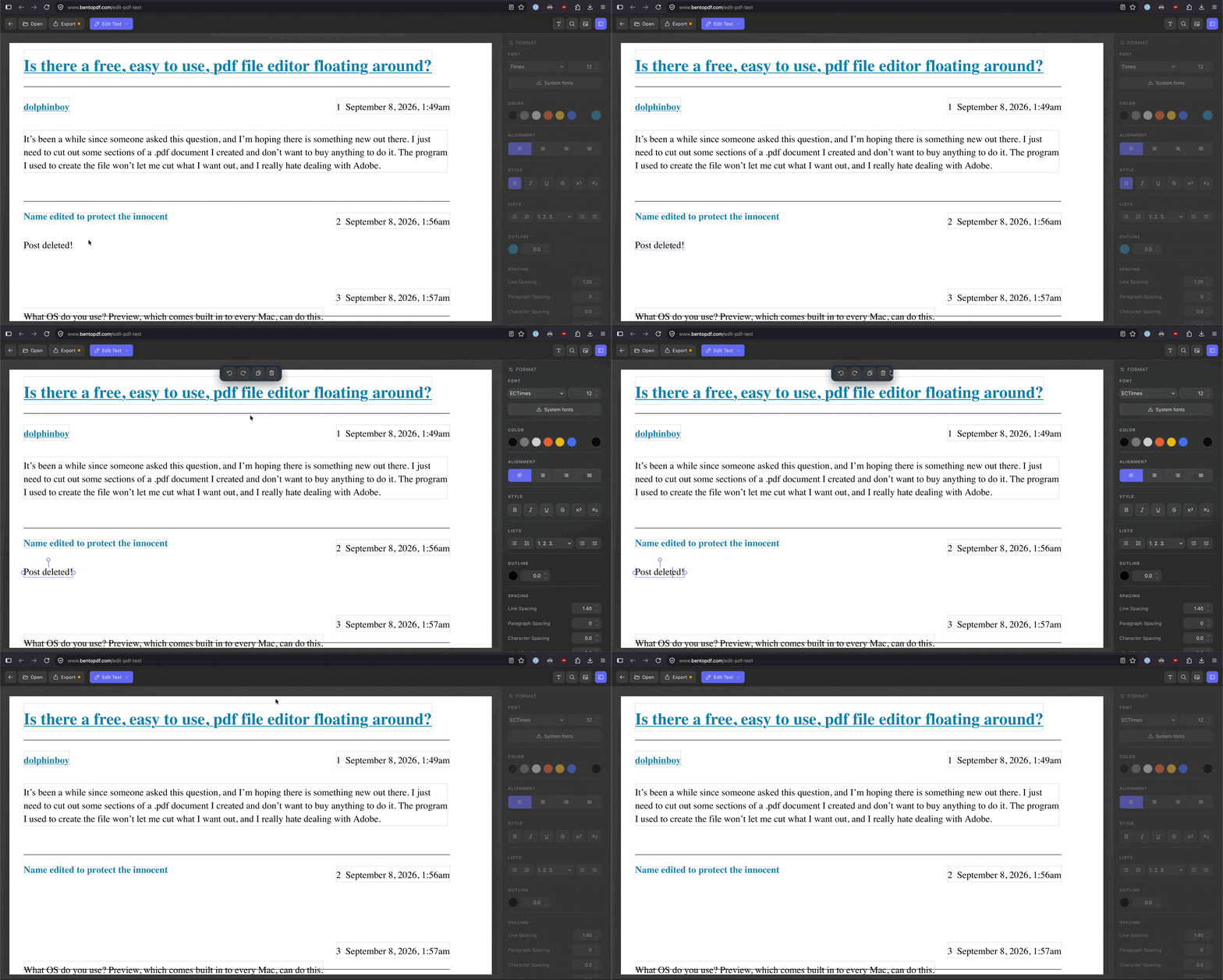
Also, @dolphinboy, this service actually lets you select text and delete it from a PDF altogether: Edit Text in a PDF Free - Rewrite with Live Reflow | BentoPDF

It’s free and requires no signup. The PDF stays in your browser (on your computer, not sent to their server). It actually removes text from the PDF too, not just draw a blank rectangle over it like some PDF “redact” apps do.

I tried doing what you described, Print to PDF, but when I did that Movie Magic created a gigantic file that was apparently not text, so that really didn’t help.

I’ll see if it works for me, and let you know.

Out of curiosity: Have you been able to print to a paper-output printer? I’ve never seen a Print to PDF function (either Microsoft or others) completely fail in the way you describe. However, I have no experience with Movie Magic whatsoever—apparently, it’s far more than a text editor.

I read up a bit on Movie Magic to get a better handle on what you’re trying to do. I learned that v6’s Convert to PDF function has known issues. But that’s not quite enough information to crack this.

@dolphinboy , what is the end-product meant to look like? Is it supposed to look like a script that could’ve been done in plain old MS Word? So that all the file data connected to Movie Magic’s extensive non-text functions are ignored upon printing/PDF-rendering?

Does Movie Magic offer a “naked” view of your script? Just text on virtual paper, nothing else? If so, can you print (to paper or PDF) from this view?

Lastly, does Movie Magic offer other file conversions besides to PDF? To Word? To EPS? To Rich Text? Anything at all?

I feel like this is the kind of thing we could solve in five minutes if I were sitting next to you.

Yes, you can export a script in Movie Magic to .rtf. I tried that, and could edit out the junk at the end, but them I had to convert it to .pdf, which was a PITA. A real PDF text editor would solve my problem, and I can get a free 7-day trial from Adobe, and then pay them $26 a month, which I’m trying to avoid. It needs to end up clean in PDF no matter how I do it, and a true PDF editor is all I really need, hence the question. I am currently creating new versions every few days, so I want it to be easy and relatively painless, if that’s possible.

… Print to PDF from an .rtf? What program were you using to view the .rtf once created?

I could view and edit an .rtf in MS Word.

Then save the document as a Word document. From there, you can try Word’s Convert to PDF which really should work fine since conversion to .rtf should strip out Movie Magic’s non-text extras (and you’ll “manually” edit out the end-of-file text).

So I saw an example from @dolphinboy, and this was a strange situation indeed…

The “binary junk” was some partial and broken metadata, actually a fragment of a rich-text copy snippet from Microsoft Word. The OP’s software (Movie Magic Screenwriter) was not correctly parsing this copy snippet and misinterpreted the rich text (actually some Microsoft Word theme, style, and font color data, zipped up). Instead, the software pasted the raw zip files as hexadecimal characters, resulting in several pages of what was, indeed, “binary junk” after the end of the actual content.

Unfortunately, the binary junk wasn’t just on isolated pages, but interspersed with actual content on the last page too — thankfully, no earlier than that, or else the PDF reflow would’ve been a real headache. OP got lucky!

Anyway, while this IS a cleanup you could manually do with a PDF text editor, it’d be a small hassle. Instead, I wrote a simple cleanup script to automatically scan for this sort of junk and strip it out of the PDF.

When the OP’s back, if they’re OK with it, I’ll share a screenshot of the binary junk itself so it’s clearer what’s happening.

Oh, and I don’t believe using a different “print to PDF” workflow would help in this particular case. The bug appears to be inside the source document itself (the Movie Magic Screenwriter format), having been inserted there during a botched paste operation (a bug of the software, not the OP’s fault). The binary junk is formatted as “dialogue” cues in the Screenwriter internal format, which isn’t something a PDF exporter would add on its own.

That said, the whole software seems very old — the PDF export library it uses is from the 1990s — and the software is up to version 6.8 now. I’m not sure what version the OP is on (6.0?), but it might be worth asking the company about this bug and if the later versions provide a fix.

Yes, I am on an older version and will check whether an update is available. And yes, you can share an example. Thanks for all your help. I’ll test your “fix” today to confirm it works for me.

I can confirm that the code provided to me works as advertised, and I can continue writing my script and make a clean copy I can give to anyone at any time, Problem solved… at least for now anyway.

I use this PDF24 Tools: Free PDF solutions for all PDF problems