Looking for a new computer to replace what I used to have before the world’s worst fire sale. I had a decent desktop, but now I am considering an 18 or 19 inch laptop for under $2000. Later version I7 or better, RTX 4070 or better, if possible. Watcha got?
I know you said you’re looking for a laptop, but in case that’s flexible, I’ve just been shopping for a new desktop myself so have done some research over the last few days. Quite a few reviews recommended the Dell XPS. You can get one with an i7 20-core processor, RTX 4070 and 32 GB RAM for just under $2000. I just ordered one today, although I got an i9.
Would you be willing to consider a smaller laptop with an external monitor? 15.6/16" is the sweet spice in terms of price vs performance, and the money you save could get you an amazing external monitor. If so, here’s a few options from a recent thread: Please help me find a Gaming Laptop. I come to you for aid(again!) - #14 by Reply
PS: You might want to avoid Intel CPUs for the time being. The company is on fire and their recent chips have been crashing, especially the high-end gaming ones. More discussion in yet another laptop topic: Advice needed on laptop purchase
Also, you probably know this, but the desktop 5080 just came out (with a new DLSS version that can do multi-frame generation), and the laptops launch in March – if that matters to you. DLSS frame gen helps tremendously in recent games that support it. Without the multi-frame gen, it’s an inconsequential boost over the previous generation (i.e. it won’t be a big improvement for games that don’t support it). And presumably that’d be after everything becomes ridiculously expensive anyway.
Because of those discussions, I ended up getting a HP Victus 16 for about $900 (it goes on sale frequently, and is also available open-box), but ended up returning it after a week. One of the worst laptops I’d ever had: flimsy build, incredibly noisy, terrible adware (including McAfee), came with a broken USB port, awful screen & hinge… etc. But, at the time and for a few months after, it was the cheapest 4070 laptop by quite a large margin. If you don’t mind owning crap and want a compromise, that may be one (whenever it goes on sale again). I definitely wouldn’t pay $1400 for that thing; even at $900 it didn’t feel good. Back to GeForce Now for the time being (Nvidia’s game streaming service, which works superbly – much better than any laptop I’ve had).
Edit: Second sentence should read “sweet spot”, not “sweet spice”, lol. But the typo is too enjoyable to change 
I am looking for a larger laptop I can take to conventions and other places that could double as a home computer.
Costco has a MSI one for $2k, there’s an Alienware one for $1.9k (Dell’s gaming brand), and an Asus one for $2.2k. Beware that they all have 13/14th gen Intel CPUs, so it might die on you after a couple years.
What is the Ryzen equivalents to the 13th and 14th generation of the Intel I7 and I9 processors?
Unless the laptop manufacturer is doing something spectacularly unwise (using desktop CPU parts for a laptop), they’re not affected.
Mm, I wouldn’t just blindly trust Intel’s word on that. Didn’t they lie and try to cover up the initial crashes? There’s a class-action suit now. That company is quite the dumpster fire right now.
Also, using desktop-grade CPUs (or overclocked/overvolted laptop CPUs) isn’t really that uncommon in the gaming world.
In particular, the HX CPUs used in ALL three of those laptops is, I believe, a desktop-grade CPU that suffers from the crash bug.
See:
- Raptor Lake - Wikipedia
- https://old.reddit.com/r/GamingLaptops/comments/1eidjde/mods_please_pin_this_intel_cpu_issue/
- Is i9 14900HX reliable? : GamingLaptops
- https://old.reddit.com/r/GamingLaptops/comments/1ejvbkl/definitive_13th14th_gen_intel_hx_cpu_14v_cap/?share_id=erTGnRZLfz2y2ALnJ9u_j (to cap their voltage)
Buy one at your own risk…
Probably the 7000 / 8000 series? See benchmark:
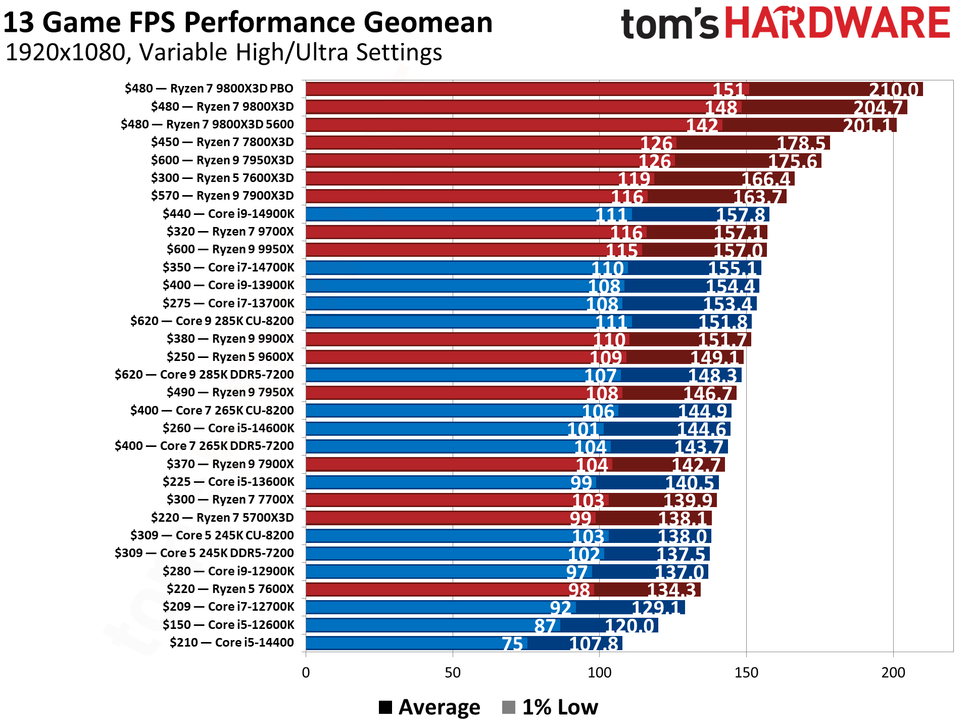
But I think it’s going to be very hard to find an in-stock 18"/19" AMD laptop (of any model) with a 4070+ under $2k. People are avoiding Intel right now so all the fire sales are for Intel machines. Here’s a 17.3" AMD one from BB.
Reviving this semi-comatose thread because I’m getting really fed up with my 10 year old Windows 10 HP Envy. It’s SO SLOW, and has also developed some physical problems (“a” key sticks, one hinge in back is broken). I think the worst of it is MS Win 10 unfortunately – it seems to run memory hogging Windows Defender processes in the background and constantly nags me to back stuff up to the cloud. I relented briefly, only to have Quicken snarl at me that it couldn’t handle cloud backups. So I give up. I’m a little old lady who makes very modest demands on a system – email, MS WORD and Excell, NYT games, SD, FB and some news websites. I’m not a “gamer.” I would really prefer to handle all my data locally.
This one gets good reviews on Consumer Reports and most other sites. Do any of you all have LG laptops? An “open box” model is $1400.
Does it have to be a Windows computer? If you’re open to a Mac, the Macbook Air or Neo would be both cheaper and better, and probably last you longer without issues, than any Windows PC. They do have a small learning curve, but they are far and away the best personal laptops you can get right now, for the use cases you described. That’s what I’d get my mom if she needed a computer.
If you’re dead-set on a Windows laptop, that one is fine, but kinda overkill for your described needs. This one at half the price will do the job (and then some): https://www.bestbuy.com/product/lg-gram-book-16-copilot-pc-touchscreen-laptop-with-amd-ryzen-ai-7-445-16gb-ram-1tb-ssd-titan-black/JJ8VPZZLZG/sku/6670750
Beware that it’s not a particularly good time to buy a computer right now. AI demand has caused RAM prices to skyrocket like 5x in the last year, and caused a bump in computer prices across the board. If you don’t need 32 GB of RAM (and I don’t think you do), you can save a bunch by going down to 16 GB.
I’ve used LG Grams briefly in the past and they seemed like perfectly fine machines, but not notably different from any of the other hundred copycat thin-and-light PCs. If I were you I’d just go into a Best Buy store in person and check out their selection there, getting an in-person look at their screens and feeling their keyboards and trackpads — the daily touchpoints that aren’t so easy to evaluate online. If you mostly use it at home (or from the same physical location), I’d spend less on the laptop and buy yourself a nice external monitor instead. Computers are very expensive right now but peripherals aren’t, and a bigger, nicer monitor would probably do wonders for your Quicken, Excel, email, etc. in a way that an additional 16 GB of RAM likely wouldn’t.
Thanks for the reality check, @Reply !
I got my laptop 10 years ago because I had a volunteer job that required it, but now they’ve assigned us Chromebooks. And I have a tablet for portability. So I don’t really need a laptop.
I have an Android tablet and phone, so would like to keep things simple by staying out of the Mac universe.
And I checked my disk usage, only 120 GB, so I don’t need 1 TB of storage. My HP Envy only has 12 GB of RAM, so maybe that + Windows bloatware is what’s slowing everything down, and 16 GB will do just fine.
You are right that a big screen would be a real plus. What do you think of the All-in-ones? Dell & HP have some that get good reviews. In any case I will go down to Best Buy & test drive as many of these options as I can.
Thanks again for all the useful insights & advice!
Here’s the Dell All-in-one Consumer Reports tested:
I love having an external monitor mounted on an arm. (So much that i have two. One arm is attached to my bedroom wall, the other to the desk in my den.) Mine are just monitors, they don’t do anything else. But that means i can have a small, light, portable laptop and still use a spacious screen when i want to.
I probably have a larger budget for electronics than most people. I have 3 of my own laptops plus my employer’s laptop in the home. (They can all use both monitors, plus, i have a cable to the big TV in the basement that can also be used as a monitor.) Currently, i have a large windows 11 box for gaming, a MacBook pro that’s my “computer of record”, where i put stuff i want to be able to use later, and a smallish Linux machine that i use mostly for travel. The Linux machine used to be a Windows laptop, until i got fed up with Windows for various reasons.
Anyway… Unless you need to use Windows software, consider Linux. It’s so much lighter and simpler than modern windows. It works… Like Windows used to work, before they added flashing screens and ads and made it hard to find your files. The interface of my vanilla Ubuntu set-up feels a lot like a quieter version of Windows that’s not always trying to grab my attention. The learning curve was much shallower and shorter than i expected. And you don’t need to commit. You can buy a Windows machine, download a Linux installation on a thumb drive, and play with it. And when i did install it, i set it up to dual boot, so i can still use the computer as a Windows machine if i ever want to.
Omigosh, you are SO much more into this than I am! I do have 2 “smart” TVs that I think can be used as monitors if I want.
My son keeps bugging me to abandon Windows and switch to Linux – then he starts yammering nonsense syllables like Mint-Ubuntu-Manjaro-RedHat and my head swims. But I hear so many positive things about it, mostly on this board, that I think I’ll let him install it on my old HP Envy & see how it goes. The Envy is a perfectly cromulent machine but the combined inadequacies of only 12 gigs of RAM and the ever-diminishing Win 10 is making me crazy. I don’t want to landfill it, so why not experiment?
If you just want to experiment with Linux, you don’t need a separate machine. You can install an machine emulator like VMWare or VirtualBox in your Windows system, and install Linux inside the virtual machine. I much prefer Linux to Windows and have had a number of jobs that required Linux, but I also need Windows for some things, so for many years I’ve been running a virtualized Linux system on Windows. It’s much more efficient than a dual boot environment and simpler to deal with physically than having two computers.
If your son is yammering about that, he’s almost certainly competent to do the installation for you. My husband made the thumb drive for me to start with.
I’ve personally found it hard to deal with virtual machines. I forget how to log into them. If you don’t do something regularly, it’s not easy to remember the steps, and these things aren’t super obvious.
My dual boot machine is pretty obvious. It boots into Linux. But it waits a few seconds on a (unfortunately tiny to the point of being illegible) screen that lets me hit the down arrow to boot into windows, instead. Yes, i suppose it costs me a couple of seconds every time i boot. I don’t reboot very often.
I don’t have two computers to have two operating systems. I have two computers because i have a small portable travel laptop and a large gaming laptop. I only converted the travel laptop because:
- 100% of what i use the travel laptop for works on Linux. Some games want Windows.
- The serious issues that made me angry enough with Windows to make the switch were only critical when I’m offline, which happens approximately every time i travel, but rarely happens at home.
And i don’t think @bobsmom101 especially wants to juggle between computers, but she has one that’s otherwise approaching uselessness, so converting it is a really cheap way to test if she’s happy with Linux.
But you still have to physically deal with the two computers. If you don’t have two monitors, you have to use a KVM switch or disconnect/reconnect cables when you switch between them. (Less of a problem if at least one is a laptop of course, but you still have to deal with two sets of power cables and maybe USB.) You do need to find space to put them where they’re both conveniently accessible, etc. I don’t have space on my desk for a laptop in addition to my monitor/keyboard.
And importantly when setting up a system for the first time, with a VM there’s no risk of bricking the computer while trying to install a new boot loader.
Also, I’m not sure what you mean by “I forget how to log into them.” When I open my VMWare app, it presents a list of VMs (currently I have one). I just click on it and after a few seconds my Linux system is running, the same as if I booted it on a second physical machine. There’s no separate “logging in” process, except for the usual logging in that would happen if I booted on a separate machine.
Using a single computer is an even cheaper way. At the very least, it uses less electricity.
Well, i installed a virtual machine on my Mac years ago, and never really figured out how to use it. Maybe i installed it wrong.
Despite having two dedicated external monitors, my laptops are rarely used with them. (Except for the work computer. It has a shitty low-res screen and it’s almost useless without an external monitor.) They are often used in my lap, or on the kitchen table. Or on the little tray on an airplane. Or on the desk at a hotel room… And they drift all over the house. So I guess i don’t see “two machines” as adding a lot of complexity. But i may have a skewed viewpoint. 
I think testing a new operating system on a computer you already own and aren’t using is a great way to see how comfortable you are with it. There’s zero chance of messing up the machine you mostly use. And it’s free (if you are installing a free Linux, anyway.)
Yes, if it works well, you’d probably want to switch over the main computer. And then you need to decide if you want to totally switch, or dual boot, or use a virtual machine. But i see that as step 2.
random rant
Also, i don’t understand KVM switches in this day and age, at least if you are using a laptop. It’s so easy to pop a cable into the side of the machine. I bought some little rubber things that stick to the wall and hold the ends of the cables when I’m not using them, so i don’t lose them behind the desk. (Not that it’s a huge level if they fall down, because one end stays attached to the monitor. But it’s tidy to have the power cords, the monitor cords, and the backup cord all handy by. (I have both an HDMI and a USB-C monitor cable for both monitors. The gaming laptop doesn’t do HDMI, and i decided I’d prefer extra cables to dongles i might lose. And i have multiple power cords because i sometimes plug in two laptops and a phone all at the same time.)
Then he starts telling me how he hasn’t been able to get Linux to quite work with his super duper fancy gaming graphics card, and the Linux community is working on a patch but it still has an annoying flicker. Or something like that – my eyes kind of glaze over. So I think for starters we’ll just put Linux somewhere that if it needs babysitting, that’s OK.
I am in awe of all you techies though. I used to be a pretty mean hand with MS DOS back in the day. Sigh.