It needs a border. Pushing what you’ve got into a smaller space (inside the border) would also help with the perceived empty areas.
OK, took care of some other stuff and I’m ready to get some more work done on this bill. Thanks for all the responses so far, guys.
About Big Brother’s head. I’m trying to make his head non-dominating. I know I’ve basically achieved the opposite of that, but I wanted to instill the feeling of his always being there, a subtle thing in the background who’s always got his eyes on you, even on your ration tickets.
Actually, when I first put his head on the bill, I tried a bunch of different positions, sizes and orientations. I can try rotating his head again, but I don’t think I’ll like the way it looks.
I really like your design. I don’t want to just rip off your work, but I particularly like the horizontal bars you have. I think I might make that a theme across the tickets. The color of the bars might be a different color for each denomination, for example. I’ll try out some of your steps and see what I can manage.
Lol, right. Hopefully I’ll figure out something to fill it in.
I really like the mesh pattern you have on the bill. I might try to do something like it and combine it with the bars that Tengu used.
I’ll examine other bills and see what kinds of borders they use.
The mesh pattern is a combination of patterns. You can find a bunch by image searching for the word “guilloche”.
Awesome. I really liked that part myself. And, yes, different denominations in different colours is a good idea.
There is a step to the wear that I seem to have accidentally edited out - all the ripple stuff is done on a thin white border (done on a different layer, of course) not the bill, or the ‘fiber’ layer, or whatever. IIRC, the top and left were about 10 pixels, the right and bottom ~5px. But I was really just eyeballing when I did it.
Didn’t see the** pulykamell**'s mesh design, so ill post this anyway, was gonna say, it needs some anti counterfeit type design, found this just searching google images for certificate+watermark. then just center it over the bill, set the transfer mode to multiply, and voila
this, along with the the other poster’s texturing mods, starts to look like the real deal. the serial number needs to bleed in there a little too, id play with its transfer mode try some things o give it a little bit of a bleed effect
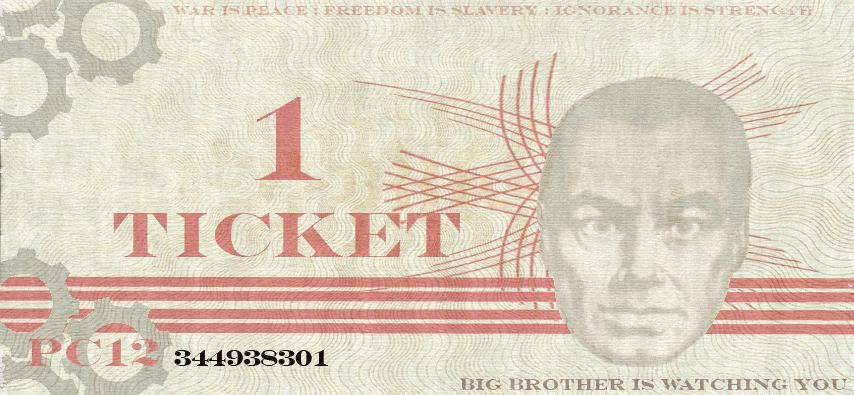
That actually looks pretty good–I like that better than the mesh pattern I have. The only things I don’t like about that design are still the head and its positioning, and the red geometric pattern behind the head looks like it should be more geometrically placed. Currency tends to have very strong, symmetrical geometric forms to it. Right now, that geometric design looks haphazardly placed. Plus all the text needs more consistent alignment.
Didn’t get a chance to use Photoshop much, went from this to this. The bill itself looks much nicer. My next attempt will be to add some designs to the bill’s background and fill up the empty space.

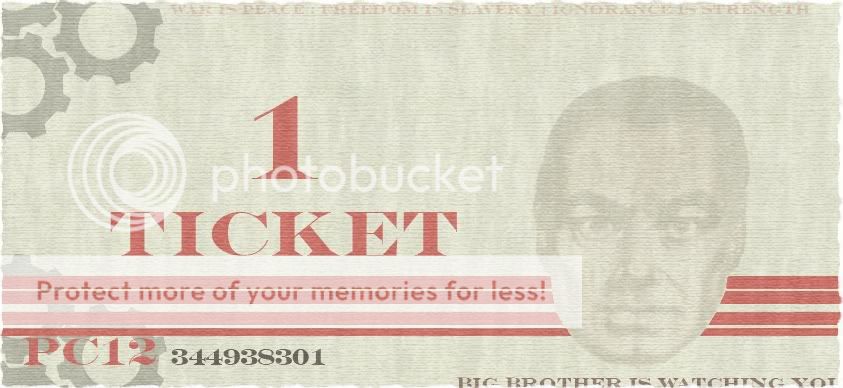
Thanks again for all the help I’m getting, guys.
I actually kinda like the more angular pattern you had, especially for the motif of this bill, and combined with a linen texture would look real good, along with the other adjustments you mentiones. I would also say cut out the pattern so itsnot over the portrait, and oh,definitely what any good bill needs is some kind of official looking seal!
What I actually envisioned for the portrait is an etching-type pattern that would follow the contours of the face and its shadows. You know, like what the actual portraits on bills look like usually. Unfortunately, that was a bit too difficult to do for a quick mock-up. 

I noticed one thing–I meant to align the bottom two text elements (the serial number and slogan) on my bill but somehow that got screwed up as I was moving around some elements.
I think the stripey pattern is cool, but it should go in and out of the little gear motif (as Tengu has it now) rather than be pasted completely atop.
Is this for printing, btw? If not, you may want to play with warping the bills to look like they’ve been folded and stuff. (If you print, you can actually fold them.)
I know there’s a warp tool in transform tools, and I seem to remember some sort of separate tool that can do more fancy warps, but I can’t find it online, and I no longer have Photoshop.
One thing you might work on is the letters and numbers. If you look at the numbers and letters on genuine currency, they’re almost never simple block letters. They have borders, shadows, and patterns on them.
No.
I think doing a vector illustration initially (Adobe Illustrator) followed by later futzing with photoshopping to make it look like a real life object would be better. Since actual currency is an engraving, but whose final printing is affected by paper grain and anti-counterfeiting measures (hidden/miniature easter eggs pictures, unique inks, UV pictures, pictures you can only see in bright light embedded between layers, and magnetic fortune cookie strips).
I don’t like that “1 Ticket” right in the middle like that. Usually the denomination of the bill is a lot smaller, and put in the corner. There may be counter-examples, but look at your own pictures of real banknotes and you’ll see what I mean.
In the middle, you should put some heroic scene, like the workers fighting the capitalists in their top hats.
here’s one:
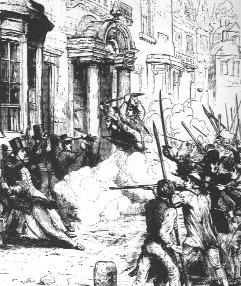
I like the idea of putting a scene on the bill. But I’d want a different scene on each bill. I tried googling “Marxism cartoon” and “Capitalism cartoon” but couldn’t find anything useful.
There are other ways of getting a papery texture. I used a displacement map for this and burned random parts of it. I also added a background, a sidebar with a pattern overlay (although I’m not sure I like it since I just used a default PS pattern… you can find something a lot better to use), and a pattern overlay to the main text. Oh, and changed the color of the gears to fit the overall color of the bill. Hope this gives you some ideas.

Actually I screwed up the displacement map, here’s a version with a crumpled paper texture over it set to multiply.
