I haven’t tried the “personal style” feature yet because I was worried it would sort of contaminate my results. I don’t know if it influences your generation or just what the explore feed shows you. I always like to work with a system at base line first to understand it before it starts doing any sort of personalization. I don’t like the idea that a system thinks it understands me from early results and sort of boxes me in without giving me the full creative breadth it’s capable of. But it sounds like an interesting feature.
(off-topic)
Not sure, sorry. Only used it a couple times. They’re a smaller Chinese AI firm. Besides, all the AI firms are sketchy in their own ways.
It applies to images you append with –p (for ‘personal style’, I guess?). It’s based on images you’ve upvoted or selected including your own images that you’ve liked. In my case, it figures that I like a grainier “artistic” style, sometimes more reflective of drawn/painted/printed images than photography along with color distortion and applies that aesthetic.
“Cat sitting at a bus stop” without the style tag:

“Cat sitting at a bus stop” with my personal style tag:

Having it be an option flag is a perfect idea! I’ll give that system a try tonight. I wouldn’t want my “personal style” to contaminate all my images, but being able to pull it out on command is very cool.
Midjourney will animate any image you use as a first frame reference, not just images that it, itself, generates. So I dropped in some real photographs I’ve taken (like of my cat, or birds) and it animates them pretty credibly. A lot of fun to make your own photographs come to life through its animation.
For example, here’s a real photo I took of a surfer:

And here’s how it animates
Now - can you tell it’s AI video? Yeah. But it doesn’t scream “fake”, it’s fairly credible. And importantly, I put no effort into it. All I did was upload a still image and clicked “animate” that and it did a very credible job of bringing that photo to life. Pretty amazing I think.
I just started using Midjourney today with the express intent of creating a graphic for a t-shirt for a group me and some others are starting.
It came up with some good ideas but no matter how much I told it to spell the group’s name right it never did and came up with some mess. Also, I kept telling it I wanted an image of an electric scooter, the kind you stand on with the tall pole at the front with handle-bars on top. 50% of the time it would give me a scooter like a Vespa. No matter how many times I told it the AI just kept going there. Very frustrating.
I have not yet figured out how to iterate on a given image. Tell it to take the image it just created but make some tweaks to it. I would be very surprised if you cannot do that but I didn’t figure it out in my short time with it so far.
Jury is still out for me.
Text has been difficult for AI image generators historically and Midjourney is still one of the older style systems that struggle with it. Certain more modern systems like gemini (especially the pro version) and imageGPT are much better at integrating text. It’s actually a fairly difficult problem - it seems so simply to insert text onto something - but understanding why it struggles requires understanding how alien these things “think”
You can try a split workflow - create the rest of the image with midjourney or another image generator and then insert text through a typical photo editor. That method can work really well.
As far as iterating on images - you have a few options. The simply is just “vary subtle” and “vary strong” - that will create an image with similar elements but mix them up a little bit. Move the subjects around a little, maybe swap the perspective a little bit. It’s a good way of getting an image that’s almost right but not quite where you like it.
There’s also the remix system. This lets you change elements to the image - to a degree. You can say things like “the subject is kneeling” or “the subject’s jacket is red” to make changes while preserving most of the rest of the elements. The important thing is that you can delete the original image prompt - that’s sort of baked into the remix system, it refers to the original image anyway - and then just use the prompt to describe the changes you want to make.
But it’s kind of tricky to use and it can misinterpret your intent. I’m still working on learning to use it.
One way you can do it is select an image (from a set of four) to upscale, and then choose “Upscale (Creative).” But, what you can’t do, as far as I know, are specific “tweaks,” like, “I like this image, but please show me different hair colors on this person,” or “show me different poses with a person who looks exactly like this.”
Upscale (Creative) sort of… fills in new details that help an image transition from being lower quality/resolution to higher quality resolution so that it looks more organically high resolution instead of just an upscaled lower resolution image. If you want to vary the image elements more than slightly giving more detail, you usually want to use “variation” rather than upscale
this is exactly what the remix tool is for, I think - as I mentioned above, it requires a bit of skill and knowledge to use properly and a tolerance for dialing in the right results. The simpler requests are easy - if you’re looking to change or expand something minor like “change this character’s hair color” or “they’re wearing a hat” that works well. If you do something that contradicts the sort of visual logic of the image like “make the cat a robot” - it will sometimes work and sometimes struggle.
I’m still learning how the remix tool works. It’s very powerful but can be very tricky to find the right way to approach something if it’s not a trivial task.
Thank you for this – I will have to give that a try, and learn how to use it properly.
If your image’s subject is obvious, like a person in a portrait, I find it’s easier to work with. If you have multiple subjects or things going on… I’m not exactly sure how to refer to them sometimes. I find that using “the subject” rather than he or the man tend to work better. You can sometimes refer to “the background” the same way. Like “the background is a desert landscape”
I also find that it’s better to just tell it what things are, rather than saying “change it to this or that”
Let me show you an example of what works.
I have a sort of “Florida Man” character, printed on a drink coaster, that I adore.

I used a remix prompt that said: “The subject is showing off a tattoo on his right arm - a wolf howling at the moon”

Which worked out very well. Well - it did mistake the right arm for the left, but the image works well anyway. There were versions where it correctly put it on his right arm, but I thought this tattoo was the best so I used it anyway. Really, I could’ve just said “arm” without specificity.
You’ll see the American flag as part of the tattoo. It tries to preserve the elements and the vibe of a picture even when you alter it. So in some pictures he’s standing in front of an American flag, in some he’s wearing an American flag bandana, in some he has an American flag tattoo - but midjourney seems to understand that the flag is an important part of this character.
But sometimes you’ll say something “change the lighting so that he’s lit from the side instead of the front” and sometimes it’ll get confused. Sometimes it will interpret your request to make sort of a split-pane before and after picture. If you saw “draw him as a cowboy”, it will overly-literally read the “draw him” part and give you a pencil sketch of that character as a cowboy next to the original subject.
Here’s an example where it kind of does both. The prompt is “Draw this character as a WWE wrestler from the 1980s”

It does change the image of him to be more like a WWE wrestler, but it also drew him as a pencil drawing right next to him. Which actually kind of works in a way, it’s a fun picture, but clearly not what I intended. This is a good example of how you have to be very careful with your words but especially with a remix prompt. Saying “this character is a WWE wrestler from the 1980s” works - leave the “draw this as” part off. Using the word “draw” makes it think - oh the user wants a pencil sketch.
It’s an extremely powerful too but a temperamental one. I think there’s probably a high skill ceiling to using it.
And let me give you an example where I’ve struggled and haven’t solved the problem.
This is my original cheesecake kitten

Adorable, right? I decided to make a whole series of plush collectible figurines with the remix tool.
Sometimes you can tell the remix tool what to preserve and what to change - but I’m not sure this is actually necessary. I think it defaults to preserving everything it can. So this was one of my early attempts at a prompt but not necessarly a good one. But here’s the prompt remix prompt:
“keep the cheesecake as it exists. preserve the kitten pose. change the fur color of the kitten to be darker”

And I got a variety of pretty good results. It preserved the cheesecake. The pose. the figurine look. And it did change up the kitten’s fur colorations.
Good job remix.
But it wouldn’t produce dramatically darker colors. You’d get lighter colors like beige and tan and even some darker points like this Siamese cheesecake kitten

But not black fur, even when I specifically called for black fur. The black fur remixes came out with a completely different look and texture.
I asked copilot to help me figure out why I was struggling to remix it into black fur and it said that Midjourney tries to preserve a certain aesthetic coherence, and the way black fur reflects off the sort of lighting you have does not show the same sort of plushy material as well as yours did, so it’s navigating competing constraints and “black fur” and this style of lighting and plushness were all conflicting so it was changing different elements to try to achieve a balance.
I got some very different results like this

where the model clearly compromised on the fur texture.
Copilot suggested various routes - changing the lighting, doing it as multi-step where you sort of generate the cat with the different fur texture but the right color, and then do another pass where you focused on making the fur plush. And they all.. sort of almost worked.
This was about the best result I was able to get

But clearly it stands out as different from the others.
Anyway, the lesson of this story is that LLMs are aliens. Their thinking is weird. Tasks that seem simple and obvious to us are not for them. They’re balancing weird constraints we’re not thinking of. Sometimes you have to do some creative problem solving to get it to do what you want. If the tool doesn’t do what you want at first, try a different approach. Turn up your chaos value (–chaos 0-100) to give it more creative space to work with. Give it a few different runs to let it try out different ideas. Change how you word the prompt to see if you get closer.
Try to think about how the elements you’re trying to change might appear in its training data - how pictures would’ve been described. For example, it doesn’t “understand” distance - don’t say “make the subject 5m away” - because while indeed, you may find photos in its training data where the description of that photo does indeed say “the subject is 5m away”, that will be be rare and overly specific. Instead, use more general terms. The subject is at medium distance. The subject is barely seen, far off in the distance. The subject fills the frame. That’s more likely to match up to how the images in its training data were described, so it better understands what you want. It’s not evaluating the logic of your prompt in the way a human would. It’s trying to merge different parts of its training in a way that fits your constraints. For challenging tasks, you have to try to think about wording things in a way more compatible with how it thinks rather than trying to force it to understand what you want.
In fact, let me show you how copilot described the black fur problem so you can get a better understanding of the failure mode.
copilot's analysis of the black fur materials problem
The real competing constraints are:
Material physics
Black fur absorbs light. Plush fur reflects light. These two behaviors contradict each other under the lighting conditions of your original image.
Lighting physics
Your original cheesecake kitten uses:
- soft, diffuse lighting
- warm color temperature
- high surface reflectivity
- low shadow contrast
Black fur requires:
- harder lighting
- higher contrast
- cooler tones
- more directional shadows
These lighting requirements break the original vibe.
Identity anchoring
The cheesecake kitten’s identity cluster includes:
- warm palette
- soft plush texture
- bright, high‑key lighting
- gentle, pastel background
- toy‑like reflectivity
Black fur disrupts all of these.
You were right that the model is balancing constraints — but the constraints are material + lighting + identity, not just “coherence.”
 What’s actually happening under the hood
This is the key insight:
 Black fur is not just a color change — it is a material change.
Midjourney treats “black fur” as:
- a different reflectance model
- a different texture
- a different lighting requirement
- a different emotional tone
- a different material category
So when you ask for black fur, the model thinks:
“To make this look realistic, I must change the lighting, the texture, the palette, and maybe even the cheesecake.”
This is why your black‑fur versions:
- look like different figurines
- have different lighting
- have different materials
- sometimes lose the plush aesthetic
- sometimes lose the cheesecake entirely
- sometimes change the kitten’s proportions
The model is not being stubborn — it’s trying to maintain physical plausibility.
 Why your “best result” still looks off
Let’s analyze the black‑fur cheesecake kitten you posted:
- The fur is black, but the plush texture is less visible
- The lighting is harsher and cooler
- The cheesecake is darker and more matte
- The background palette shifts
- The kitten’s proportions subtly change
- The overall vibe is less “collectible plush” and more “realistic figurine”
This is the model’s compromise:
“I’ll give you black fur, but I must change everything else to make the image coherent.”
You correctly noticed the result “stands out” — that’s because it belongs to a different identity cluster.
I put that in a details box because some people get really irate about quoting LLMs on message boards. Which is a little silly on a thread about LLM image generation. But to be on the safe side, I format it like that so people can decide for themselves if they want to read it. But I think it’s really insightful and explain the sort of elements that the model is trying to balance when it gets your request “wrong”
I also asked copilot, given what we were discussing about what works with the remix tools, to write a guide on best practices. It’s useful.
copilot's guide on the remix tool
How to Think About Remix: A Practical Guide for Humans
 1. LLMs Are Aliens — Don’t Expect Human Logic
Image models don’t “understand” scenes the way people do. They don’t track objects, remember anatomy, or reason about cause and effect.
They interpret your prompt as a static description and try to merge:
- the original image
- the new prompt
- the patterns in their training data
…into one coherent picture.
If something seems obvious to you but the model keeps missing it, assume the model is following a completely different logic.
 2. Describe What Is , Not What to “Change”
Imperative commands like:
- “change the lighting”
- “make the fur black”
- “turn him into a cowboy”
…often backfire because the model doesn’t understand “before vs after.”
Instead, use declarative descriptions:
- “the lighting is soft and directional from the left”
- “the kitten has deep black plush fur”
- “the character is a cowboy from the 1880s”
Declarative phrasing collapses the prompt into a single interpretation instead of two competing ones.
 3. Remix Preserves Identity Anchors
Remix tries to keep the most important parts of the original image — the things that define its identity.
High‑salience anchors include:
- the main subject
- the pose
- the composition
- the material (plush, ceramic, metal, fur)
- the lighting style
- the emotional tone
- iconic elements (like your American flag motif)
If you try to change something that the model considers part of the identity, it will resist — or mutate the entire image to compensate.
This is why your cheesecake kitten kept its pose, its vibe, and its warm palette, even when you asked for black fur.
 4. Common Remix Failure Modes
A. Split‑Pane / Side‑by‑Side Images
Cause: The prompt contains two incompatible descriptions. Example: “draw him as a WWE wrestler” The model interprets:
- “draw him” → pencil sketch
- “as a WWE wrestler” → full render
It satisfies both by putting them next to each other.
B. Wrong Limb / Wrong Side of Body
Cause: The model doesn’t track anatomy. “Right arm” and “left arm” are weak constraints. Use “the arm” unless the distinction is critical.
C. Identity Drift When Changing Materials
Cause: Material + lighting coherence. Black fur, chrome metal, glass, velvet — these require different lighting physics.
If the original lighting doesn’t support the new material, the model changes everything else to compensate.
This is why your black‑fur kitten became a different figurine.
D. Over‑Literal Interpretation of Verbs
Words like:
- draw
- sketch
- paint
- sculpt
…are treated as style tokens, not actions.
“Draw him as a cowboy” = “pencil sketch + cowboy version.”
 5. How to Solve Tricky Remix Problems
A. Rephrase the prompt using training‑data language
Models understand:
- “medium distance”
- “fills the frame”
- “far in the distance”
They do not understand:
- “5 meters away”
- “30° camera angle”
- “change the lighting to…”
Use the vocabulary photographers and catalogers use.
B. Break the task into steps — but in the right order
If you need a big change (like black fur), try:
- Generate a version with the new material/color first
- Then remix that version to restore pose, vibe, or plushness
This avoids fighting the identity anchors all at once.
C. Use Chaos When the Model Is Stuck in a Rut
Chaos helps when the model keeps giving you the same interpretation over and over.
It does not help when the model is resisting a change because of material‑lighting constraints — but it’s great for escaping semantic gravity.
D. Give the Model Multiple Attempts
Some prompts only work on the 3rd or 7th try. Remix is probabilistic — not deterministic.
If you’re close, keep iterating.
E. Think in Terms of “Semantic Clusters”
The model doesn’t see:
- kitten
- cheesecake
It sees:
- “cheesecake‑kitten” as a fused concept
- with a specific palette, texture, and vibe
If you want to change one part of a fused concept, you must phrase it in a way that doesn’t break the cluster.
 6. The Mindset That Makes You Good at Remix
- Don’t fight the model — work with its tendencies
- Assume it interprets your words literally
- Assume it merges all instructions into one static scene
- Assume it preserves identity unless forced otherwise
- Assume materials and lighting are deeply linked
- Assume verbs like “draw” and “change” will be misinterpreted
- Assume you’ll need to iterate
If something doesn’t work, don’t get frustrated — try a different angle.
 In One Sentence
Remix works best when you describe the final scene clearly, avoid imperative commands, respect the model’s identity anchors, and phrase your instructions in the language of its training data.
FWIW, I think this is a pretty doable task for certain other models, like Nano Banana (Gemini):
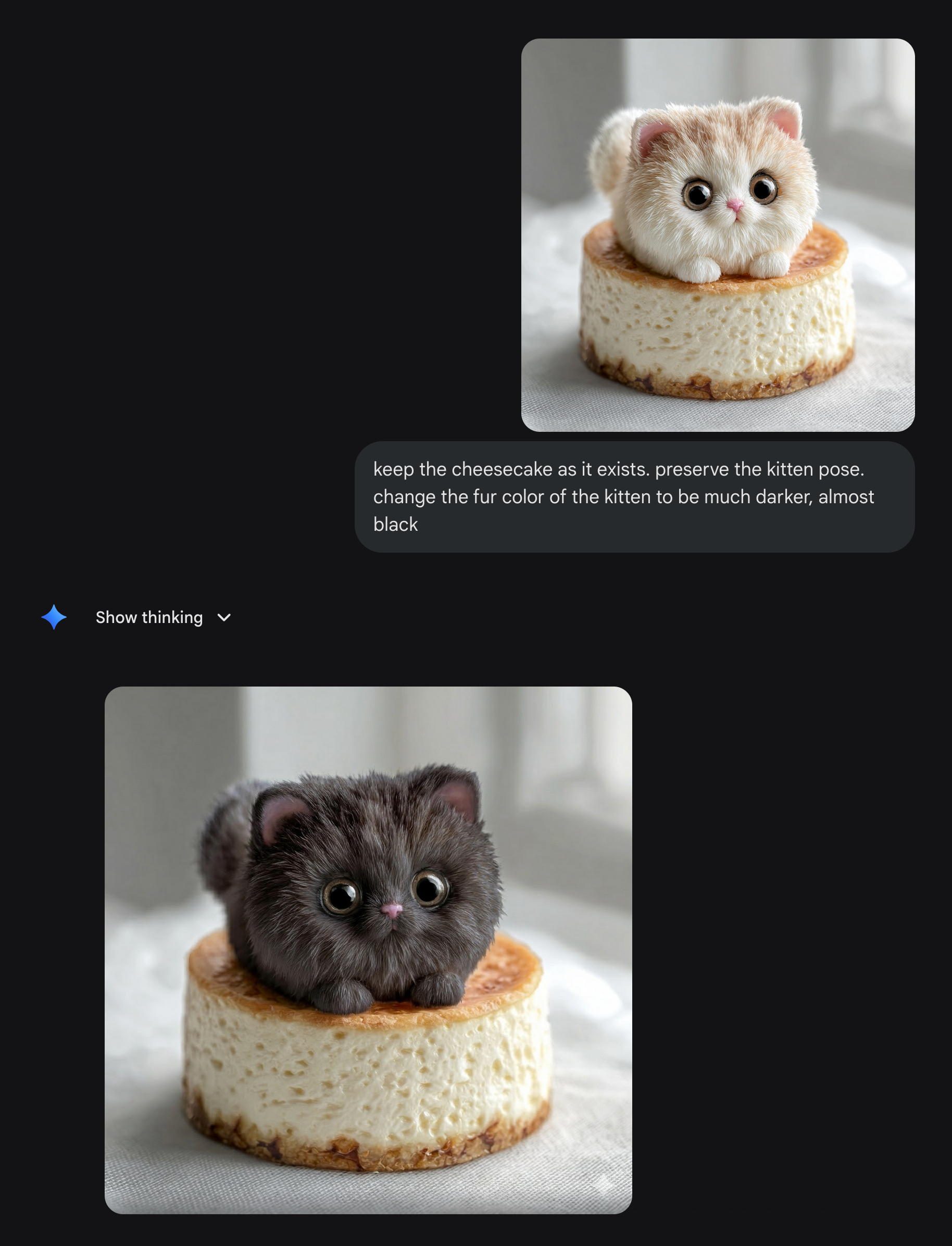
Image-to-image editing with a preservation of original detail is one of that particular model’s strengths. It preserves not just what’s explicit in your prompt but the unspoken detail, like the cheesecake texture, hole patterns, background, etc. In my experience it’s not always perfect at this, but often better (sometimes dramatically so) than the OpenAI and Midjourney models at that particular task.
Mmm, I think Copilot hallucinated that. The image models don’t work like that (based on physical materials modeling like in 3D games).
This particular use case is probably just not one of Midjourney’s strengths right now.
Or with the wrestler dude:
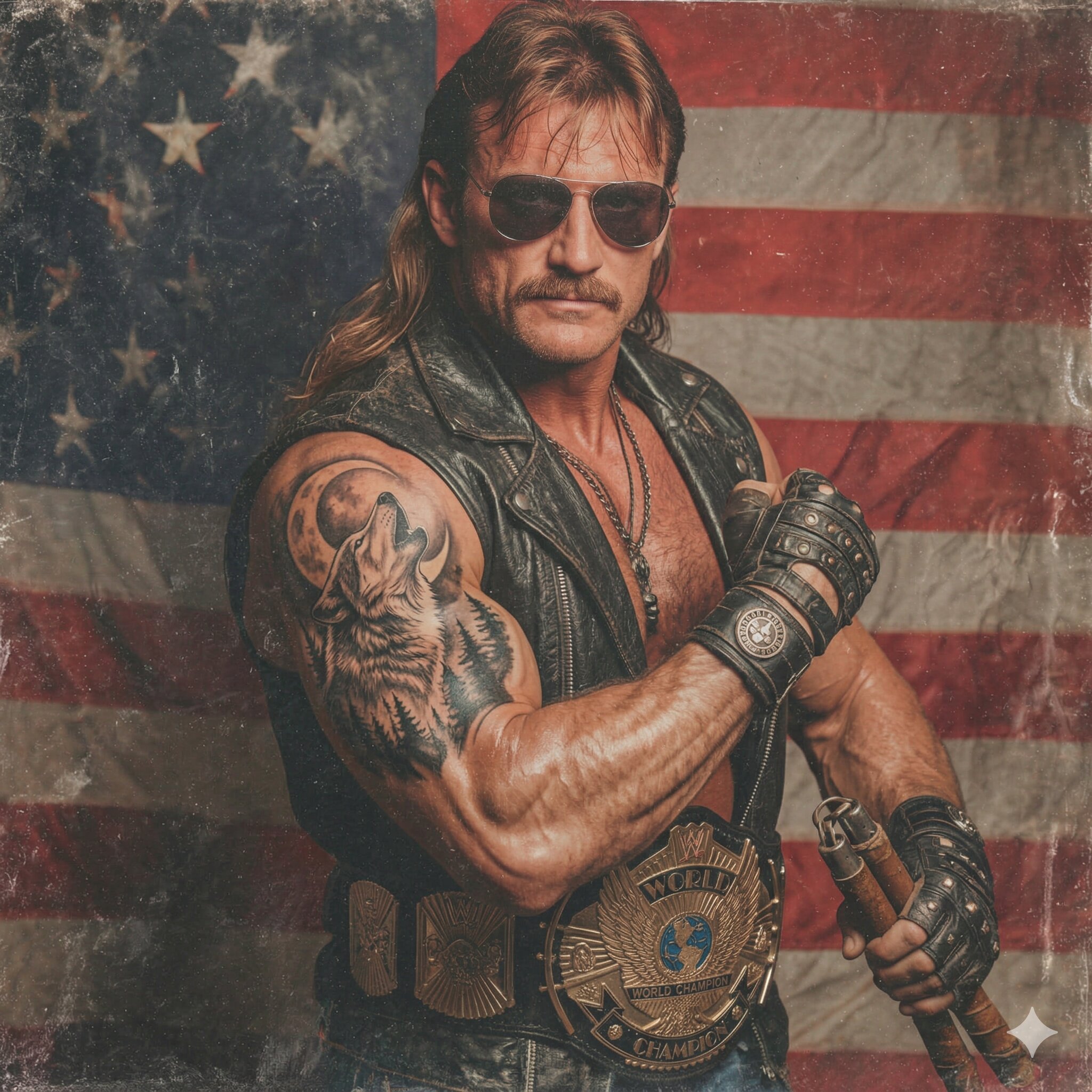
The models all have different strengths and weaknesses that change with every release… there are people benchmarking them all the time, e.g. Image Arena Leaderboard - a Hugging Face Space by ArtificialAnalysis
Right now it looks like this:
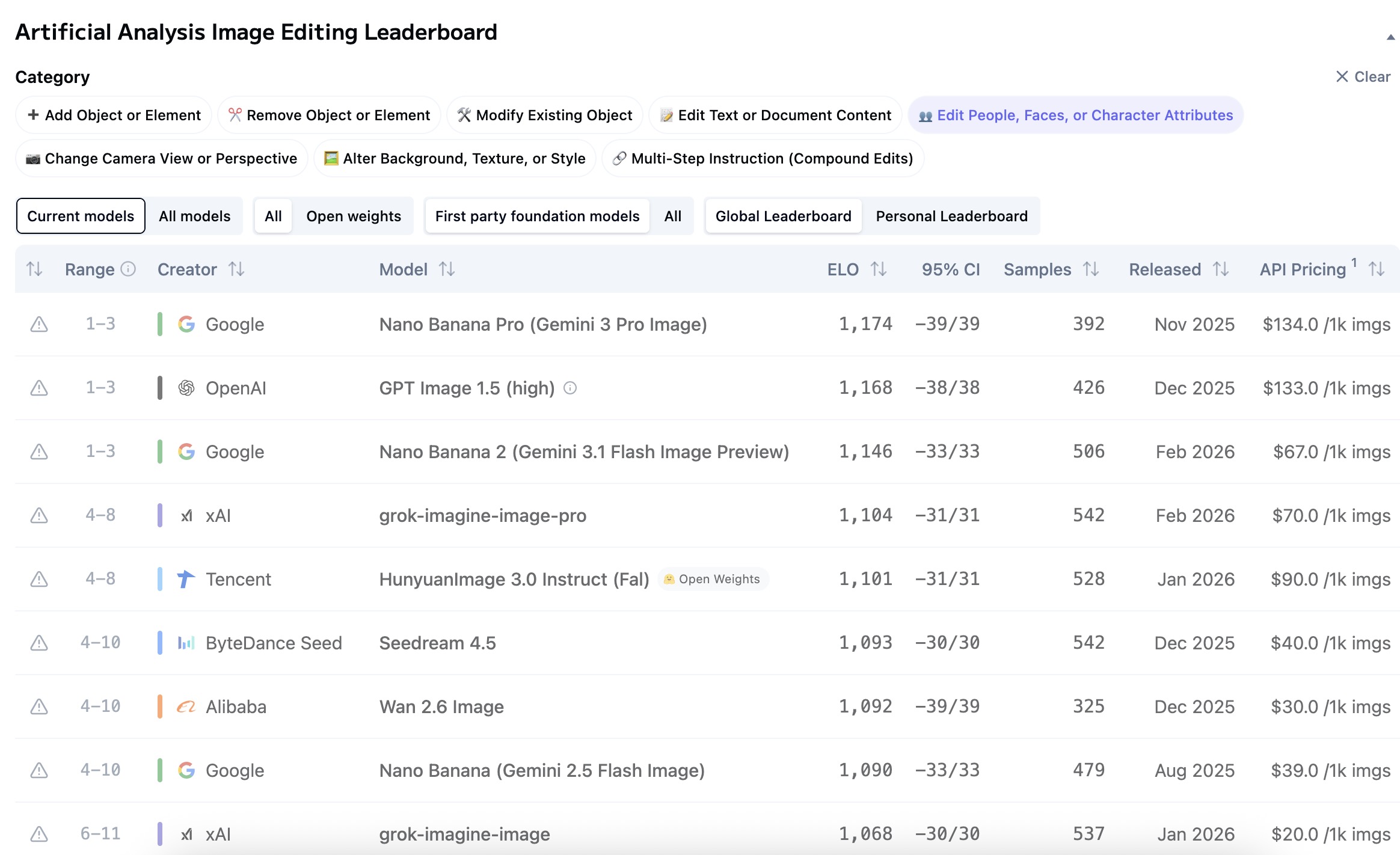
Midjourney isn’t on the image editing leaderboard but it is on the text-to-image one. (I don’t think Midjourney has a proper image-to-image workflow the way the other models do; when you remix, it seems to be generating new images fresh from a decomposed picture, like picture to prompt back to picture. Other models can work directly off a source image and modify them in-place, keeping much more detail that way.)
Good points and thanks for showing me how it can work. You’re right. I might be forcing midjourney to try to do something it’s not good at which other models might do better for very specific purposes. I’ll keep that in mind. The black cheesecake kitten came out really great.
So rather than struggle with midjourney, if I have a specific outcome I’m having trouble with with, I could try gemini or imageGPT.
The main advantages of midjourney are the workflow, the ease of iteration, the various tools. It’s a very free-flowing creative journey that I really enjoy. But trying to hammer at it to produce the exact image I want when it’s struggling is somewhat misguided. What I should do use midjourney to iterate, explore, create, and when it’s struggling with something - just hop over onto another tool that’s better at that particular task. Those tools can be genuinely better sometimes when your goal is “I have an exact image I want to generate with a very specific set of criteria”, versus where midjourney is better at a sort of “I want to examine a vibe or an idea and iterate many times to explore that idea” workflow
Yeah, exactly. I was typing the same thing but you stole the words out of my mouth 
No reason to lock yourself to just one model/tool/company. They can all be used together, and they’re each getting better in different ways every month.
And indeed I already do that with textual LLMs. Copilot is my super analytic detailed LLM that basically presents a powerpoint every time I ask it a question, which is really good for certain types of tasks like learning or analysis. I use Claude for more naturalistic human interaction, like if I want to discuss what I like about certain movies and ask for recommendations, or if I want to rant about something and get a ranting partner who won’t get me tired about bitching about stupid things.
Okay, so I was playing around with gemini (I think it’s nano banana 2.5 flash that free users get access to) and they added an amazing editing tool. You can now click on an image, and draw on it in various colors and even text. And use that to instruct gemini on how to refine the image. So you can take your marker and draw a red circle around a telephone poll and draw a blue circle in the sky, and say “can you remove the telephone pole I circled in red and add a flock of birds where I put the blue mark?” — and that’s a really cool way to interact with an image generator, too.
And it did my task - take this photo I took and turn it into an oil painting - much easier than trying to coax that result out of midjourney. This is where the benefit as a hybrid chat bot and image generator kicks in - it knows how to take a natural language description and write its own prompt.
Though to be fair midjourney has a function like this - “conversation mode” - which I haven’t tried yet. It’s not going to be as sophisticated as gemini, but it may help with some of these issues where I don’t know how to design the right prompt to get the results I want.
I wish more image generators did the 4 picture output method of midjourney - it’s so much better (albeit more computationally expensive) as a workflow.
Edit:

I drew the outline of a sail boat into the picture and asked Gemini to add a real sailboat where I drew it

How cool is that?
But! I asked gemini if other systems have this ability, and it said that many did, including Midjourney, where you would use the edit tool to select a region and then a prompt to fill it. So you can still accomplish this task with midjourney, though this is one where the gemini workflow is actually a little better.
Sorry - as a follow up, I’m familiar with the concept of inpainting so this wasn’t entirely new. But I tried inpainting with stable diffusion a while back and it was a pain in the ass and worked right like 10-25% of the time. The workflow here is remarkable. Draw what you want, circle an area, explain in plain language - that’s the improvement. You’re not a techie trying to use the right prompt and the right mask to get your result, you’re just telling the system in plain easy terms what you want and it works.
Yeah. The models are advancing incredibly fast across most of the major fronts (text, science, logic, math, images, coding, music, etc.). Video is on its way out (too expensive for now) but the rest just keep getting better.
Nano Banana is a huge improvement in both quality and UX over the Stable Diffusion apps of just 1-2 years ago.
Google is one of the few companies here that has a meaningful advantage and a moat; they have both their own models and their own AI hardware (and plus a horde of super smart scientists and engineers and bazillions in capital). Most other companies would be lucky to have even 1-2 of those things.
I’d be surprised if Midjourney doesn’t get bought out eventually. The creative workflow is nice, but it’s something any of the other providers could copy overnight if they wanted to. (You can already do something similar just by hitting the “retry” button with any of the other providers, except you have to generate, wait, retry, generate, wait, retry, etc.)
But if you do it via API instead you can generate as many as you want in parallel. You can probably have Claude or Copilot write you a Midjourney clone that uses Nano Banana under the hood.