Midjourney image/video creation tool

Midjourney is an AI based image and video generation tool. I’ve recently subscribed to it and it’s genuinely one of the most fun creative tools I have ever seen in my life. I’m having a blast with it.

I want to state up front that this isn’t a thread for the discussion of “AI slop” or whether can be a tool to create art or any of that. Here is a better place for that kind of discussion.

I wanted to share how cool it was with people (this post may sound like I’m an evangelist but I’m honestly just really enjoying it), share some of the things I’ve made, and invite others to do the same.

So I’ve tried other image generators before - DALL-E 3, imageGPT 1.5, google gemini. They’re all very good. They can create very interesting photos. But the workflow isn’t that fun. I’ll usually create 2 or 3 images and then I’m all done with that. If the image isn’t quite what you want, you have to try to master your prompt engineering to get it right. Which is a little bit frustrating.

Midjourney works quite differently. It always outputs 4 “takes” on the same idea. You can control how similar or different or creative these takes are. But the interesting thing is that you’re no longer trying to perfect one prompt to get the right picture. Rather, you’re generating 4 pictures and selecting and building off the one that most matches your intent or that you find interesting. And the tools are designed to easily iterate those images.

So you generate an image. Tropical sunset on a Hawaii beach. It gives you 4 photorealistic candidates (or you can make them oil paintings if you prefer - whatever). You pick the one you like the most, and you click “vary strong” which means that it generates 4 candidates with similar elements but are differently composed images. Ah, you like the #3 variation the most. So now you “remix” that image and you add the prompt “add some sailboats” - now you get 4 images of your chosen image that now have sailboats in them. You pick which of the 4 images you like the most and you click “animate” and it automatically animates your image so now the waves are rolling in and the sailboats are moving along. There are, as always, 4 different animations, all of which have a different take on what to animate. Some may look like a time lapse with the clouds moving fast across the screen. Some may be real time and show the waves coming in gently and the sailboats moving very slowly.

You started with a very simple idea and now you’ve refined several times, added elements, and even animated it. And that’s only using a fraction of the tools it has available. That’s what makes Midjourney more fun than the other image generators. It also outputs very high quality images. Quite possibly the best of any image generator.

And what’s even more remarkable is that it’s a team of like 100 guys at a company that funds through user subscriptions. No trillion dollar google, no venture capital billions - a small business that has a traditional business model that somehow beat out the tech giants. And that means it’s not free. They’re not trading venture capital for user share. They’re funded like a normal business, and quite frankly I appreciate the honesty of it. You can get 5 hours of GPU time (which would last for a few hundred images or video) for $10 a month or much more for $30 a month, including unlimited low priority image generation (may have to wait a minute), 15 hours of GPU time. You can pay the $10 to try it out, and if you like it, upgrade to the $30. That’s what I did.

It’s a very sophisticated tool and I don’t know how to use half the options it offers - I’ve only been using it for 3 days - but I’ll show you some of the sort of stuff I’ve created with it in that time. I’ll also share the prompts and tools I used - I think it’s more interesting that way and recommend you guys do the same if you share your own stuff.

Prompt:“a humpback whale jumping out of the water pictured on its ascent - its tail is still in the water. it is in samana bay in the dominican republic. turquoise tropical water, the tropical island in the background. the camera is a few meters above the water’s surface watching the whale from approximately 10 meters away. photorealistic style.”

This is a real place I’ve been and so I was trying to recreate an experience. I think that photo is excellent and could be mistaken for a real photo.

prompt: two humanoid robots fighting with light swords on the rooftop of a cyberpunk city. it’s night time. there’s light rain. the neon signs and screens light up the scene.

Prompt:An exhausted soldier in a war zone posted on guard duty for the night as the rest of his unit sleeps. there’s a campfire in the background. he has a rifle slung across his chest. his combat uniform is dirty, his gear worn out from extended time in the field

Let me show you an example of the workflow. I deliberately used a vague and absurd prompt to see what it would do and I got this result:

Four different takes on the same idea, 3 of which are genuinely interesting. There’s picture number 3, the literal kitten made out of cheesecake that’s begging “… kill me. kill… me”

Number 1, the adorable pixar-ish cartoon cat that’s a garnish/topping on the cheesecake (the little dollop of whip cream on her head means she’s part of the cheesecake), and image 4, which is sort of a pastry chef’s take on what a kitten-shaped cheesecake would look like. Two is a little lazy, just sort of… kitten+cheesecake. One simple and silly idea - 3 genuinely interesting results.

I left poor #3 alone because I didn’t want to create any more kittens begging for death but iterated on #1 and #4 to really good effect.

I’ll also share an example of the (rather incredible) video it creates. This is the cheesecake garnish kitten. You can manually animate (describe what you want to be animated) or just click animate and see what it does. This was an auto-animation. It gave the character life and cartoon-kitten behavior automatically. Really impressive.

You also get 4 video outputs with different ideas - I also animated that whale image. Two of the variations correctly made a pretty good looking whale jump - out of the water and back in. But two of them seemed to think that whales defied gravity and created a sky whale. But even that failure mode was genuinely interesting and pretty funny.

So - if anyone wants to share their stuff, I recommend carefully curating it. Share 1-4 images with us, tell us your prompt, your idea behind it, don’t just dump 20 images with no description.
If anyone uses midjourney, we can also follow each other. this is a link to my profile. Feel free to post yours.

Do you know if it only generates video from prompts or can it change an existing video? I’ve been trying to find a user-friendly service to turn actual videos into cartoon style. Anything that I’ve found that looks even semi-close to being able to do that is very tech-intensive or, if not, it outputs crap.

I’m actually not sure about that. I know that you can upload your own images taken from anywhere and use them as a sort of “inspiration” - you can use it as an image prompt (it inspires the composition), a style prompt (it tries to inspire the style), or an omni prompt (I think you can tell it to do various things like keeping a character or a pose) but I haven’t been able to get that function to work very well yet. There are a lot of sort of advanced user stuff that I haven’t figured out yet.

I tried to upload a video file (mp4) into the image prompt system and it told me invalid file type.

There’s nothing on the video documentation page that suggests you can upload your own videos, so my guess is that no, it doesn’t have any sort of video to video functionality.

Hey @SenorBeef, have you already seen this other thread? AI image generation is getting crazy good

A lot of Dopers there are having fun sharing AI image creations with each other (including but not limited to Midjourney). Just mentioning it because I don’t see you in that other thread (unless I missed it).

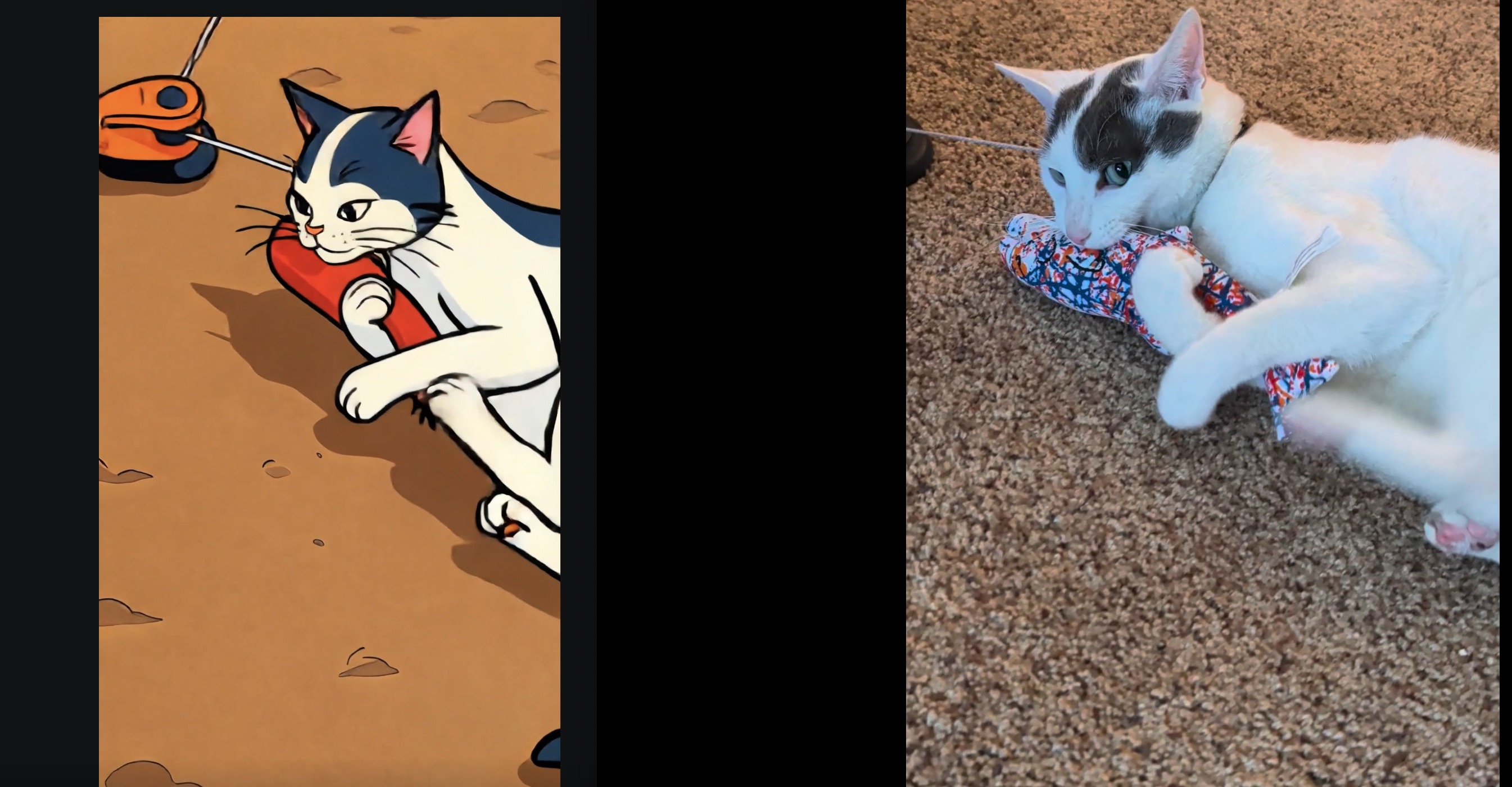
Kling.ai can do this sort of video-to-video, sort of. But the results aren’t terrific…

It’s not worth uploading the full videos, but here’s a screenshot. AI on left, original on right:

Thanks, it’s not the worst I’ve seen! Do you know if Kling is a reliable/reputable company?

Thanks for checking!

Fair point. I should participate in that thread. I hope this one doesn’t seem too redundant. In some ways, it is - if it’s just an image sharing thread, we don’t need an image sharing thread for just one image generator. But it’s also a thread that says “hey, even if you don’t like AI image generation, you should really take a look at midjourney because the workflow is genuinely different and more interesting and the results are spectacular”

This would apply to me specifically as an example, who barely used AI image generators until Midjourney, and now I’m obsessed.

I’ve been using Midjourney for about three years, mostly to do images (characters, locations, spaceships) for tabletop role-playing games. It’s improved dramatically in the time that I’ve used it, and I’ve learned a lot of the ins and outs for getting the sorts of images that I want for my games.

A few that I’ve done recently:


I love the city and the steampunk dog. I didn’t realize that it would interpret images as in-line in the thread if we just posted midjourney links, cool. I can’t find a way to show a 4 series-batch (called a job) as a midjourney link. You can get the job ID number, but if you put that into a URL, it redirects to the first image alone, it doesn’t show all 4. So I’ll still use screengrabs to show them I suppose. Apparently this “direct link to job” functionality used to exist but they removed it at some point.

I found a new way to show you guys how interesting of the 4-result system is and I want to show you one of the variables you can set - chaos.

The chaos value is essentially “how far apart / how creative can the 4 image creation be from each other?” - if you have chaos as 0, the 4 images will tend to be relatively close variations on a theme. But if you up the chaos, you get wilder results that diverge more from the prompt you created. Sometimes you end up with goofy or stupid results, but sometimes you get unexpected and great results. Chaos can be added with a --chaos 0-100 number to the prompt or it’s in the prompt generator options as “variety”

Let me give you an example.

I ran “a stereotypical American” with chaos of 50. I got a few quite different takes on what is a stereotypical American. But the 4th one is… perfect. It’s a beer coaster with an image of Florida Man himself. I adore it.

And so I took that 4th image, and ran a 50 chaos variation series.

And it’s just so beautiful

What I did was went back to Midjourney, selected “open in new browser tab,” and then pasted that URL into the thread. But, yeah, I only did images which I’d selected from the “foursomes,” and had upscaled into full images.

Some awesome stuff in there. Scrolling through my feed is a bit of a fever dream, mainly because a lot of it was “shitprompting” with friends on Discord and, devoid of context, would probably worry most people. Even now, I almost never use the web interface and do anything through the Discord bot (but not in the official channel). Here’s a small example of stuff: A couple images for Starfinder, a couple images for Twilight: 2000 (a post-apoc RPG set in Poland) and a couple just random images.

Those are all from the last few years, a lot of them from v6.1 though honestly the change from v6.1 to v7 didn’t impress me much and I saw a number of people drop off because there wasn’t much new to mess with. Hopefully v8 is a bit more successful although, at this point, I think they have image quality pretty well nailed down and need to improve prompt coherence to match other services. But without the benefit of some giant LLM backing them up, I don’t know how they do that. Guess that’s David’s problem! Also, that’s not meant to diminish SenorBeef’s new found fun with it – we’d been around since v3 so we’re all cranky and old and harder to impress at this point.

I’ve been using copilot to help me learn how to use midjourney (it’s AI all the way down) and he had an amazing interpretation of my Florida man photo shoot.

The Man Who Has Opinions about Fireworks Laws went to a photo shoot in his finest leather vest, the one he reserves for court dates.

One thing that I’ve struggled a bit with, with Midjourney, is using the “zoom out” and “pan” tools. I can start with an image I really like, but when I try to expand on the image using one of those tools, the results are nearly always terrible. It’s a bit frustrating.

Have you tried it recently? Because I’ve found the pan and zoom out tools to be excellent.

Let me show you.

I created a sunset scene on an alien moon.

And I thought - cool - but I want to see more of the giant planet we’re orbiting. So I did a pan left.

This was my favorite of the 4 results

It preserved the original scene perfectly and just extrapolated what would be to the left of the scene. There was a version that was worse - it seemed to lose track of what the planet was and it sort of became a cloud that faded away - but there’s the beautiful of the 4 results system again. 3 of them were genuinely great extensions of the image.

I also did a communist propaganda baker series. I liked this one:

So I did a zoom 1.5 to expand the scene.

And it did its job - it created 4 perfectly plausible expansions of that scene. This was my favorite:

I have sometimes decent luck with the outpainting/panning but the inpainting is almost always terrible for me. If I really want something done, I just save the image and use local AI image gen to inpaint it.

That’s actually my main use case for MJ right now; getting base images to then import locally and play around with.

Within the past two weeks, in fact. Still janky, at least for my images.

I definitely get janky results sometimes with the remix tool (I don’t think I understand how to use it properly) and I haven’t tested it with a lot of scenes, but you can see above that the pan left and zoom 1.5x functions worked almost perfectly for me. Some outputs were more perfect than others, but I’ve only used each tool once and you can see the results above.

Remember that you can just keep cranking out results until you find one you like. The first 4 interpretations may be janky but maybe the 5th one works great.

I should add that “zoom 1.5x” is a terrible name for what that tool does. It should be called more like “zoom 0.67x” - a “zoom” number above 1.5x ALWAYS means that you “zoom in” - that your field of view narrows - and midjourney’s version means the opposite. I genuinely didn’t know what purpose it was supposed to serve (it sounds like a cropping and upscale tool) until I realized it was labelled to be the opposite of what it actually does.

Oh, heck, yes. I iterate and iterate when I’m making images, but panned and zoomed ones don’t seem to get any better with more tries, at least for me.

That’s 30 Hour Privilege talk. Some of us have to watch our minutes! :smiley:

(Actually, it’s pretty trivial to get an extra hour a day if you want by image ranking plus that helps refine your personal style tag)