It’s not necessary to buy an actual Dell-branded SSD. One from any manufacturer will work, as long as it’s the correct form factor.
My old drive spec (linked earlier in the Search thread) is form factor 2.5" x 7mm Fits All laptop.
Pasted from the drive info link
The Dell is Form Factor M 2
Is that the Same thing?
I’ll check NewEgg for laptop drives.
Absolutely not! 2.5 is an SSD that looks like the old mechanical mobile HDDs that fits into a conventional HDD port. M.2 is basically a chip that plugs into the motherboard. I’ve not seen any docking stations that accommodate M.2 drives, though there may be some.
It’s actually a bit more complicated because you have to prepare the USB stick first. Burning a CD is actually simpler.
Ok.
I’ll checked Newegg for a standard 2.5 in laptop drive
Ah, WTH
I might as well quit screwing around.
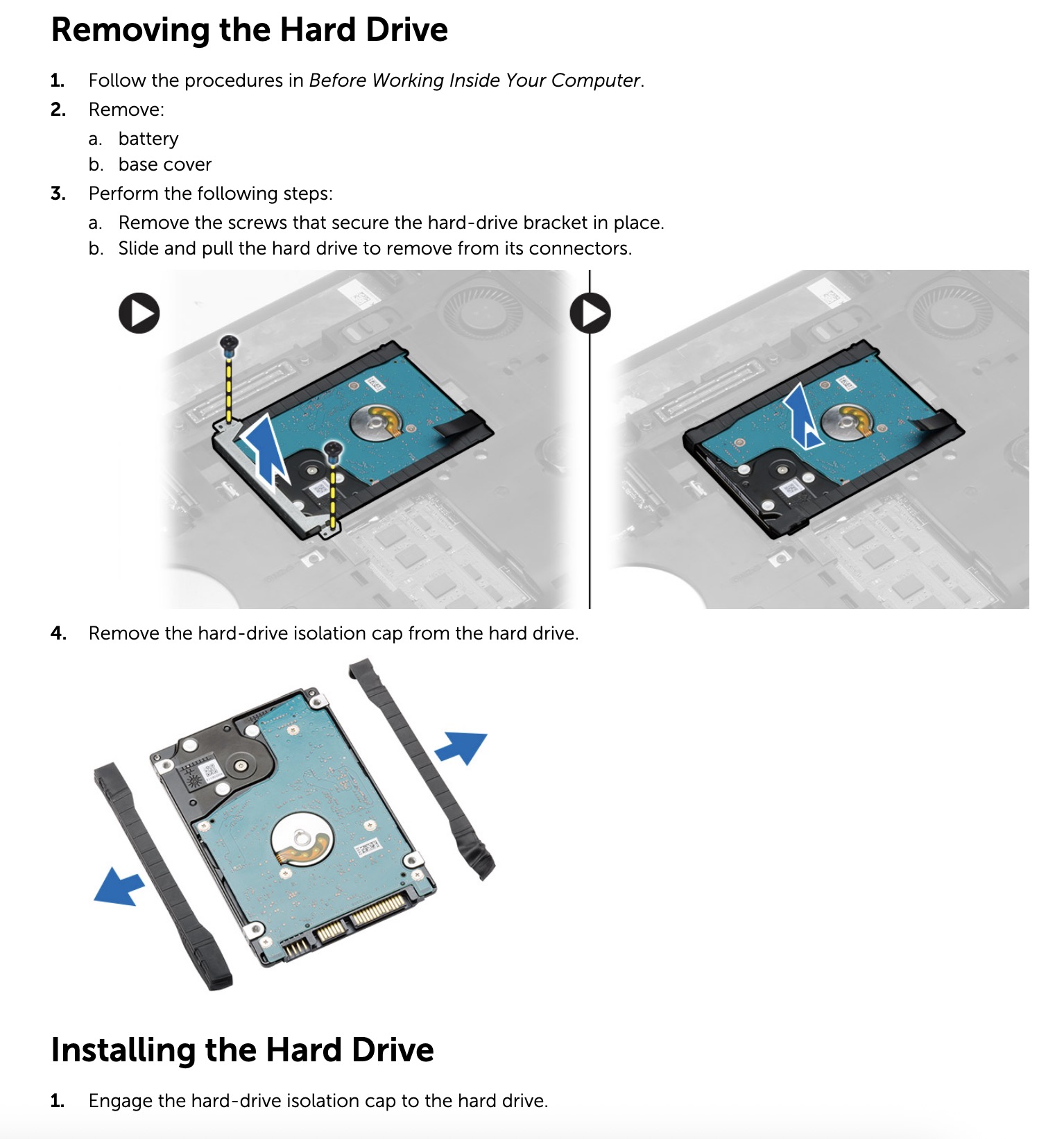
An upgrade means taking the back cover off the Laptop and unscrewing the old drive. Then gingerly unpluging the fragile connector.
1TB it is.
Hopefully the bios can recognize 1TB
Coming in here late from the other thread, so this might’ve already been said, but you don’t technically need to store the drive image somewhere else (USB stick, SD card, etc.).
You can directly clone the old drive to the new drive: Clonezilla Live Doc
It’d work something like this:
- Get a USB drive (1 GB or larger)
- Put Clonezilla Live onto it
- Connect the new, empty SSD to your computer (via a USB docking station/adapter/enclosure type thing)
- Boot into Clonezilla Live on the USB drive (it includes its own lightweight bootable OS). At this point you’ll no longer be in Windows, but the Clonezilla runtime environment
- Use Clonezilla Live to directly copy your old SSD over to the new one. (Read the part about the
-k1: Create partition table proportionallysetting in order to make proper use of the larger space on the new drive, while keeping your old files)
Then you can try to boot from the new drive (while it’s still in the USB enclosure, just to make sure it works) and then put it into the actual laptop slot once you’re confident everything works as intended.
It just saves you a step of having to first image the disk onto another medium only to then recover that image onto the new SSD… no need to do that when you can do a disk-to-disk clone directly. You can just copy the boot partitions over directly.
(Make sure to disable Bitlocker first, if it’s currently enabled)
Do you know what kind of Dell laptop you have (its exact model number)? You should also make sure it even has a user-serviceable hard drive before you buy anything.
The SDSSDA120G is a 2.5" SATA SSD, so you’ll need something like it (not a M2). The Samsung you linked to should work, but if I were you I’d double-check the instructions or service manual for your Dell laptop first just to make sure.
PS On the newegg page for that, be sure to choose the “Sold by NewEgg” version… it’s $150 instead of the $240 or so that the default 3rd-party seller is asking for. (edit: Oh, it’s out of stock. Amazon and Best Buy both have it for $150 though.)
Awesome advice.
Thanks Reply.
I need to download the Dell manual and confirm my bios will recognize 1TB drive.
If so. an upgrade from a Laptop with 128 GB almost full drive, to 1 TB would be fantastic.
My main goal is keeping my registered Software happy.
Reinstalling means notifying every company that I’m changing hardware.
You bet.
PS Rescuezilla looks like an easier-to-use GUI built on top of Clonezilla: Screenshots | Rescuezilla (Clonezilla GUI). Same underlying software, just might be slightly easier to use/prettier.
If you just clone the disk, Windows should just automatically reactivate — it typically takes a bigger motherboard/CPU/etc change to trigger an deactivation. Other software will probably be fine too, though it’s hard to say until you actually try it. My guess is that most apps won’t even know you’ve changed drives.
Dell service Tag lookup reports
Latitude E5440
Dell support ended on March 11, 2017
I bought it from Ebay for $275 two years ago. Wiped, with a fresh Win 10 install
I assumed at the time it was built around 2018. (meaning a 5 year-old Win 10 laptop in 2023)
The Ebay seller had over 20 identical models for sale.
Never had any problems. It’s been a great buy for the price.
YouTube has several E5440 upgrade videos
There’s a couple disassembly and fan cleaning videos.
Should be doable… PDF page 20: https://dl.dell.com/topicspdf/latitude-e5440-laptop_owners-manual_en-us.pdf#_OPENTOPIC_TOC_PROCESSING_d153e4172
Looks pretty easy, actually. The battery should just slide out, unscrew the bottom cover plate, and then you’re there:
Just a note on this before you spend money… that laptop looks to be about 9-10 generations behind the current crop. A modern laptop might be about 2x-3x faster. It might not matter if you’re happy with the current performance, but just keep in mind that a new Dell business laptop, e.g. a Dell Pro 15 Essential, would be $589 and much faster, though that only includes a 512 GB drive and not a 1 TB.
If you’re happy with everything else and just need a bit more storage, yeah, the bigger drive makes sense. But if you have any concerns about the rest of the computer’s performance, IMO don’t keep dumping money on this ancient machine… it might be time for an complete upgrade soon anyway…
IMHO only: Given your discussions in the other threads, if you don’t actually need the mobility of a laptop, I might actually consider a mid-range desktop instead. It would make working with MIDI and sound cards easier, give you much more extensibility (in terms of ports and drives), cheaper RAM and drives, etc. But anyway, getting offtopic there.
(EDIT: I should clarify the rationale here. It’s just that computer OEMs get much better deals on whole systems. The $150 you pay at retail for a SSD would pay for like a third of a machine at an OEM.
Similarly, you can probably find a newer used laptop with a 1 TB SSD already included for not much more money, e.g. used recent-gen Latitudes on eBay for $250-$350 ish)
I am thinking about buying another used Win 11 Dell
As usual there are bulk sellers
He’s sold 600 of the identical
Dell Latitude model with Win 11 Pro
I am seriously considering buying instead of upgrading.
I’d still plan on Clone the drive to a 1 TB as we’ve already discussed.
The downside is reinstalling and registering all the software that I purchased in 2025.
Including my Python IDE.
Groan. This time, I’ll write down a list of all my installed software. Then plan on six hours of work setting up a new Laptop.
Another $250 purchase
This link works. It wants to confirm your himan.
Are you human Reply? 

That’s still a very old machine, FYI. The first digit or two after the i5 tells you the generation, eg an i5-4300U is 4th gen, that laptop’s i5-8365U is 8th gen. We’re up to 13 or 14 now, or the AMD equivalents.
Probably the price-performance sweet spot is in hardware 2-4 years old. They don’t get much cheaper older than that, since it still takes labor to refresh them, list them, and ship them. If you want hardware that old, probably a garage sale or local thrift store would have them for less than $100.
If you just clone the disk to the other machine, you shouldn’t have to reinstall or re-register anything.
Do you not like Pycharm, BTW? It’s free forever now.
Believe me, I question that sometimes!
Especially when I fail the CAPTCHAs seven times in a row…
Cloning won’t work if I change Windows.
Right?
My software is currently installed for 64 bit, Win 10
The clone would move Win 11 to a bigger drive.
I haven’t heard of Pycharm.
I’ll read up on it.
I’ll go through the Ebay listings
Find a Dell Latitude with at least a 8th or 9th gen processor.
I buy Dell because that’s what I’m familiar with. Dell has or had our state contract.
All state agencies and Universities got special pricing and support from Dell.
We could buy other brands. but it required approval from our Purchasing department.
Oh, good point, sorry I neglected that. Hmm. If you clone the drive to new hardware, Windows may or may not work. You’ll just be putting Windows 10 on the new computer, replacing the 11 that it came with.
Two problems there, though:
-
The hardware is different and sometimes it will be able to just auto-detect the new stuff and install the right drivers for it, but other times it’ll just keep blue-screening until you manually fix it.
-
It probably won’t automatically activate on the new computer, either, without manual intervention — used to take a phone call to resolve; not sure what the modern version of that procedure is… the new computer is only auto-licensed/auto-activated for Windows 11, not your old 10 license.
Too bad =/
Anyway, the $150 SSD would certainly be the easier route here, just not necessarily the most cost-effective.
Is it really that hard to reinstall the programs, though? These days, the internet is so fast that I typically just redownload and reinstall everything instead of dealing with disk backups/clones and then copy over my own data. But your needs may be entirely different.
I mean, that’s just one option. VScode is also free. There’s JupyterNotebooks for data science stuff too. But IDEs are like religions, everyone has their favorites… 
Python is so popular and there are so many Python IDEs now, depending on what you need it for (basic scripting, AI/LLM/ML stuff, data science, etc.)… could be its own Great Debates… lol. Let’s not go there.
I really need to migrate to Win 11 Pro.
Bite the bullet and get it over with.
I got extended support. I think it expires in November or December.
Anyway, I look at Ebay listings with newer gen processors.
There’s nothing really better about 11 anyway. It’s just more Copilot spam everywhere. I’d have stayed on 10 too, were it not for a new machine that came with it. Microsoft is just getting shittier every year.
Why would you need Windows 11 Pro rather than Windows 11 Home?
I’m learning Python and programming.
I don’t want to be restricted by a home version of Windows.
Here’s an Dell Latitude with i7 processor.
Extra $100 compared to an i5
One year warranty.
I’ve always bought these cast off Corporate computers. I’ve never bought a new Dell for my own use.
I would suggest starting with Windows 11 Home and upgrading later if you really need to (though I’m skeptical that you’ll need to). I’m pretty sure you can just do an in-place upgrade.