I am a new project manager for a web developer and I am writing a project plan all the time now (define the scope, describe the features, assumptions, etc), but here’s my issue:
I am running into a problem with effectively updating the project plan/project requirements document that both captures any changes made via change order or re-thinking a way to do the same thing…
How can one document this properly? Is there a standard to use? I just do not want to add too many documents to the mix if I do not have to.
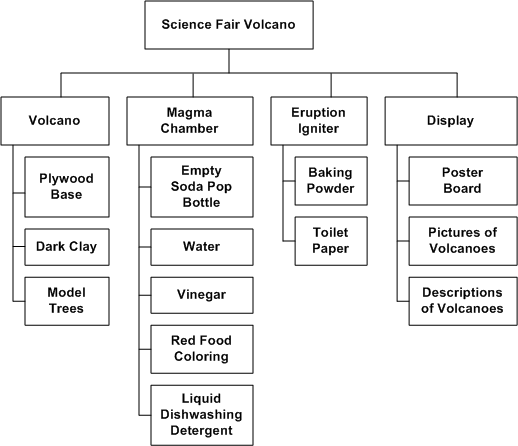
Also, Does anyone have a good example of a WBS? Should it be included in the project plan? I use workflows to distribute tasks so the order is specified in the workflow (i.e. assign this to person B after you’re done)…is this fine? Should a to-do list be a part of this?
We usually keep the following project management documents, in addition to the project plan:
Change Management Procedure and Log
Risk Management Procedures and Log
Issue Tracking Procedures and Log
On a regular basis (usually weekly) we report our status to our clients. Within this status report we have separate areas for changes, risks, and issues that arise. We update the status report with new changes, risks, or issues and discuss them in the meeting. We keep a log of all of these changes, risks, and issues and track their resolution. In this way, the status reports become the documentation of the changes, and the log contains all of the information in one place along with the resolution.
For each log, we usually keep them in a spreadsheet with the following columns:
No. | Description | Date Identified | Identified By | Impact H-M-L | Assigned To | Due By | Final Resolution
Each change, risk, or issue is given a unique number and tracked throughout the life of the project. The completed log is considered to be an official project management document. Do you have a copy of the PMBOK? There should be some examples of change management reporting there.
This page has a good example change management log, similar to what we use.
As for the work breakdown structure, it’s more than a to-do list. The WBS is not resource-oriented, so you’re not breaking it down into things that a particular person will be doing. What you’re trying to do is get down to the individual tasks. If the finished project as a whole is a cake, what the WBS does is break it down into its ingredients.
Here is some good basic information on creating a WBS. What you’re trying to get at is a decomposition of a task into smaller sub tasks. So, if you’re building a website you might have a high level task of creating the main page. That task can be broken down into gathering requirements, designing the interface, and developing the page. The requirements gathering can be further broken down into areas of functionality. Design can be broken down into graphics and content, etc.
Here’s an example of a WBS that shows the increasing granularity of the tasks.
For building a web site, you might have something like this:
Level 1: Create Web Site
Level 2: Create Registration Page
Level 3: Gather Requirements, Design Layout, Create Content, Develop Code
Maybe you’ll like to have a overview of what project management is all about.
An example of an WBS structure is also shown in the ‘structure’ page (see menu.)
I don’t micro manage my staff to that level. I create a WBS, have weekly meetings to check off status and take care of issues not important enough to get brought up between meetings.
Big things - milestone markers - we “move” as a team. But tasks move from person to person without me. They should be able to move things along looking at your WBS. I use MS Project for format.