Resource needs of browsers

Back in the olden days of the nineties, when I started to be online, a common piece of lore was “I’ll use this computer only to browse the internet”. What you meant with that was that the device you were getting wouldn’t need to be powerful in terms of hardware - it’d only need to run a browser, which wouldn’t take up a lot of resources, but nothing fancy in terms of graphics or the like.

But nowadays, when I run the task manager on my Windows machine, it’s always the browser that stands out as the biggest culprit. It’s Firefox in my case, but I’m sure the same would be true for others. It eats up memory in particular, which I suppose is for cached websites, but it also takes up its share of the CPU.

Why is this? What is so complex about browsers that they’ve become so resource intense? In my naive thinking, I’ve always assumed their only job was to decode and display HTML code, but probably a lot of additional processes are running in the background.

Webpages these days are quite complex. You have all the fancy scripts, images, animations, videos, etc. And all need to actually run in memory: uncompressed and doing their job. On top of that we have multiple tabs, with each one being basically a separate little web browser. Extensions run on top of that.

Browsers usually also have a separate video renderer and a sandbox that everything runs in to keep it isolated.

And they prioritize speed over efficiency. So they load things ahead of time, cache everything, and basically consider unused memory to be wasted memory.

I don’t really see much in CPU cycles. I’m at less than 1% right now with 13 tabs open. Though I do get up to like 3-4% if I check the browser’s task manager.

Computing has shifted to the cloud via browsers.

I just looked at Firefox on task manager. The CPU changes every second or so, varying from 0.5 to 7.0. Makes me jittery to watch.

Browsers are very good at rendering basic HTML, but very few webpages are basic HTML anymore. As BigT said, most are quite complex now. Even a simple forum app like Discourse (which powers the SDMB) is a combination of Ruby on the server and a lot of Javascript on the client (your browser).

And because what’s running on your browser isn’t just the HTML markup anymore but a whole software app, they’re often developed like any other software app: by reusing a lot of third-party libraries and dependencies, which in turn have their own fourth-party libraries and dependencies, which in turn have their own, etc, etc. Your average webpage now probably has hundreds if not thousands of these libraries, arranged in a giant tree of dependencies and dependencies-of-dependencies-of-dependencies.

There might be one for handling drag-and-drop, another for uploading file uploads, another for handling inter-page navigation (instead of serving you different HTML files like the old days, most apps these just keep the HTML cached locally in your browser and then download small chunks of changed content, re-rendering it all locally against the cached HTML), yet another for video playback, another for error reporting, another for recording user analytics, another for advertising, another for notifications…

In theory all of these functionalities can be hand-coded to be fast and efficient. In practice pretty much no development team does that anymore and everyone just reaches for huge, bloated libraries that somebody else wrote because it can save a lot of time. Or these days, when AI codes something, it’ll often do the same thing.

For example, here is the dependency graph for OpenLayers, an app that displays a map (like Google Maps):
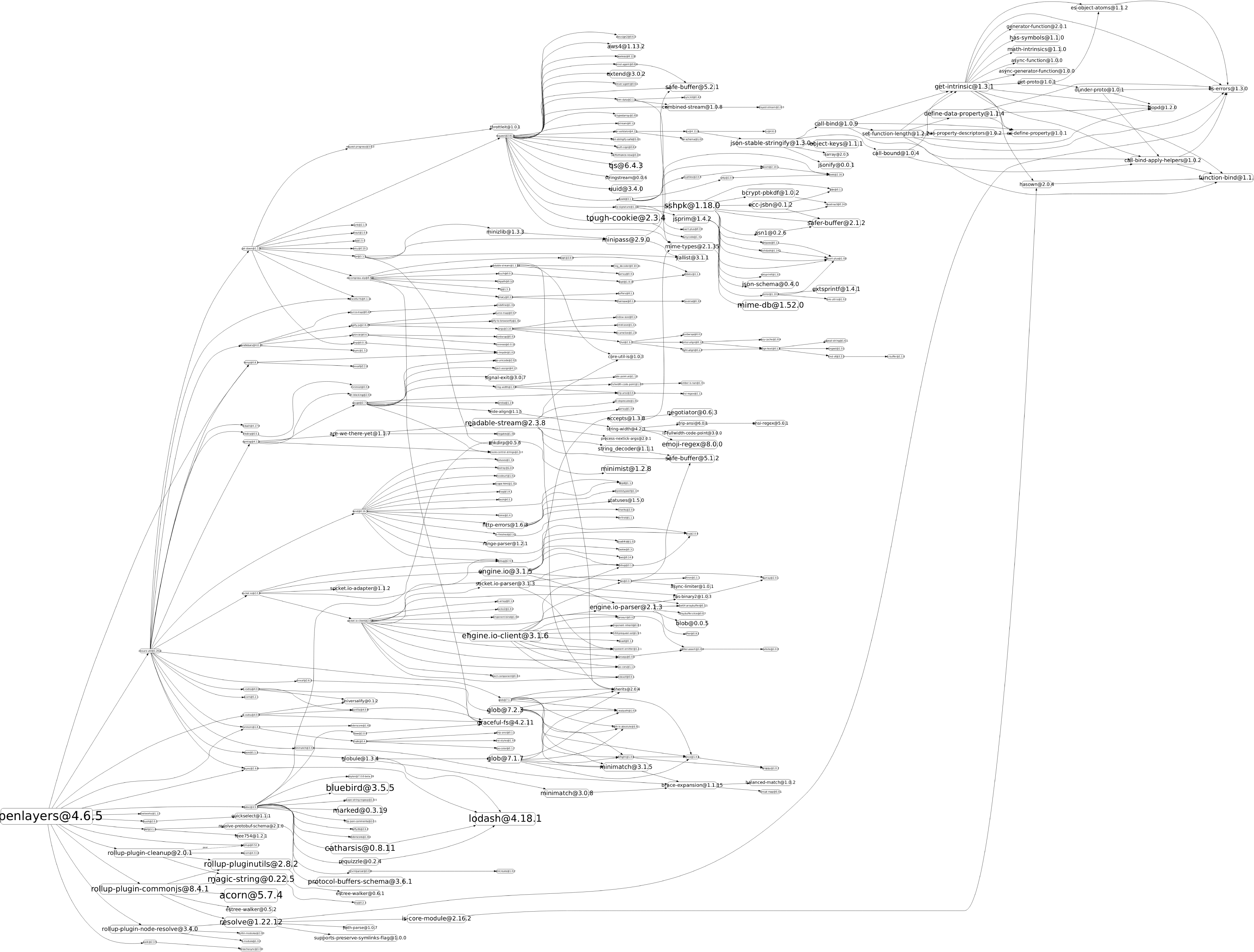
In the old days, something like Mapquest would’ve just done all of that hard work serverside and sent you a rendered image of the map. But now a lot of the work runs right in your browser.

Not every app is that complex, of course, but the same principle stands… every feature takes a whole tree of helper libraries that somebody else wrote, which in turn depends on other helpers that yet another group wrote… all the way down.

That said, though, most webpages still aren’t very demanding relative to other computing tasks. On a recent laptop (especially one with an ARM CPU) you can easily get like 8-12 hours of battery life while browsing the web, vs (for example) maybe 1-2 if you’re playing a demanding video game.

Most of the CPU usage is spiky — it might reach 100% for a few seconds, and then throttle down to almost zero. The memory usage is mostly just cache so that the webpages stay fast as you navigate between tabs & pages.

Yeah, browsers use a lot of ram, but not a whole lot of CPU power. They can spike up high, but that’s what you want, as it means it hurries up and gets the whole page rendered and then can let the CPU go back to idle. Lower CPU power just means the spikes have to last longer—whether that’s because of a weaker CPU, being on low power mode, or just other programs are also using the CPU.

They also throttle their memory usage. They just are designed to take advantage of the memory you have in order to keep things fast. The current expectation is that you’ll need 8GB total on your system for good performance (though, with some tricks you can get that lower). Gaming and other more intensive stuff usually wants you to have 16GB as the sweet spot.

With my tweaks, my browser is using 2GB of memory right now, out of the 8GB I have on this computer.[1].


  1. I had to replace my motherboard, and the new one only had two memory slots. I’d need to buy bigger memory modules to get more memory, and I waited so long the whole RAM price surge started. It’s just not worth it right now. ↩︎

I just ran the task manager. The CPU usage of Firefox kept jumping around from 0 to 1.3%. But it used the most memory by far of any program. The biggest user of CPU was … the task manager that varied from 1.5% to 3%.