It’s gone on my Windows PC and my Android tablet. There used to be little arrows at the bottom right to make it appear or disappear, but now they’re gone.
Did you switch from the traditional editor to the WYSIWYG editor? Probably by accident?
Look at the upper left of the post input box. To the left of the [B] bold button is a slide switch with a little M and down arrow in reverse vid in the the left half of the switch and a large A in the right half. One or the other half is highlighted. And you switch from one mode to the other by clicking anywhere on either side of the switch.
if the A is highlighted, you’re in WYSIWYG mode and there is no preview, since it’d be pointless; what you’re typing is the preview.
Conversely, if the M+arrow is highlighted, then you’re in the traditional text input mode with a preview display to the right and the >> or << to open or close that preview respectively.
I bet you’re in the A mode and didn’t know you’d switched. So click it again to get back to your normal mode.
That was it! Thanks!
FYI, if you almost never put fancy coding in your posts, you might find the WYSIWYG editor perfectly happy to use. It handles the basics just fine.
IMO it’s a little clunky for doing fancy-pants formatting, so for that kind of work I always switch to the tried and true “markdown” mode where you can see all the codes you typed in the input box and also see their results in the preview pane.
Android phone, Chrome browser, not set to WYSIWYG mode, and my Preview button has been missing for a couple of days now. Apparently replaced with a persistent cookie icon covering half of the Reply button…
I now see my preview button is gone too. It was there yesterday (Sunday) evening for sure; I was using it then.
Android, Chrome, Discourse Classic theme.
Now my “preview” button is gone on Android Firefox. And in its place is an “upload” button. Which seems to let you upload an image, but not post it. (On reflection that useless upload button may have always been there and I tuned it out. It is more obvious now that it is the only button.)
Yeah, the upload process is pointless here because local storage of media on SDMB’s servers is prohibited. Because no one wants to pay the premium for the storage needed to make it happen. (A 25-year backlog of messages requires enough storage as it is.)
Using Straight Dope Light on iPhone Safari, I no longer have a post preview button. Instead, I have an upload media button, for attaching a photo or file. This is not allowed on this forum, yet there it is. And without a preview button, I have no way to see what my post will look like without actually posting it.
Any fix possible?
Did the editor get switched from Markdown to WYSIWYG mode?

If the switch animated in the picture above is in the “A” mode, the editor pane is its own preview, and you can’t use embedded codes for format marking. The “Markdown” mode (the M plus down arrow) is the traditional editor mode here, and uses the preview pane to show you what your post will look like.
I use markdown mode. Switching that doesn’t change the upload button, nor show a preview button.
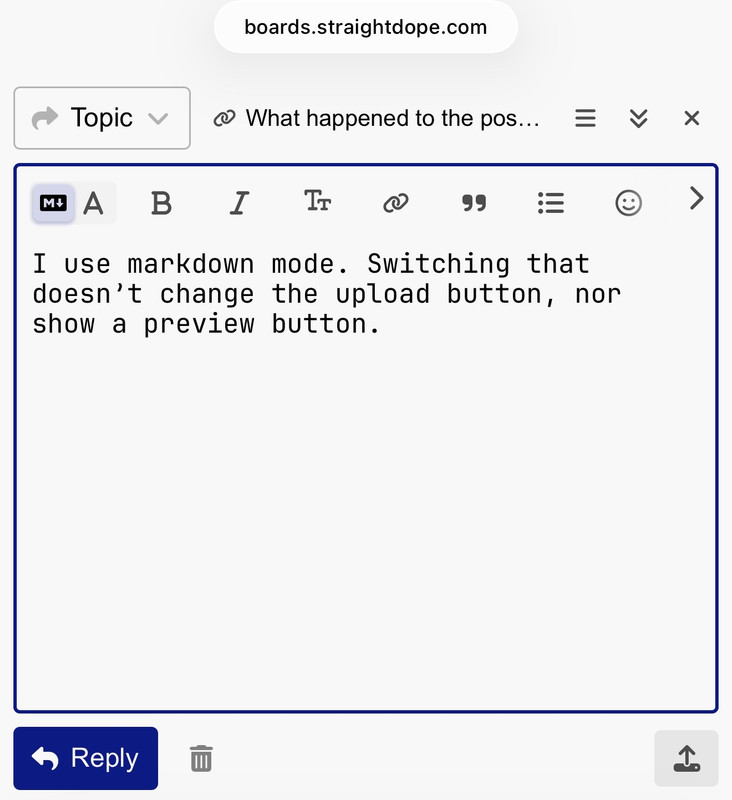
Note the lower right upload button.
Good observation!
When I turn my Iphone horizontal there is a preview pane next to the reply window.
Oh, so there is! This must be new, I couldn’t do landscape mode on this website before.
Not a solution, but a useful workaround.
I merged two similar threads. FWIW, this issue clearly spans several themes.
Ooh, that’s neat, works on Android, too. It resembles the desktop Prev. I wish it was the old button for mobile, I don’t want to have to turn my phone to see Preview, but it’s still pretty cool.
Testing, testing
Yeah, turning the phone works, but that’s a pain.
There used to be two angle brackets pointing upward on the preview panel that you could click on to minimize the box to see the rest of the thread. That’s now been replaced by a hyphen that disappears it entirely.
Is this something new or has there always been two ways of reducing the size and a redundant one got removed?
The hyphen-like icon replaced the double stacked ^ symbols. This was a couple days ago.
That icon choice mystified me for a awhile until I (probably) broke the code. I think it’s by analogy to the controls at the upper right corner of a window in Windows or MacOS where the x icon at far upper right closes the window and the hyphen-like icon to the x’s left minimizes the window to invisibility or to the dock or task bar or whatever OS-specific term is relevant.
Here in Discourse, when I click the new hyphen-like, the post entry & preview panes collapse to the same title bar across the bottom as the old stacked caret did. At least on my Win11 PC with Edge & Discourse Classic theme. And on my Android with Chrome.
Several years ago, when the problems with uploading video links and pictures first reared their ugly heads, the discussion included a tip that securing the preview pane would make the upload easier. I turned the preview off, and haven’t seen any reason to turn it back on since.
That’s what I thought, and it also frustrated me until I started clicking what was now there.
The only difference is that I remember the downsized reply panel was still visible at the bottom.