How to change your avatar tagline/signature?
Sorry, I did search but the 2000 thread did not seem relevant.
Also, while composing, I don’t have a preview. Suggestions?
Your avatar itself = your Cool Hand Luke pic can be changed by clicking your icon at upper right, then the little person at lower right. That takes you to your profile page. On that page, select Preferences from the right end of the top menu. On that page the second entry is your avatar. Click the pencil = edit icon to the right and you can upload your new desired pic. You might have to then scroll down and click [Save changes] for that to persist.
If you mean how to change the words that now read for you as “Wild Crazy Handful of Nothing”, the answer is to post your request in plain English here:
and a mod will make the change for you. Once your change has been made, the mod will move your request post to the end of this other thread for posterity:
As to preview, there are two possibilities.
Number 1:
The editor has two modes. One mode, which sounds like it’s the mode you are used to, has you typing in plain unformatted text in a box towards the left of your screen and simultaneously seeing a preview off to the right with your formatting, bold, italic, etc., displayed.
The other mode is more like a modern word processor, so called WYSIWYG mode. Where any formatting appears right when and where you’re typing it.
The switch between modes is a slider / toggle at the upper left of the iput box. Just to the left of the [B] for bold icon. The left side of the slider is a small inverse video=style box with a little uppercase M and a down-pointing arrow. The right side of the slider is an uppercase A.
If you accidentally clicked or tapped the right = A side you switched into WYSIWYG mode and there is no separate preview. As you’re typing that is the preview. To switch back, click or tap the reverse video M & down arrow. That will restore the mode you’re used to.
Number 2:
If you are in fact in the M-downarrow mode, when you look just above the upper right corner of the input box you will see at far right an X icon to close the input box, and just to its left you’ll see an – icon to minimize the input box to just a bar at the bottom of the browser window. Finally, just to the left of the – you’ll see either a >> or an <<. If it looks like >>, the preview is hidden and clicking that rightward-pointing icon will make the preview slide out from the right side of the edit box. To retract it again if you ever want to, click the left-pointing << to make the preview disappear by sliding under the edit box.
Thank you, kind sir.
FYI, here’s a screenshot of composing a question:
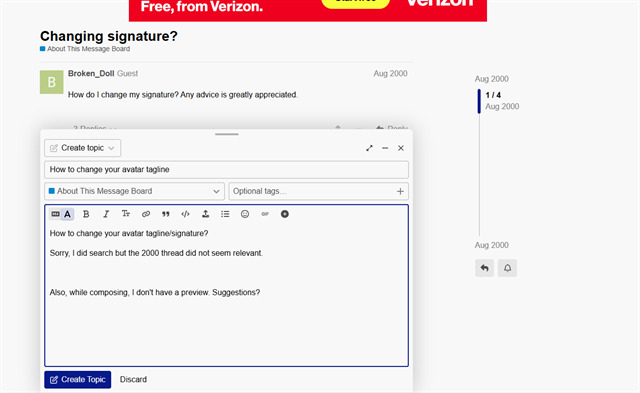
With that screenshot, your problem is solved by my item #1 just above. Click the little black M + down arrow at the upper left to the left of the [B] bold button.
That did it. And, yep, I must have clicked it by accident. Thanks!
Lotta folks do that inadvertently.
You might try the WYSIWYG mode now that you know it exists. For folks who use the basics like bold and italic and not the rest if the dancyvstiff it’s probably easier.
Thanks, I’ll give it a try.